As it turns out, the ability to accurately tally up the ingredients you need to buy at the store is a rather difficult problem to solve. Upon looking through other recipe websites (which I’ve been doing a lot of recently), it became apparent that no one else out there has even really put forth much effort into solving this problem. Here’s some sites that have made an effort:
Epicurious

Epicurious shopping list aggregation
Epicurious is a fantastic site, with the option (for signed on members anyway) to create shopping lists out of a recipe they like. However, the site doesn’t even attempt to bother trying to combine anything. The default view for your shopping list is grouped by the recipe, which will then just list all the ingredients and amounts underneath. The user can also group by shopping aisle, however still no common ingredient aggregation takes place. Even a seemingly easy conversion between cups and teaspoons results in duplicate ingredients being listed, as seen in the screen shot above. I won’t even bother trying to see how they would combine incompatible forms, such as shredded cheddar cheese in cups, and cheddar cheese by weight. The user is probably best off just jotting down ingredients on a piece of scratch paper and heading off to the store. Someone must do better than this, right?
RecipeZaar
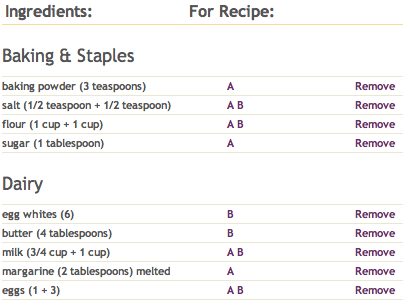
RecipeZaar's attempt at basic ingredient aggregation
RecipeZaar is one of my favorites. They’re owned by Scripps Networks, who has successfully vampired countless hours of my life with their television networks such as HGTV, Food Network and The Cooking Channel. You’d think these guys would be the masters of recipe websites. It does seem, to me anyway, they made somewhat of an effort on their shopping list feature. First off, they recognize when an ingredient is common among two recipes. That’s a start! However, once I start adding multiple recipes, I start to get very confused.
I started with a puff pancake recipe that calls for 4Tbl of butter, 3 eggs, 6 egg whites, 1 cup of milk, a cup of flour and a half teaspoon of salt. Let’s add that to our shopping list. Done. Next, I dug up a second pancake recipe (I’m a man who likes his pancakes as some out there can attest to.) This recipe calls for 1 egg, 3/4 cup of milk, 2 tablespoons of melted margarine, a cup of flour, a tablespoon of sugar, 3 tablespoons of baking powder, and another half teaspoon of salt. Added, done! What do we have?
Once again, the shopping list is organized into recipes. There’s a column for which recipe the ingredient goes with, in my case the latter pancake recipe is “A” and the puff pancake recipe is “B”. They get a few points for at least recognizing when a common ingredient exists within multiple recipes. However, even on the simplest form of aggregation, they fail to deliver. For example, milk appears in both recipes. On my shopping list, the line for milk appears as “milk (3/4 cup + 1 cup)” I could see this getting very confusing if I were to say, add 50 recipes to my list all with milk. Another thing is that eggs appear for both recipes (I need to buy 1 + 3 eggs, thanks!) and “egg whites”, something you extract from an egg appears on its own line for recipe B. In other words, something you do to an egg appears on a shopping list that is intended to describe products you should purchase at a store. The same error happens with margarine, as the list instructs you to purchase 2 tablespoons of melted margarine. Sorry, my local Safeway doesn’t sell melted margarine. That’s what my microwave is for.
AllRecipes.com

AllRecipes combines common flour, cheese, etc.
AllRecipes is the best of the best. They’ve been around forever, have tens of millions of users, and are probably the most well known recipe destination on the Internet. Surely they won’t disappoint. I started out looking for recipes that use cheddar cheese. The first one I came across is “Creamy Cheddar Cheese Soup”, mmm. This recipe calls for 1/4 cup butter, an onion, 1/4 cup flour, 3 cups of chicken broth, 3 cups of milk and a pound of shredded cheddar cheese. Sounds good so far! I’ve added this to my shopping list and decided to see what else I can do with the 18 crates of cheddar cheese willed to me by my grandma Ester, who recently died in a freak dairy accident. Cheddar cheese puffs it is! This recipe stipulates a cup of shredded cheddar cheese, half a cup of flour, 1/4 cup of butter or margarine, and half a teaspoon of ground mustard. Let’s toss that in to our list as well.
The results are very encouraging! First, I notice the flour has been combined into a total of 3/4 cup! This is progress. Even more impressive is the fact that a pound of shredded cheese and a cup of shredded cheese were combined into 1-1/4 pounds of cheese. AllRecipes seems to get it, but I wonder how they do this magic?

AllRecipes tacks user entered data to the bottom
One clue is when you add your own recipe to the site. I added a “test recipe” that only I could see that calls for one cup of milk. I saved the recipe, and added that recipe to my shopping list. Here, we got no ingredient aggregation of any sort. My ingredients were simply tacked on to the bottom, completely unsorted in any way. This leads me to believe that AllRecipes doesn’t actually have any native normalization of ingredients or forms behind the scenes. I’m willing to venture a guess that each individual “approved” recipe contains certain metadata which describe what ingredients one needs to purchase at the store. These metadata can be combined with other recipe metadata to come up with totals. Further evidence of this is when I manually add an individual ingredient to my shopping list. Here, I can actually type in anything I want, including “tennis shoes” and it appears on my list. In other words, I don’t have access to add my own ingredient and append it to the total of a previous aggregated amount. I could go spend more time to really prove this hypothesis (for example, does a cup of shredded cheese always weigh a quarter of a pound in AllRecipes-land?), however I think I’ve seen enough to understand their basic design. Which I will now tear appart in great detail.
Why this doesn’t work
These guys are trying, they really are. Their customers obviously emailed is masses with “We want shopping lists!” requests. They complied. They cobbled together a shopping list feature that basically gave the user the ability to do what they could already do on paper, or on the magnetic whiteboard attached to the kitchen fridge. The root of the problem is they were hacking this feature onto a database design that simply wasn’t built to generate accurate shopping lists.
When designing KitchenPC, this challenge was one that intrigued me and I was determined to provide accurate shopping lists for users, allow them to modify their list and add ingredients, and have it work with any recipe in the database. The root of the problem is in ingredient organization. For these sites like AllRecipes and Epicurious and RecipeZaar, a recipe is just a list of ingredients. Some might just store a single string in the database that contains an ingredient and amount, such as “1 cup all-purpose flour.” Each recipe would have one or more of these usages. The problem is, another recipe might call for “2 cups all purpose flour.” Is “all-purpose flour” the same as “all purpose flour?” Sure it is! The only difference is how the author typed it in. However, to a computer it’s difficult to tell that these are in fact the same ingredient, and unless the strings match up perfectly, it may assume otherwise. For this reason, ingredient normalization is the first step to the perfect shopping list feature. We need to have a single “datum” in the database called “all-purpose flour” and have other recipes simply point to it. This is extremely powerful in various ways, such as in providing the ability to look up all recipes that call for “flour” very easily, providing filtering abilities for ingredients the user wishes to avoid, etc. I’ll go out on a limb and say that the three recipe sites above at least partially employ the concept of ingredient normalization in their database. However, the second step to providing a working shopping list feature is to recognize the difference in “ingredient forms.” When you purchase an ingredient at the store, you usually purchase it in a certain form (almost always sold by weight) and then “do something” to it to prepare it for use in your recipe. You may chop and onion, or melt some cheese, or slice an apple. The problem is that recipes often refer to an ingredient in its prepared form, with a unit that makes sense only in that context. Your local grocery store will sell you cheese by the pound, however your recipe might call for a half cup of shredded cheese. This is because the recipe assumes you’ll buy some cheese, shred it, and then fill a half cup measuring device. To summarize, the accurate formation of a shopping list necessitates the ability to convert between the form one uses an ingredient in, and the form one potentially purchases that ingredient in.
The way KitchenPC does this is by managing a finite list of ingredients in their “shopping list” form. This list is similar to an inventory you’d find at your local grocer, and it’s this database that is used for generating a shopping list. KitchenPC next has a separate table of forms for these ingredients. These forms describe a way this ingredient could potentially be used in a recipe. As this is a one-to-many relationship, a single “shopping list” ingredient might contain several forms. An example of a form of cheddar cheese would be “shredded”, and it would indicate this is a volumetric form and could be measured in cups, tablespoons, gallons, whatever. There also exists “conversion metadata” which ensure any form of any ingredient can be converted to its parent shopping list form. If a recipe calls for a cup of shredded cheddar cheese, the system is able to identify the relationship between this usage in a recipe and how cheese is sold in stores. In other words, it knows how much a cup of shredded cheese cheese weighs and thus how much you need to purchase at the store to make this recipe. It doesn’t matter if the ingredient was added manually, through the addition of a recipe to your shopping list, or through the meal calendar. Furthermore, since ingredients are kept in a normalized manner, units can be abstracted from the ingredient usage and determined “on the fly” as appropriate. If I combine 4 recipes that each call for 4 tablespoons of olive oil, my shopping list will deem that “cups” is a more appropriate unit for that and express my shopping list as “1 cup of olive oil.” If I increase the serving size on a cookie recipe to serve my army of 5,000 warriors, the recipe will start expressing itself in pounds and gallons and stuff.
But there’s a dark side to this of course as well, and it comes at the cost of usability. The site will only be as smart as the data it has to work with. As I require all recipes to adhere to this schema, users must choose an ingredient and form from a pre-existing list. Right now, I have thousands of ingredients and forms but it’s pretty safe to say I will have missed some. Users will become very agitated with their inability to add their recipe. I believe this problem will simply be solved in time. Eventually every ingredient conceivable by man, woman and chef will be in this database, or at least enough to satisfy 99.9% of recipes. It’s possible that I could eventually implement some sort of “backup UI” that would allow the user to type in the ingredient as pure text and human intervention would be involved on the backend to add that ingredient and/or form to the database for future use, fix up the links, and then “publish” the working recipe.
In addition, adding a single ingredient requires the user to first lookup the ingredient name, then choose a form (shredded, melted, chopped, etc), and then enter the amount and the unit. Most recipe websites allow the user to simply type in the whole thing on one line of text. This is a very difficult problem to solve, and prevents me (at least for now) from doing stuff like the bulk-import of thousands of recipes, and makes the recipe editor rather clunky. I’m already thinking about some “natural language” techniques to parse a description of an ingredient usage and extract the amount, form, ingredient, and any preparation notes implied.
I tend not to worry about this as much as one might think. The ability to accurately aggregate ingredient amounts is one crucial to my feature set, my revenue model, and my overall business strategy. Provided I can have enough recipes in the database, I believe adding new recipes will be a relatively seldom used feature. If it’s a little bit of a pain, so be it. But like any beta product, it’ll be my attempt at “building a better mouse trap” and I’m sure I’ll make tweaks here and there depending on customer feedback and pain points.
If you’re thinking to yourself this is a long way to go just for shopping lists, as most people just do what you’re doing in their heads, then you may be right. However, my broader business vision starts to really take advantage of this concept in ways never before possible. But this will be for a later blog post.
Mike
One thing I like about recipes is you can’t copyright them. So long as you’re only posting the actual ingredients, amounts and the method to create the recipe, they are not subject to copyright protection. This is great news for me since I don’t really have to deal with people posting recipes from other sites, cookbooks, etc. I’ll never get into a YouTube style legal battle with angry recipe owners.
Furthermore, any recipe published before 1923 is considered public domain. I can just import those to my heart’s content, including any literary description, pictures, etc. There’s a ton of archives online that will make populating my recipe database quite a bit easier.
A have some quick advice about scripting languages. It seems as programmers, we’re very untrusting of where data comes from and making assumptions about what it will be. For example, if I had a function as such:
void RockCasbah(Casbah c);
I might want to make sure “c” was valid. Like such:
if(c != null)
{
   c.Rock();
}
I think we’re trained to do this because if someone else tries to rock a null Casbah, we don’t want our whole application crashing. In scripting languages I believe it’s a bit different. You want to crash! I’ve found myself checking for null quite often in my own script functions, which only I call and no one else. Later on, I would discover a bug where something just doesn’t show up right because some function quietly exited without showing any errors. My advice is to just let stuff crash sometimes; if something is never going to be null then don’t check it. Just let there be a script error. Your customers, unless they have script debugging enabled, won’t really be confused; they will probably see a “script error” icon in the browser status bar and become aware something isn’t quite right. While developing, seeing an error popup will inform you early on that something is not running as expected, and you can debug into it then and there without having to wait for some random hard to reproduce bug to popup later on.
Mike
One thing I’ve been dealing with, as has every dot-com startup, is deciding what technology to use for implementing my web site. There’s soooo much out there, be it trendy new things like Ruby on Rails, or proven platforms like PHP, perhaps Java if you’re into that sort of thing, or .NET if you’re a fan of the Microsoft stack. They’re all good, and they’ve all been proven, and they all have their strengths and weaknesses as well as fans and critics.
Early on, I decided as a poor startup, I needed to make use of open-source projects. I simply didn’t have the time to invent everything myself, or the money to purchase commercial platforms. Open-source projects not only offered the advantage of being free, they provided the ability to be modified if I ran into some annoying bug or limitation. I also didn’t want to limit myself to a certain operating system or web server, as I haven’t made the decision yet on where KitchenPC will be hosted; be it a cloud environment like Amazon EC2, or a single dedicated server with a company like Rackspace.
This post will give a brief overview of the technology stack employed at KitchenPC currently. I’m not saying it’s the best choice, or that none of it will change, just what I’ve learned so far.
So I’ve been using .NET since about 2000, before it was even called .NET. I know C# better than any other language, and feel comfortable building scalable, enterprise level software on the .NET platform. On the Windows Server platform, I don’t think anything runs better than .NET. Though I’d love to check out things like Ruby on Rails or go learn Java (which wouldn’t be too much of a stretch), I felt to get something up on the web quickly I needed to stick with a language and platform I knew like the back of my hand. One project I’ve been extremely interested in is the Mono project sponsored by Novell. Mono (I believe pronounced with a long o, like Spanish for “monkey”, and not the disease,) is an open source implementation of the .NET framework and compilers. I’ve been following this one for quite a while, as it would provide the ability to run on an open-source operating system such as Linux. Down the road, this could save me quite a bit of money on software costs and would actually make KitchenPC a complete open-source shop. Mono has progressed leaps and bounds over the last couple years, and is almost to the point where I’d consider it for production use. But I just can’t say it’s there yet. MonoDevelop, their development environment, is making huge progress, especially with the recent release of 2.4, but the debugger is still clunky and doesn’t allow me to really do what I want. It doesn’t integrate seamlessly in with script code running within the web browser and lacks the raw power of Visual Studio. Also, I fail to trust the scalability of the Mono runtime. They still yet to have a modern garbage collector that’s compacting and generational (though 2.8 should have this!) and I don’t think the platform has really been proven in any “real” production environment. At this point, I’d rather pay for Visual Studio and lease Windows servers to run on. However, I still have hope that Mono will someday present itself as a viable choice to run KitchenPC off of.
For a database server, I’ve had better luck. Most of my experience has been with Microsoft SQL Server, as I’ve been using that since SQL Server 7.0. Of course, that sucker’s insanely expensive. Well, ok not Oracle expensive but still. The main two choices for open source relational database systems are mySQL and PostgreSQL. mySQL is probably more well known, but is definitely not for everybody. mySQL and Postgres have two radically different philosophies when it comes to the role of a database. mySQL seems to believe databases should be dirt simple, like a file system. Until fairly recently, mySQL didn’t really have the concept of foreign keys or transactions or stored functions/procedures. This was all up to the business layer to take care of. One of the main drawbacks of mySQL, for me anyway, is there was no native support for a uuid datatype. I have no idea if this is the still the case, but I’m a strong believer that keys should be generated outside the database and passed in. This makes transactions simpler, replication less error prone, and plus you instantly know the key in code and can do other things with it programmatically. Sure, mySQL could just use a string to store a uuid, but this could of course have performance impacts as now you’re looking up a row by a string value instead of just a 128-bit number. So that was annoying. When I found Postgres, I immediately fell in love with it. In fact, to this date I believe it’s probably my favorite open source project of all times. Postgres is more aligned with my own feelings on database design, and is considered by some to by an open source implementation of Oracle. It has a single table engine that everyone works on and supports everything. It’s insanely extensible, I’ve even heard of people writing their own index types for it. One of the things that really sold me on it was the fact that is has a native “array” type. If I have a list of recipes I need to load into memory, I can pass in an array of uuids into a function and return only those rows. This was something that was a complete pain to do even in Microsoft SQL. You would have to pass in a comma delimited list, parse that in a stored procedure, create a temp table, and JOIN on that. No thanks! Data types in Postgres are just designed in a way that makes sense to me from the ground up. I can create my own data types, I can create enums, and every function must return one of these data types, or a complete row matching a table schema, or define exactly what data it returns. Nothing is “loosely typed” as is the case in other database systems I’ve used. Another thing that sold me on Postgres was the awesome technical support offered through their mailing lists. I remember I once had a question on why an index was not being used when, to me, it obviously should be. I think my email was even a little bit rude, as if Postgres was flawed. Tom Lane, one of the main contributors who also works on performance, replied within ten minutes with a very friendly and very detailed response on why Postgres was not using the index. In this case, it wasn’t being used since it knew based on the table statistics that most rows would be returned anyway, so it might as well just do a sequential scan. Tom was right. I was wrong. I’ve also seen someone post a question about how to get something working in mySQL! The arch rival of Postgres! Surely this was a troll, but someone actually took the time to come up with a detailed answer and was still very friendly and professional. To this day, every time I have a Postgres question I get a detailed and helpful response. I don’t have to pay any money for this support, these guys just want their platform to be the best. Postgres has also proven itself in production environments. Skype is backed by Postgres, as is IMDB. Yahoo! has some multiple petabyte database with a modified version of Postgres. I’m definitely sold on Postgres and think it’s the right choice for KitchenPC, and I’ve been able to really take advantage of some of its features for a database design I’m really proud of. I could probably start a blog about how much I love Postgres. Oh and man I can’t wait until 9.0, it’s gonna have streaming replication and all sorts of cool new stuff!
Another open source project I’m quite fond of is Castle ActiveRecord. It’s an implementation of the Active Record pattern built on NHibernate (a .NET port of Java’s Hibernate.) ActiveRecord makes representing your database in code very easy and almost fun. You have a class that represents a table. An instance of that class represents a row in that table. The class has static methods to find rows, delete rows, etc. If you want to add a new row, you just new up an instance of your class, set whatever properties you want (which map to columns), and call the Create method. All the mapping between the class and table is extremely flexible. I’ve even gotten Postgres enums to map seamlessly over to .NET enumerated data types. The drawback I’ve found is it presents the possibility of not very efficient queries being generated. If you’re crafting queries by hand, you can finely tune them to be as fast as possible for your database design. Due to NHibernate’s flexibility, it’s possible to work around these limitations with enough custom code, but so far I’ve ran into many hurtles in this area. Never the less, I’m a fan of this project and it’s saved me a ton of time not having to write my own database interfaces or use ADO.NET.
Finally, on the client I’ve decided to employ Yahoo!’s “YUI” toolkit. I insist that it shall be pronounced “Yooey” similar to “GUI”, but Yahoo! disagrees, though they admit this pronunciation is popular outside Yahoo!. YUI is a framework for creating web UI. It does stuff for you such as popup divs, autocomplete text boxes, tab controls, animations, etc. It also abstracts the DOM to hide a lot of those cross-browser annoyances (which I’m sure I will blog about frequently). The thing I like most about it is it’s 100% Javascript files. It doesn’t care what backend you use (unlike Microsoft’s framework) or what web server you’re on (you don’t even need to have a web server), it just works. It’s also very well documented, has support groups, has a unit testing framework, and has been tested at length in production. It’s also obvious from the design that these guys really know the Javascript language and have written this platform from the ground up to really take advantage of Javascript’s “functional” roots. Data is usually passed is as object maps, many parameters take references to functions, etc. The API is also nicely organized into namespaces which make sense. It’s componentized, so you only include the Javascript files for the features you want to use. All the UI is skinnable so your site doesn’t have to look like Yahoo!’s web apps (which aren’t too visually appealing in my opinion), and it’s easy to override behavior if you don’t like something.
YUI has saved me a ton of time, except I do have to admit I decided not to use their rich text editor. After dealing with limitations like the inability to accurately detect when the editor becomes dirty, and the inability to control how HTML gets generated (I want XHTML 1.0 with no inline styles!), I decided to switch to TinyMCE. TinyMCE is the rich text editor I’m using right now to type this post, as it’s the RTE of choice for WordPress. It’s extremely flexible, extremely powerful, and just seems to work the way I want. I replaced YUI’s text editor in no time, and wrote a few lines of code to describe exactly how I wanted the output to be formatted. I’m definitely a fan.
For “process” type stuff, I’m using the normal arsenal. I use Subversion for all change tracking, NUnit for unit testing and NAnt for build scripts. For bug tracking, I was using Bugzilla until I got annoyed by it and switched to Mantis, as per the advice of a friend. I’m not 100% in love with Mantis, but haven’t found anything better yet. I’m using using TWiki to help manage content, and LimeSurvey for my survey software, both which I host myself.
Time is sparse right now, but there’s a whole list of projects I’ve been meaning to check out. Memcache is one of them (I don’t really have any caching story right now, besides what Postgres offers out of the box) and Lucene to improve recipe searches. There’s also more Castle stuff to check out. Perhaps one of these days.
The open source community is definitely a wealth of resources for small companies just starting out like myself. I find the quality good on most of the major projects, and help fairly easy to come by. I’m hoping some day, I’ll have the resources to give back to these projects by contributing features, fixing bugs, and perhaps even open-sourcing some of the KitchenPC framework itself.
Mike
Well this evening I chatted a bit on Skype with a Polish design firm called Merix Studio. They’re one of the many websites I stumbled across during my quest to find that perfect design company over the last few days. I’m really impressed by their website and think their work is fantastic. They also like to “show off” with elaborate script, which I have to respect. Piotr browsed my prototype for a bit, gave me quite a few complements on it (well, if “I’ve seen worse” can be considered a complement) and said he’d get back to me. They seem like a great company and I’m really hoping they’ll come back and be within my budget. Either way, it’ll be nice to have at least one other quote to compare with the duck people before making any final decisions. I remain optimistic about this company.
Mike
This week I’ve been shopping around for a graphics designer to make my site look pretty. Now, mind you I’ve been making stuff on the web for about 15 years now and got started doing web page design. However, these days I feel a bit more comfortable doing the techie backend stuff and think I should be leaving the cutesy Photoshop tricks to the professionals. Having a background in web design probably just makes matters worse, however, since now I’m sure not gonna pay for anything I could do myself. I consider myself an HTML/CSS expert, and can put together a nice layout using W3C compliant, XHTML that displays nicely in pretty much every modern browser out there (except IE6, @#$! you IE6!). If I had the time. As far as graphics, I have some basic Photoshop skillz but nothing that I’d put on a résumé.
This leads me to think I should be focusing my search on a skilled designer with exceptional graphics talent. Over the past few months I’ve been dreaming of this awesome KitchenPC interface that just boggles the mind with its pure brilliance. So far this week, it just feels like I’ve been slapped in the face by the cold, harsh hand of reality.
On the bright side, I’m starting to really learn what it is that I like. What makes you say “wow” when you see a site you really enjoy looking at? For me, I’ve learned the more Mac like it is, the better. I like Mac style fonts, I like rounded corners, I like bright colors and I like the use of opacity and gradients.
One site I’ve totally fallen in love with this week is http://icondock.com/. I think the main thing I like about it is the fact I can really see my UI working with this layout. Imagine the horizontally scrollable icon samples to be suggested recipes instead. And the user could drag them over to the “checkout” (which in my case would be a shopping list widget) to instantly create shopping lists. The text below could be a newsfeed, that would update in real time, keeping you informed on your friends’ activities. I also really love the colorful center graphic with the icons flying out of the cardboard box, and the rounded top navigation bar with the integrated search box. This site has been my ideal as far as good site design.
There’s a couple other great sites I’ve found recently too. I’m sure the owners don’t mind the plugs. One is gist.com. The front page looks great and uses some nice looking alpha-blending towards the bottom creating that “reflective” look. Once again, the UI is very rounded in nature and doesn’t really have any sharp corners for kids to run into and get hurt. The fonts are pleasant, the design is very simple, and they have a very cool graphic that catches the eye. I have no idea what these guys actually do, but that’s beside the point.
Another one is lifecellar.com. They lose a few points for having a Flash animation on their page, as I use a Flash blocker and hate to have to manually allow Flash just to see what I’m missing. This particular animation, seems to me, could be an animated gif. However, once again the fonts are nice and they use a lot of rounded corners. Most of their backgrounds make good use of gradients to add a professional feel to the layout. Their icons are probably all stock, but it works for them in this case. I also like how if I move the mouse over one of the top icons, a little description fades in. Fadey things excite me.
Ok so now I know what I like. So now for the hard part. Finding a designer that works within my budget and can deliver something like one of these sites. Searching for graphics designers on the web is like finding a piece of hay in a haystack. They’re everywhere. And they all look the same. Most of the samples in their portfolio do not impress me, as it’s something I could do myself over a weekend. Why would I pay good money for that? I did email the Icondock guy, who runs n.design studio. It’s obvious this guy is talented, especially when it comes to illustrations. I have a feeling he’d be out of my price range, which is just as well as I never did hear back from him. I think he’s busy drawing artwork for magazine covers.
I also contacted Filter Talent. I heard about these guys a few years ago from a friend of mine at Microsoft. He works on the Windows Embedded team and apparently, Filter is their go-to firm when they need something done. Since he had a connection there, he made some introductions. However, I never really followed up though they’ve been sitting in my email box, archived away, for two years now. I decided to send them a note and see if they’d talk to me. A guy named Dave called me the next day wanting to set up a phone call. I didn’t get to that email until about 4am but I sent him a link to my prototype website and a UI spec I’ve been drafting up in Word over the past few days. The next evening I heard back from him, and he had read my doc and checked out the website. He was a very nice guy, but after talking to him for about five minutes he interrupted and said, “Mike I have to be honest with you. I like your idea, but I think the way our company is set up is just not going to be a good fit for you.” In translation, I believe the response was “We like to deal with big companies like Microsoft and Amazon, we’re looking for six figure bids, and we don’t have time for some guy running a startup in his spare bedroom.” However, he was very friendly and maybe if I do make it big some day, I’d give them a call again. For what it’s worth, he said he’d ping me if he ran across any freelance designers who might be interested in the project.
Another company I stumbled across is a firm in the UK called “friendly duck.” Or something like that, you know I’m still not quite sure what the name of the company is. They sure love ducks though. Maybe they actually are ducks. Anthropomorphic ducks, “pecking” away at Photoshop all day. I’ve been emailing this company back and forth this week and so far I really like them. They came up with an estimate within a day, they dug through my site very thoroughly, and they’ve been incredibly responsive to emails. However, I’m not completely sold on their raw talent. Their portfolio is a bit limited, with several sites not even online anymore. The sites I have seen are pretty basic without too much custom design. I haven’t seen anything really pop at me like Icondock or Gist or Lifecellar. Their quote is reasonable and within my budget, however it’s still enough money to make me really picky about getting something that wows me. If they came up with a site that looks like the others in their portfolio, I wouldn’t be too happy. I’m trying to express this to them without coming across as down right rude, but I need some assurance that I’ll be left satisfied, and I need to let them know where my bar is at, and what sorts of results I’m expecting. My feelings about them is they’re a small firm that wants to be good, and they’re out there looking to prove themselves. If they have a masterpiece within them, it hasn’t come out yet but perhaps my project could be that masterpiece. However, at this point I’m just not sure they fit the “bill” (oooooo bad Mike.)
One more company I’m looking at is run by my old friend Ryan. Ryan and I used to be moderators on the #HTML IRC channel back in the late 90s. Ryan sure knew his HTML like no one else, but his Photoshop skills were out of this world. Ryan lived in the Philippines and ran a little one-man operation called Eyeball Design. When I was doing my hardware based KitchenPC prototype, I used Ryan to draw up some of the graphics. Though he was a little slow at times, he did not disappoint. However, a lot of what he does is very Flash heavy and I’m not sure on his design and layout skills. I emailed him a few days ago and heard back the next day. He was very surprised I even remembered who he has! He’s apparently living in California now, I assume working. I emailed him back with a link to my site (which he’s logged on according to my database) and a copy of my spec, but I still have yet to hear back from him or have him express any interest in helping with the project.
One option I’ve been considering is having the duck people take the project, and then paying Ryan a bit of extra cash to come up with a few random original graphics here and there to spruce up the site a bit. This approach might be the best of both words.
Either way, my search continues for the perfect design firm. I feel I should get at least three quotes before making any decisions, and work on finishing my UI spec and rough sketches for a final, beta quality UI. I’ll let you know how it goes!
Mike
One thing that became very clear to me after reading the book “The Four Steps to the Epiphany” by Steven Gary Blank (Ooooo he opens with a plug!) was the importance of really proving a customer base before you ever begin to think about developing a product. If no one’s gonna use it or buy it, there’s really no point. In essence, a product must be built to address a certain problem in peoples’ lives. They must be alleviated of some sort of pain. Which begs the question, does anyone actually plan meals? The entire point of my site is to allow people to plan meals in advance, figure out what to cook, create shopping lists, and get organized. This is all great in theory, but do people do that? Or do people just figure out what they want tonight, make a list in their heads, and head over to Safeway or QFC.
One good way to answer that question is to do a user survey. Which I have done. If you haven’t already taken this survey and you cook, stop reading this now and click on this link. It’ll only take a few minutes and this blog will still be here when you’re done.
I made the mistake of thinking a survey would be the easiest way to collect user feedback! And it probably is. However, I was really blown away at how hard it’s been to get people to answer it. I told all my friends, told them to tell their friends, posted on Facebook, posted on recipe boards, and still the best I could do was about 100 responses.
I really wanted at least 1,000 to get accurate data, so I decided to try advertising. The two outlets I used were Facebook Ads and Google AdWords. Both services allow you to type in how much money you want to spend per day, and they’ll display your ad to a set number of people. I decided to spend $10 per day each, for 7 days.
The Facebook ad is shown to people who live in the US, are 18 years of age or older, have “cooking” listed as one of their likes, and speak any flavor of English (including Pirate, which – yes – is an option for targetted advertising; or ad-varrrrrrr-tising)
So far, the Facebook ad (which started running on the 20th) has been averaging over 76,000 impressions per day. That’s a lot of eyes looking at my ad! However, only 63 people have actually clicked on it. Looking at the survey results, I’d guess less than half those people actually started filling out the survey yet alone completed it.
So how did Google AdWords do? I paid the same amount, but only got 12,300 impressions so far, total!. Out of that, only nine clicks. I was paying over 3x the amount to get a click on Google! Figuring it was a waste of time when Facebook was doing so much better, I decided to end that campaign early.
Still, it’s a little bit aggravating to have so few survey responses after hundreds of thousands people having seen the ad. Is it actually possible to cheaply advertise on the Internet? It seems the going rate is about a dollar for someone to click on your ad. I’m sure not going to spend $1,000 on getting my desired number of respondents. Maybe my ad sucks, but it was the best I could do with the allowed number of characters. Is there a better solution?
Mike
Recently, a friend asked me while hiking where the idea of KitchenPC got started. Not one for verbosity, I replied, “over a quarter inch of drywall.” Though she seemed more than satisfied with the answer, I decided to extend the reply into a more protracted response.
About ten years ago, I had just purchased my first condo and was eager to remedy one glaring flaw with the otherwise sufficient abode. The unit had no washer and dryer. There were not many places upon which to install one, but the bathroom was, what I thought, the obvious choice. It boasted a large linen closet that ran from the floor to ceiling and had plenty of room in front. Since I was a single guy with little “excess” in my life, the closet was pretty much entirely empty. It was just asking to be converted into a stackable washer and dryer unit. There was one problem; it was only 24″ wide. Following several minutes of Internet research, I found a European brand of washer and dryer that (apparently made for boats) was confined in the desired dimension. I was rather excited at my visions of upcoming laundrydom.
I shopped around for various contractors who wished to attempt the feat, and quickly a major problem reared its ugly head. The unit itself was 24″, as was the closet, but this 24″ included the quarter inch of particle board separating the closet and the cultured marble countertop which spanned the rest of the bathroom wall. Darn. Installing a washer and dryer there would entail ripping out the entire vanity, which was quite nice.
After contemplating a few other locations, it finally became apparent that the kitchen could be useful here. Behind the fridge, there was already a wet-wall servicing the adjacent powder room and a dryer vent could easily be poked through to the outside wall on the left. My contractor drafted up a quote we both agreed on, and the project got started. It would simply require fridge to be moved over to the right, taking out the existing counter area, and building some drywall enclosures for both washer/dryer combo and fridge. But why stop there? I was young and ambitious, and wanted to get rid of the ugly fluorescent lights cluttering the ceiling. Some modern canned lights would be much better. Oh and those 70s looking white cabinets! They needed to be put our of their misery and be replaced with nice modern oak cabinets. But once you do that, you’d have to replace the countertops and why not use a solid surface material such as Corean. At this point, it’s cheaper to just demo the entire kitchen. Oh yea, and replace the linoleum floor with tile, which would be extended into the enter entryway as well. For those of you who have ever been through a remodeling project, you’re nodding your heads in collective agreement. Long story short, about $24,000 later and 6 months over deadline, I had a fantastic new kitchen. One problem, I had no idea how to cook!
At this point, I had an undeniably good excuse to get into cooking; which I did. Plus, it could even be cheaper since I had used up all my savings. While cooking I noticed a recurring behavior. A habit if you will. Since I didn’t really know any recipes by heart, I’d usually look stuff up online, print out the recipe, bring it downstairs, dig through my pantry and fridge to figure out what I needed to buy, go to the store, blah blah blah. After making a big mess and trying to avoid catching anything on fire, I’d usually find the printed recipe covered in some sort of food-like substance, unsuitable for future use. It would get thrown away, and perhaps I would bookmark the page if I wanted to try it again.
There had to be a better way.
“Oh wait,” thought I. “aren’t I a software engineer?” They say if you’re a hammer, every problem looks like a nail. Or something like that, actually I’m not sure who says that. The point is, to a software engineer, every problem must be solved with cool software; with pretty icons and stuff that fades in. And whatever three-letter-acronym (TLA) is popular with the kids these days. Upon careful thinking, I decided I’d put a touch screen monitor fixed to the countertop with silicon, and sealed in with clear caulk. The cables would be buried and descend through a hole directly below, completely out of sight. A compact (actually it was a Compaq) computer would be mounted in one of the cabinets and have an Internet connection. I could then be free to write some slick little UI in Visual Basic, perhaps with an embedded web browser to make things easier.
I found there’s actually a market for these types of touch screen displays. There’s various “ratings” they possess which indicate how much abuse they take before they keel over and die. A cheaper monitor could be used in your office but nothing else. One a bit higher up could be sufficient for use in restaurants, and the top of the line ones could be used on oil rigs and probably dropped off a building while set on fire and be fine. I ordered one from ELO Touch Systems that was rated for kitchen use and had touch capabilities, and built in speakers. I was very excited about my purchase, and spent quite a bit of free time writing a cool recipe organizer with a touch screen interface. It pulled all its data off my web server upstairs, and I could copy recipes to the server using a little recipe editor I crafted.
My contractor, who I had become friends with due to recurring business, caught wind of this and knew he needed to sell these to his trophy wife clients (those were his words, not mine). Since I had a full time job, I wasn’t really interested at the time in getting involved in this sort of side business. However, it did get me thinking about PCs in the kitchen and why this had not really taken off yet.
Fast forward a few years. I was talking with an ex-coworker of mine who had left the company to start his own business. Upon successful acquisition by Amazon, he was looking for the next stage in his entrepreneurial career. He thought of me as someone who he could rope into whatever harebrained scheme he could come up with, and we got to talking about my kitchen PC ideas. At the time, my idea was to get touch monitors, cheap computers (or even Windows embedded devices) and get contractors to install them in rich peoples’ kitchens. The software was no doubt cool, but the business plan was flawed. “Mike,” he said, “your idea is awesome but a hardware business is almost impossible to succeed at. You’ll need millions in capital just to get started and you’ll probably just lose everything.”
However, my friend loved my ideas for the backend service that would power these “Kitchen PCs” – allowing them to get content, interact with other cooks, manage their shopping lists, etc. He told me I really had something there, and I should focus on that side of the business. This is what I did, and I’ve been at it ever since.
The KitchenPC idea has shifted into an online web service that allows cooks to find recipes, organize meal plans, and aggregate ingredients into shopping lists automatically. As most recipe websites just focus on a single recipe, KitchenPC allows users to work with multiple recipes at a time. It’s also designed to meal plan for you. You’re able to enter the ingredients and amounts you have on hand, and KitchenPC will analyze your likes and dislikes and suggest a meal plan that will most efficiently utilize your available ingredients, resulting in the fewest amount of leftovers. KitchenPC is able to come up with accurate shopping lists, and determine the exact amounts of each ingredient you’ll need. In short, KitchenPC is my attempt at making meal planning easier, fun and save people time and money.
A couple months ago, I decided to quit my day job and work on KitchenPC full time. I’ve never owned a business before, but I’ve always wanted to. This is something new and exciting (and scary) for me, and what better way to document my journey than by creating a blog! This will be that blog. I hope to use it as a vehicle to share my experiences as a first time entrepreneur, eventually learn how to spell the word “entrepreneur” on my first try without using spellcheck (I almost did it that time!), and create a personal “face” to my company by connecting with my users on a personal level.
I see this blog existing in three stages (well, provided the business doesn’t crash and burn, which will of course make for great blogging too.) First, in the beginning it will journal my experiences getting a product out on the market. I’ll be dealing with business partners, trying to figure out who’s gonna actually use this thing, worrying about technical problems, etc. The second stage will be once I actually have a product. The blog will be advertising a lot, demo’ing new features, and trying to promote awareness of the site. Third, and ongoing, it will be used to talk about KitchenPC, what’s going on in the business, and just sticking around as a way to connect with users.
If no one reads this blog, it’ll simply be my journal and something I can look back on to marvel at my progress years in the future. I hope it will be enjoyed through many pairs of eyes. More to come soon!
Mike
 KitchenPC