Note: I’d recommend clicking the little “HD” button in the top right corner of the video player :)
I figured I’d take a break from my usual KitchenPC related postings and talk about something near and dear to the tech community.
This evening, a friend and I were having a mostly civil discussion about the effects of SOPA and exactly what it would mean for privacy, free speech and the future of the Internet. It became clear to me that, while this proposed bill is for sure scary, there is absolutely no technical implementation that I can see which would have any affect on software piracy or copyright infringement. The only thing that this would do is push further components of the Internet’s architecture underground.
I’ve decided it would be fun to outline my hypothetical six-month timeline for the universe post-SOPA. It’s for sure hyperbole, but it also provided me with some amusement to contemplate. I’m far from an expert on Internet architecture, and even I was able to come up with reasonable workarounds for this proposed “DNS-blocking”. Imagine what real hackers could do, given enough time and snacks from Circle K.
Month 1: SOPA is passed, and domains can be blocked without court order
Within days, copyright owners complain about thousands of sites that contain links to or posts about copyrighted materials. Every day, YouTube is threatened to remove content or name resolution for youtube.com will point into a black hole. Larger sites have the legal resources to deal with this, but this causes a huge amount of overhead and their earnings suffer. Apparently, users don’t like it when every third Wednesday, YouTube becomes blocked for three hours. Thousands of tech jobs are lost as the casualties pile up. Smaller sites don’t stand a chance and go under immediately.
Month 2: Pirate sites decide DNS servers are lame anyway.
Pirates are keenly aware that only name resolution (which is done through any DNS server you care to configure your network interface to use) is inconvenienced by this law. They figure they’re already running their own pirate sites, why not just run their own pirate DNS servers? The more technically savy quickly configure their computers to use these DNS servers instead of the legitimate, law-respecting ones run by ISPs and schools.
These DNS servers respond like anything else, but also resolve special names such as “http://PiratesRUs/”. Who needs top level domains anyway? These DNS servers would of course completely ignore any request to block certain legitimate domains accused of piracy.
Month 3: Lobby groups pressure congress to outlaw these rogue DNS servers
After becoming irate that people can apparently still get to these pirate sites, copyright owners demand a more aggressive solution. Non-compliance with SOPA laws while running your own DNS server is a crime, and the government spends massive resources trying to track down offenders. The problem is, most of these pirate DNS servers – like spammers – are operated off shore.
Month 4: The government starts blocking IPs known to operate rogue DNS servers
Each and every time a rogue DNS server is shut down, three new ones pop up. The government even attempts to port scan over four-billion IP addresses (232) looking for “unregistered” DNS servers. Hackers decide that IPv4 is lame anyway.
Month 5: People start using IPv6 networks for name resolution
Since every major OS now supports IPv6, these networks start to become increasingly popular especially for name resolution. The government attempts to use the same tactics to enforce the law, however trying to police 2128 possible IP addresses becomes impossible. Every time an IPv6 address is blocked, it just changes to something else. New schemes involving IPv6 addresses that change every 30 seconds also become available, but are too much of a hassle for people to use. Peer-to-peer name resolution is also considered, but has its own problems.
The hacker community once again steps back and says, “Wait a second. There are enough IP addresses every living organizing on the planet, including bacteria.”
A new architecture for name resolution is devised. Users can now send a request for their own personal IP address by using a known public-key and a numeric code generated randomly by their own computer. That numeric code is used as a shared key to exchange the newly generated IPv6 address, ensuring no one could have possibly intercepted the communication. That user will then use their personalized IPv6 address to reach pirate DNS servers operating in countries all over the world. These IPv6 addresses are unknown to anyone but the holder. Even if your personal IPv6 address did leak, you could just get a new one in a few minutes.
Software is released on the black market with open-source implementations of name resolution layers that pretty much do all of this and more transparently. Name resolution itself is also done with the originally generated encrypted shared key, as certainly criminal name resolution will be considered terrorism and wire-tapped.
Month 6: The tech economy is in ruins, everyone hates the RIAA and piracy is still thriving.
Since every legitimate place to download legal content is in ruins, more and more people turn to piracy as it’s the only way to watch the latest episode of Glee. The American people are now so angry at the record industry and movie distribution studios for ruining the Internet, that no one ever again bothers to buy a CD or BluRay disc. Record labels and motion picture distributors begin to file for bankruptcy. The government has wasted considerable amounts of time and money trying to stamp out piracy, and every step of the way has been thwarted by minds more creative than their own. A new wave of politicians run on the promise of change, and bring net neutrality and free speech back to the Internet. Yay!
Oh, of course by that time everyone just pirates everything, all the tech giants have collapsed, the stock market has tanked and SOPA advocates no longer have the money to purchase their own congressmen to do their bidding. Oh well.
One of the unfortunate inevitabilities created by the pivoting of any web startup as it searches desperately for a business model is the complete and utter alienation and ungrateful dismissal of the few users you did manage to scrounge up in cyberspace. Sometimes it may feel difficult to cut off a finger to save the whole arm. What about those 1,000 early adopters who were kind enough to put up with all the bugs and work around all the limitations in your software? Are they to be thrown to the gutter, their time and effort completely unappreciated? What about the content they contributed to your site, shall it be wiped from disk as if it had never existed?
These questions have bounced around in my head lately, like little rubber guilt balls.
To me, it’s obvious that KitchenPC needs to become the most powerful recipe search engine on the Internet. People search for recipes, tens of millions of them. Powerful search algorithms are hugely valuable. Companies like Google, Yahoo! and Microsoft purchase powerful search technology. KitchenPC can pivot into this market by taking advantage of several of its technical abilities such as ingredient aggregation and complete recipe normalization and allow users to intelligently find recipes and manage those search results in groups rather than one at a time.
The failed experiment of trying to build a respectable recipe database on my own taught me many lessons; chief among them was not to try to build a respectable recipe database on my own. The Internet should be my recipe database. Users do not want to manage recipe data themselves online, nor do they want to use a completely convoluted web-based editor that’s limited beyond reason due to a level of backend normalization that borders on digital OCD.
So, if this is the direction of KitchenPC’s future, is it possible to respect the past? I do know for a fact that several users have typed in dozens of recipes on their own, and adore KitchenPC as a place to store their personal favorites online. Obviously, I’m not going to just delete their content. I’m not that kind of person.
There are a few ideas I’m considering, which I’d like to go over from worst-case scenario but completely practical to purely ideal but would cause Eric Ries to knock on my door and proceed to beat me over the head with a club.
Worst Case: Just keep everyone’s recipes in the database
At the very least, I’d like to just keep everyone’s recipes in the database. They’ll exist just as if they’d been crawled from the web somewhere, however they won’t have any source URL. They’ll never expire from the cache or be updated. If you’ve uploaded a recipe to KitchenPC, it will automatically be saved in a default menu called “Favorites”, allowing you to quickly find content you’ve contributed. However, since recipes can no longer be edited on KitchenPC (since, you know, I’m a search engine now) these recipes will just sort of “sit in limbo” forever. Sorry if you made any typos. As far as the 10,000 or so recipes my hired help created, I will probably be able to salvage the majority of these as they do have source URLs. My crawler can re-import these automatically and most likely do a better job at it as well. Basically, these recipes will be nothing more than leads for my crawler to use. This will allow me to preserve existing user cookbooks, so any recipes you’ve saved links to on KitchenPC will hopefully still exist.
Private Recipes
Another option is to resurrect my recipe editor and allow the concept of personal recipes. These recipes would be linked to an individual user account, and those users could access them through their own saved menus, but they wouldn’t appear on any searches or be accessible for anyone else. This prevents potentially bad content for surfacing in search results. The recipe editor is so awful that the majority of recipes created by users are missing lots of data or hacked into working out of pure frustration. The problem with this is that I was truly looking forward to completely doing away with the recipe editor page. Not only is it a usability nightmare, but it also contains an insane amount of code I have to support. Furthermore, the second I start allowing user-created content, I go counter to my vision of re-inventing KitchenPC as a search engine. It becomes a search engine plus a place to store your recipes online. If I were to resurrect Steve Jobs and, as repayment for his extended life, I enslaved him as my personal business advisor, he would tell me to focus on doing one thing and doing it really well. Zombie Jobs would be right.
The Dropbox of Recipes
This one really resonates with users well. A huge chunk of my survey respondents store recipes, or links to recipes, on their computers. They want some sort of centralized place to organize them. They want to consolidate their browser links, their Word documents, their recipe emails, etc. KitchenPC would be an awesome place to do that. I’ve spec’ed out features that would provide exactly this ability. Users could upload plain text (or just paste it in), Word documents, PDF files, or just plain URLs. If KitchenPC was able to crawl or index the data, it would. URLs would simply be added to the crawler queue, and other unformatted data would be accessible privately for that user. Users would be able to add these private recipes to menus along with other saved search results, but features such as ingredient totals wouldn’t be available.
I think this would be a very useful feature, and I think it might be the eventual direction for KitchenPC. However, I just can’t make myself admit that it’s important enough to launch in this first wave. I need to be able to sell KitchenPC as a simple, easy to understand vision that anyone can grasp right away. If I tell someone that KitchenPC is “the most powerful recipe search engine on the Internet,” they immediately understand. They think, “Cool! I search for recipes!” and will give it as shot. If I sell it as a search engine that also allows private recipe collections, user content, and all sorts of other directions not relevant to the core vision, they tune out and go back to playing Angry Birds.
So Now What?
While I’m making great progress on the KitchenPC re-invention, it’s looking less and less likely that I’ll have time to do everything I want. Fail early, fail often. If features need to be cut, the first to go will be anything not directly related to being the most powerful recipe search engine on the Internet. So I do apologize in advance to my users who have uploaded a few of their favorite recipes. I promise I will keep the data at the very least, and you’ll be able to access this data! Hopefully, down the road I’ll be able to build some scenarios around personalized recipe management and all your content will once again be fully available to you in all sorts of great ways.
I’ll end this post by apologizing for the lack of status updates recently. I’m still working hard on KitchenPC pretty much every night, and making amazing progress. The new interface is almost to the point where I can “leak” some screen captures or video demos of this new direction as somewhat of an appetizer for what’s to come.
The WordPress.com stats helper monkeys prepared a 2011 annual report for this blog.

Here’s an excerpt:
A New York City subway train holds 1,200 people. This blog was viewed about 5,000 times in 2011. If it were a NYC subway train, it would take about 4 trips to carry that many people.
Long time no see!
I just figured I’d write a quick post before my readers swept all hopes for KitchenPC under the rug, along with Kozmo.com, Pets.com and Quikster. I assure you I am still quite alive, and rumors of my death have been greatly exaggerated. However, I must admit my focus on KitchenPC has dropped considerably recently. Allow me to explain.
Shortly after finalizing the spec for the KitchenPC redesign, I was offered a six-month contract at – let’s just say – a large wireless communications company. It was a tough decision, as I was hoping to take a full three months off and focus 100% on KitchenPC to get the new design out. It turned out to be a pretty good offer (too good), so I figured why not and accepted. So the past couple months or so I’ve had a day job, relegating KitchenPC work to my already cramped night and weekend minutes.
That’s not to say I haven’t made any progress though. I’ve received the new user interface code from Merix and have already begun integrating this in with the site. It’s turned out to be a massive amount of work; as if I just hadn’t realized before how much of the site I was really changing! I’m also quite determined to give this iteration the fit and finish it deserves. This release will be the one I rip off the “Beta” sticker from and declare it real, working software. For this reason, I’m being extra picky on every little pixel, making the UI feel polished, and not putting up with the annoyances that some developers might let slide for a beta product. This release needs to be so good that Steve Jobs wakes from the dead just long enough to say, “Well the iPhone 4S was somewhat of a media letdown but damn that new KitchenPC looks sweet!”
I’m hoping to get this new UI completely done within the next month (which is looking more and more like a stretch goal at the pace I’m going) and ready for “next generation content.” At that point, I’d like to start reaching out to culinary experts, personal trainers, dietitians and others in similar industries to help me put together some pre-made meal plans to really sell the site. This version of KitchenPC will really be focused on great content, unlike the previous attempt which disappointed users with a plethora or pitifulness.
While that’s going on, I also need to finish up the recipe crawler. I’ve managed to create a crawler that can crawl any given site, extract recipe content and store it in a database. It will just be a matter of hooking that up to my existing recipe parsing engine to get this data imported accurately into KitchenPC itself. This will be no small amount of work either, but I believe my prototyping efforts have proved this possible.
I’ve also started thinking about a strategy to really promote the site when it’s done. Since I never really worked very hard on the advertising side of KitchenPC (since you have one chance at a first impression, I wanted to really be happy with the product first,) this is something I think I have a chance at doing right now. One conclusion I’ve come to is I want to hit the media hard and all at once. This means a coordinated multi-prong effort including press releases, news articles, viral videos, social networking and traditional advertising vehicles. I want to sell KitchenPC as “hands down the best recipe search engine online” and deliver a clear and concise message across as many channels as I can. I fully believe in the direction I’m taking the site in, and I think once people see this new concept the first word out of their mouth is going to be “Woah.”
In fact, I’m so confident in this release of KitchenPC, I will go on record right now predicting the amount of traffic I can drive into the site on launch day. Click on the image below to let me know if you agree with this prediction or not!
Ah,the famous business “pivot.” All a tech startup need do to reach eminent fame and fortune is simply pivot once their original idea goes south, right? Clearly, every company anyone has ever heard of got their feet wet in a humorously unrelated business. Nokia started out making rubber boots to compete against the well known Russian imports. YouTube got its start as an online video dating service, and Flickr was some sort of online game. Even Starbucks had absolutely no interest in selling coffee, content with their profitable business manufacturing brewing equipment and distributing coffee beans.
Etymologically, the word pivot in this connotation is rooted in a basketball analogy. To avoid losing the ball or getting stuck, a player can pivot. Eric Ries (a well-known expert on pivoting if there ever was one) put it like this: “rather than hit the ground with the product, they ‘pivot’ just in time to save themselves from crashing.”
Learning when to pivot (and to what extent) is perhaps one of the most difficult choices to make as an entrepreneur. You could have the greatest product on the planet, just no one knows about it because you lack the marketing budget necessary to bring your idea mainstream. Finding out if your vision has any sort of basis in reality is something that takes market research, time, and flat out asking a lot of people. It also requires you to face your fears of admitting everything you did was crap, and needs to be thrown in the source code scrap pile. It leads to depression, as you contemplate the insignificance of your bitty little site on the Internet, like an ant peering up at the milky way. Maybe that revolutionary idea you had, though still intriguing to your consolatory friends and family, just doesn’t have the oomph required to go viral.
To make matters worse, there’s of course a spectrum of magnitude when it comes to a pivot. Do you scrap your rubber boot work force and hire a bunch of electrical engineers? Perhaps you just need to emphasize a single part of your product that seems to click. Twitter started out as Odeo, a audio-based microblogging platform. Turned out, setting up recording hardware is somewhat of a hassle and no one cared that much. However, once they made it simple and text based, Ashton Kutcher started using it the next day (ok this may not be entirely true.)
So what’s the difference between a pivot and just adding a bunch of new features? In my view, a pivot requires you to re-address the core user scenarios and customer problems addressed by your product. It may be the problem your business is trying to solve didn’t exist in the first place, or it could be the very business model has been obsoleted by the progression of technology (Blockbuster should have pivoted, instead they’re now all but dead.)
When pivoting, you don’t just burn down the building and forget everything you’ve learned. Pivoting involves keeping one foot where it is, and simply changing directions. This provides the advantage of bridging everything you’ve learned from the past and adapting it to a successful vision for the future. Of course, it also involves pissing off anyone who actually did like your product just fine before, so one should pivot only if certain death lay imminent otherwise.
The point of this post, as promised before, is to comb through what I learned through collecting data from real users and outline my ideas for the future of KitchenPC. After spending days of self reflection, it’s become clear that KitchenPC needs to pivot.
The First KitchenPC Pivot
Every web startup starts with a business hypothesis; “My theory is that business plan x will work.” The challenge is to prove or disprove your hypothesis before you run out of money. My original hypothesis was that people want an easy way to plan meals online using simple tools like a calendar, a grocery list, and pantry management. The fact I even had a recipe database in the first place was simply a technical requirement, as the ingredient aggregation behind shopping list generation necessitates a very normalized and proprietary data format. Searching for recipes was almost an afterthought, and I was happy to just be on par with other recipe databases on the Internet.
With that in mind, it’s quite possible there is a market for online meal planning. I’ve even managed to get a small collection of die-hard users who rave about how KitchenPC has changed their life. However, this business model caters to the type of user who wants to plan out each meal on a daily basis, manage their inventory as not to waste a single leaf of lettuce or ounce of onion, and print out accurate shopping lists to take to the grocery store on Sunday at 4pm sharp. Do they exist? Sure. Am I going to find a few hundred thousand of them to build a profitable business around? Not likely, at least not without a pretty massive marketing budget and a joint endorcement from Martha Stewart and Oprah on prime time television, just before the Desperate Housewives season premier airs.
Plus, 57% of users who filled out my recent survey said they just want to find recipes, they really don’t care about meal planning. Their words, not mine! Oh wait, those were my words – but the point is, they agreed!
The new KitchenPC will focus on searching, not on planning. In fact, I see this pivot as more of a bit flip. The old KitchenPC was perhaps 90% meal planning and 10% searching, the next iteration will be just the opposite.
I can now hear the disembodied voice of Eric Ries saying, “but Mike – a successful pivot requires you to adapt what you’ve learned from the past. How can we leverage the unique advantages of the current design to provide a better solution for recipe search?” This is a valid point, and also alludes to another aspect of this pivot. I’m now transitioning from creating a new market (online meal planning) to entering an existing market (online recipe search.) This transition requires a whole new thought paradigm in marketing, feature requirements, etc. Anyone who has read “The Four Steps to the Epiphany” will, of course, know what I’m talking about. It’s rather pointless to just create a search engine that lets you dig up recipes online. Google and Bing do that, and they have a whole team of people to make that pretty awesome too. Sites such as Foodily and Yummly are now my competitors, and I have to provide a better solution to have any sort of chance at gaining significant traction. The way to stand apart from these sites is to leverage the advantages my site already has, implementation wise. This advantage is, of course, KitchenPC’s ability to deal with multiple recipes at the same time.
Only 27% of users surveyed said they find recipes one at a time. The majority of users want to dig up a collection of recipes and work with several at a time. 58% of users want to search based on what a recipe contains or does not contain, by far the most desired from the survey. A staggering 95% of users expressed interest in pre-built meal plans, allowing them to just grab a bunch of recipes at once and be done with it. KitchenPC is definitely in a position to offer all of these advantages, and do it right.
Old Features, Out
The following features will be phased out, as there’s simply not enough interest to continue to invest in them. They also distract from creating a single, unified vision of simplicity.
- Pantry: The pantry has been wrongly accused of being an inventory management system and mostly scares users away. The pantry was originally intended for grocery store integration, which was a feature that was never implemented.
- Calendar: Users are, for the most part, not interested in this level of planning. Very few users are able to accurately predict when they’ll make a recipe and stick with it. There is no accountability with the calendar feature, and most recipes just “fall off” the schedule completely ignored.
- Shopping List: After studying the current shopping list behavior, it became clear that users are not interested in an online shopping list tool. While these make fun cell phone apps, people are not quite interested in logging on to a website and entering in what they need to buy at the grocery store. For the most part, the shopping list feature is used in conjunction with combining multiple recipes to figure out what to buy. This user scenario can be addressed in a much simpler way.
- Social Networking Features: Talk about a complete market failure. I spent much of my vacation in Hong Kong working on this feature, and pretty much no one uses it. Obviously, there is no interest in “following” another user to find out what they’re putting on their calendar, what recipes they uploaded, when they rate recipes highly, or when they leave comments. Most likely because no one uses those features either.
- Editing of Recipes: Since KitchenPC is being re-invented as a search engine, there’s actually no need to even have a recipe database. This will simply be a cache of recipes indexed from other sites on the Internet.
- Suggestions: Only 6.5% of users wanted KitchenPC to suggest recipes for them. Since suggestions only work if users take the time to rate recipes, and only around 2% of users have ever done that, I see no reason to maintain this feature.
New Features, In
The new face of KitchenPC will be geared around powerful recipe searching, while providing a simple to understand and minimalist user interface. Basic recipe searching will be front and center right on the home page, and will be the first thing people see when they enter the site. Searches can be done by keyword, by ingredient inclusions or exclusions (58% rated this as a high priority) and what meal the recipe can be served for (48%.) All other searching options will be hidden out of the way and exposed through a “More options” popup.
There will be three ways to search, each targeting a certain user scenario.
Scenario 1: Basic Recipe Search
This will be the default search mode (though trying out other defaults would be a good opportunity for some A/B testing) and provide basic searching abilities to find recipes on the Internet. This mode targets users who are looking for recipes to make before acquiring ingredients, which appears to be around 33% of users.
Scenario 2: What Can I Make?
This is the next evolution of the meal planning engine. In this mode, users can enter ingredients and (optionally) quantities, select the number of recipes they want, and generate an optimal set of recipes that will use those ingredients. This mode targets the 55% of users who claim they dig around the pantry or fridge to see what they have, then figure out what they should make.
Scenario 3: Pre-Built Meal Plans
An overwhelming 95% of survey respondents expressed some sort of interest in pre-built meals (though perhaps the question was loaded, so we’ll see how many users end up using this feature.) This mode will allow users to simply browse through plan categories and find sets of recipes that accomplish various goals.
For those of you reading this that are virtually yelling at me across cyberspace for my obviously ridiculous decision to remove meal planning and shopping lists from the site, here’s where you can start paying attention. Just wait.
All three of these search modes will have the common ability to work with sets of recipes displayed on the page. Every recipe will have a checkbox allowing the user to check or uncheck a result (or individual recipe within a pre-built meal plan.) At any time where multiple recipes are selected, a “What you’ll need” ingredient aggregation box will make itself visible along the side of the screen. This view will give you a real-time list of what ingredients and amounts you’ll need to make the selected recipes. This list is read-only, so there is no longer a need to worry about saving your shopping list, dragging stuff around, or modifying the contents. This decision was made after a careful study of exactly how people used shopping lists.
Furthermore, selected recipes can be saved as a menu in your cookbook. Menus are a logical progression of the cookbook that offers simple meal planning without all the fuss. A group of selected recipes can be added to a new menu, or appended to an existing menu. A recipe can exist in multiple menus as well (this is very important.) A pre-built meal plan can be saved directly as a menu, or individual recipes can be added to a new or existing menu. Menus will have names and optional “notes” associated with each.
When a user goes into their cookbook (which will probably just be called My Menus,) they can easily thumb through all saved menus. Whenever a menu is displayed, the aggregated ingredients are displayed at the side. Of course, individual recipes within that menu can be checked and unchecked as well. There will also be the opportunity to print a menu, which will print each recipe as well as the shopping list required for those recipes.
This feature provides some basic meal planning abilities without the convoluted calendar approach. A user can create a menu called “Thursday dinner party” and browse the site for recipes to add to it. There’s nothing stopping anyone from creating a new menu each week, or even each day. When they’re done, they can print that menu (or access it via the upcoming mobile app) complete with shopping list.
There will also be a built-in menu called “Recipe Queue” that is based around the familiar NetFlix® movie queue. Users can click one button to “queue up” recipes from anywhere on the site. There’s really no difference between the recipe queue and any other menu (besides the one-click ability to add to it) until a user goes to de-queue a recipe. When a recipe is removed from the recipe queue, the user is presented with a popup dialog asking if they indeed made the recipe. If so, they’ll be asked to rate the recipe, and have the opportunity to add the recipe to another menu. This will provide a way to close the feedback loop with the user and find out whether they made the recipe or not, and gather input as well. Users who simply want to browse the site looking for great recipes can just start queuing stuff up without having to worry about menu creation, losing track of their search results, and definitely not having to worry about what date they’ll make the recipe. For all KitchenPC cares, a recipe can stay on your queue for a year.
So, to summarize, KitchenPC will be re-invented as a powerful recipe search engine that can index millions of recipes out on the Internet through advanced natural language processing abilities and an in-depth understanding of ingredients and relationships. Users can save and group search results into menus, or browse pre-built search results known as meal plans. This design is far simpler than the current implementation, but still addresses 90% of what my users do.
What about my recipes that I spent hours uploading to your dumb site?
I knew you’d ask that. 34% of you said you want a place to store your own personal recipes online. Though this isn’t a majority, I would still feel bad about kicking you to the curb. That’s why I also plan on supporting “recipe uploading.” Users will have the ability to upload a recipe directly into a menu from the cookbook page. This recipe can be uploaded in any text format, including a Word document or PDF file. The recipe can also simply be a hyperlink, pointing to another recipe on the Internet. In the case of a hyperlink, KitchenPC will attempt to scan and index that link and assimilate the data into the KitchenPC search cache. If successful, the recipe will act as any other recipe available through the site. Of course with custom user recipes, features like ingredient aggregation and shopping list generation won’t be available, and these recipes will be private and not visible by other users. This will hopefully provide an opportunity for the 28% of users who bookmark recipes in their browser and the 43% who store recipes on their computer to use KitchenPC as a means to store recipe collections in the cloud; a Dropbox of recipes if you will.
I also haven’t forgotten about the 25% of users who jot down notes on recipes, and the 40% who want to change amounts and customize recipes. Recipes, once saved in a menu, will be editable by that user through the existing recipe editor (yay, I don’t have to throw away that massive chunk of code!) Users will be able to change any part of the recipe or add their own personal notes and a “fork” of that recipe will be persisted in the database just for them. This feature might also be exposed as a “Personalize this recipe” link on the recipe viewer. It would allow the user to modify the recipe and then immediately save it to one of their menus for later retrieval.
And I can get all this when?
Well, I’ve been working on wireframes and specs for all these changes but it’s no small amount of work. As of yesterday, I also received some new UI prototypes from my Polish designers that incorporate some of my ideas. With any luck, this new vision should be realized in the coming months depending on how all the various details get finalized. I figured I’d “tease” my readers now in order to get some feedback on this plan; perhaps I’ll be spammed with hundreds of nasty messages about how these ideas are terrible and no one will ever visit my site again. I guess better to know sooner than later. I’m quite excited about this new vision, and I really think this is a huge step in the right direction for KitchenPC. If not, maybe I can start selling rubber boots online.
While going over the survey answers, I tried my best to keep an eye out for trends that could help me figure out what users truly want out of KitchenPC. I believe I get enough traffic now to create a strong user base around, so it’s just a matter of building a product people love which is useful to a wide variety of people. I’m fairly confident the data I seek is encoded within the depths of the survey results, so now it’s just a matter of extracting it and doing something smart and businessy.
What better way to gather my thoughts than to go over the survey results in a blog post, so exactly that will this post be. Sorry guys, it’s very long.
1) Where did you first find out about KitchenPC?
I figured this was a good opener to jog peoples’ memories and bring them back to the time where they first used KitchenPC. Plus, it’s a good way to figure out where people are finding out about my site; even though I’ve yet to spend any real marketing dollars. Overwhelmingly, most users stumbled across the site through some sort of Internet search or blog link. This is great, as it means search engines are paying attention to me. There were also several references to various “cooking clubs,” such as “Cooking.com” and “Cooking Club of America.” Several users replied with “email”, which of course could mean anything. Also, there were more than a few “word of mouth” or “from a friend” responses. One response I truly enjoyed was “my co-workers; I’m a Pampered Chef consultant and they were talking about recipes on your site.”
Most responses to this question were too vague to do any real data mining around. Several people said “don’t remember” or left it blank. Other popular responses were “email”, “link”, “online”, “search”, etc. Very few people actually named any sort of website. This is just as well as Clicky and Google Analytics both let me mine referral links.
2) What really interests you in a site such as KitchenPC?
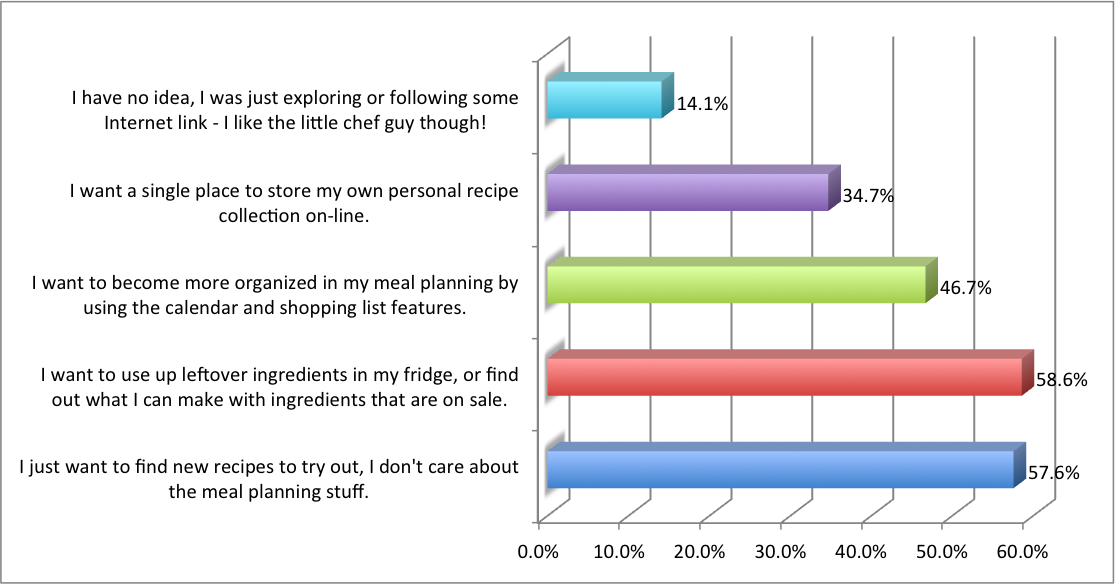 This question was designed to get a good grasp of what users expect what they go to my site. I figure everyone has some sort of goal, which they hope KitchenPC can help them accomplish. I was quite curious if their goal is searching or meal planning, as it really affects the future of the site.
The huge surprise here was the 58% that said, “I just want to find new recipes to try out, I don’t care about the meal planning stuff.” Seeing how the entire point of my site is “meal planning,” it’s pretty disheartening to find out over half my visitors don’t really care about that aspect of the site.
However, 59% said “I want to use up leftover ingredients in my fridge, or find out what I can make with ingredients that are on sale.” This means the meal planner code was not a total waste; a common goal of my typical user is to find uses for certain ingredients.
48% said “I want to become more organized in my meal planning by using the calendar and shopping list features.” Hmm, perhaps we have an even split. A little under half my users wants to become more organized in their meal planning, and a little over half just want to find great new recipes.
35% checked “I want a single place to store my own personal recipe collection on-line.” This tells me there’s a bit of interest in uploading or storing personal recipes on the site, but the amount of friction required in doing so scares almost everyone away. There were several comments from people who were meaning to do this, just hadn’t gotten around to it yet. The question is whether or not it’s worth developing these features to appease around a third of my users.
Only around 14% checked “I have no idea, I was just exploring or following some Internet link – I like the little chef guy though!”
There’s a lot of great data buried in these answers. Perhaps meal planning can be made a lot more passive and less “in your face” through a re-design of the interface. Is scheduling what recipe to make on each day really useful to anyone? At the very least, it’s clear that my goals need to align with powerful recipe search, while still targeting scenarios demanded by at least the casual meal planners. This might be a tricky balancing act, involving trapezes and stuff.
3) Feel free to go into a bit more detail on your initial reaction to KitchenPC? There must have been some reason you bothered to create an account, right?
When a user takes the time to sign up on your site, it means they have an expectation of what they can get out of it. There exists an “ideal” implementation of your service within their imagination. Questions 3 and 4 are designed to capture those expectations and gauge the level of disconnect between what the user thought KitchenPC was and what it actually ended up being after they used it a bit.
Correlating with the data from question 2, the majority of users mentioned finding or searching. Quite a few commented on the pleasant UI and overall look and feel of the site. One comment that really stood out was, “I wasn’t too impressed when I first found it. Glad for this email to have me come back. You have done untold hours of work and I will definitely be using the site more!” Perhaps I am getting somewhere.
One user commented, “…when I started looking around at all the ways you could use this site to get more organized, I realized it was way better than the other sites I was currently using.” They went on to mention how useful it is to plan out meals in advance and create shopping lists. Another user commented, “I really like the shopping lists I can create on KitchenPC. I also like having a place I can put my recipes when I have time to create them.” Several others mentioned the shopping list feature, which is not surprising as it takes such a prominent position in the UI.
A recurring theme in these responses was being able to store personal recipes:
“Having a place to store my own recipes is always great.”
“I am frustrated with trying to find a recipe from the many sites I may have saved them.”
“I like saving recipes to a site even if I print them because sometimes I need to find the recipe on the computer again.”
“I have a cluttered
“My other sites can ‘save’ a recipe to my own personal favorites file, but yours is way ahead of theirs in that you can figure out what ingredients you already have on hand, and then plan out your shopping list, and be reminded of what other ingredients you’ll need from the store…”
There were also several comments from “meal planners”, who were drawn to my site as a tool to help them plan meals in advance.
“The meal planning caught my eye first. I am always looking for a fast way to figure out what to make for dinner.”
“I love the pantry list feature. I can add items that are on sale then use the recipe finder to meal plan.”
“I was initially drawn by the ability to plan a set of meals and create a specific list to accomplish the objective.”
“I collect recipes… now I would like to get organized and be able to use a calendar and shopping list each week without trying to figure out what to have for dinner at the last minute.”
“I am a planner. I have planned our weekly menus for years and know that is why we don’t eat junk food!”
So, these answers are obviously all over the place. It’s of course impossible to please everyone, but what generalizations can we make about what people are looking for? Obviously, people are intrigued by the idea of planning out meals and finding out what they need to buy. Overall, people seem to “get” the site. However, the site statistics show me that people aren’t really using it. Shopping lists are mostly generated from a couple recipes, most users have never used the pantry, and almost no one actually uploads a single recipe. With that said, the ideal of becoming an organized meal planner still exists. Can KitchenPC do something to help these people?
4) After exploring KitchenPC a bit, did you find it useful? Which features stood out, and made you go “Hey that’s pretty cool!”
This question follows the previous one to basically ask, “ok so what did you think?” Did that ideal implementation of KitchenPC in their head match up with what they actually found? Did I totally screw up everything? Did the user completely waste their time, or am I actually on to something?
In general, most of the feedback to this question was positive.
“I did find it useful. Everything stood out, it was great!!”
“Calendar and meal planning was something I didn’t do but do now.”
“I found KitchenPC very useful. The item that stood out the most was meal planning. I love that I can plan meals for the whole week and know what I need to go shopping for. […] It’s a must when you have 3 teenage boys…”
“Meal planning is cool. Am looking forward to getting more pantry items listed so I can take full advantage of the wonders of this site.”
“I’m beginning to use the meal planning more often, and creating the shopping lists can actually be more helpful in saving money, since I’m focused on what I need versus what I want.”
There were, of course, a few honest criticisms as well.
“I did find it useful, but entering my recipes was troublesome because of the need to have everything unknown to the system get approved.”
“Not very useful. Needs more professional recipes.”
“The recipes seemed lackluster.”
“Nothing really grabbed me, but that is the kind of person I am… not impressed much.”
“It needs a lot of fine tuning from an organization standpoint.”
Unfortunately, the negative responses lacked actionable criticism; though it’s apparent recipe quality is still an issue. I have a feeling that will be an ongoing effort for quite some time. Other sites like AllRecipes and Epicurious can solve this issue through crowd-sourcing. Crap recipes get buried in the pile, where the best recipes get high ratings and lots of comments and surface to the top of any search results.
5) Which of the following more closely describes how you decide what to cook?
 This question has only two possible responses:
I figure out what I want to eat first, and then I go to the grocery store and buy the ingredients required to make those things.
or
I dig around my fridge or pantry to see what I have, then I figure out what I can make with those ingredients.
I absolutely loved the results here. 56% of users chose the latter, indicating they want to make use of their available ingredients, while only 33% said they figure out what to eat first and then go buy stuff to make it. This makes the meal planner that much more important, as it’s incredibly clear people want to use up leftovers and not make unnecessary trips to the grocery store.
6) When you search for new recipes on-line, which of the following best describes your behavior?
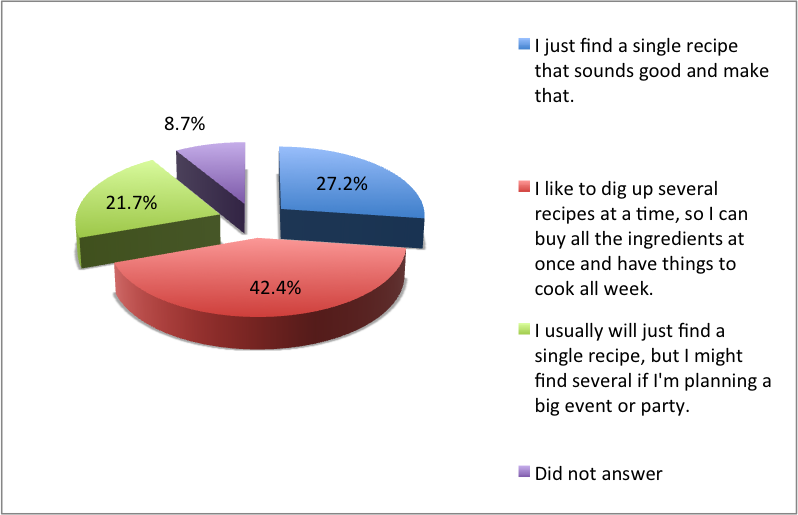 27% said “I just find a single recipe that sounds good and make that.”
Over 42% said: “I like to dig up several recipes at a time, so I can buy all the ingredients at once and have things to cook all week.”
Finally, another 22% said: “I usually will just find a single recipe, but I might find several if I’m planning a big event or party.”
I love the fact that the more rare case is finding a single recipe at a time. KitchenPC really shines with its ability to work with multiple recipes at once. This is a strength I don’t really think any other recipe website has, but users clearly want to work in this way. Users don’t work with recipes one at a time; they’re looking for things to make in the upcoming future. They’re looking to pair items with other items, and looking to make use of ingredients they have available. They don’t want a single recipe that calls for parsley if it’ll just be used once and then sit in the fridge for weeks.
7) Where do you keep your favorite recipes so you don’t forget them?
 Only 29% of people will bookmark recipes in their browser. A surprising 75% of people will print them out on paper (I was shocked by this statistic!) and 47% store recipes on their computer in files. 40% use cookbooks and will put sticky notes on recipes they like.
It’s definitely clear that KitchenPC needs to be really good at printing individual recipes, sets of recipes with a shopping list, and entire meal plans. Since nearly half of people have files saved on their computer with recipes, it seems being a “cloud storage” for recipe files might be a pretty solid business model as well; especially if I can mine and parse those files intelligently.
8) How often do you find yourself “improving” on a recipe, or jotting down personal notes or annotations?
 This question also changed a lot of my views. Only around 7% of respondents said “For the most part, I just stick with the original recipe.” This was quite eye-opening! People obviously want to personalize recipes online, jot down notes, change things, and make recipes their own.
25% said: “On occasion, I’ll jot down a note if something’s unclear or I want to remember something about it.”
39% said: “I find myself changing amounts, adding or removing ingredients, all sorts of stuff to make it my own.”
And finally, under 20% said: “I will almost never follow a recipe exactly, I only use them to inspire my own creativity!”
Obviously, the majority of users need to create notes on recipes and personalize things after they try them. These sorts of features need to be a huge priority in the upcoming versions of KitchenPC.
9) We’re planning on completely redesigning the way you search for recipes with KitchenPC. In your opinion, which features should we focus on?
 I will admit I want to make KitchenPC the most powerful recipe search tool on the Internet. This means I want users to be able to find recipes in any way, no matter how obscure. This question was asked mainly to get UI feedback. Obviously, no one wants to see a daunting page layout with a million different dropdowns, checkboxes and input controls. Searching needs to be simple, intuitive and fun. I plan on using this feedback to do UI wireframes for the next generation search page.
So what are the top three ways users want to find recipes? First, I left the plain old textbox style Google search out because that obviously needs to be front and center. Out of the choices I gave, the top (with 59%) was to be able to search based on what ingredients the recipe has or does not have. Second, with 48%, was to search for certain meals; such as breakfast, lunch, dinner or dessert. Third, at 39%, was to search by cuisine: Mexican, Southern, Indian, etc.
Only around 16% cared if they could search by maximum preparation or cook time. Only 15% wanted to search based on what the recipe tasted like (sweet, spicy) – take that Yummly!
A mere 12% wanted to browse through recipes by category, and a shockingly low 6.5% wanted a site to suggest recipes to them based on their previous ratings. Either people just don’t trust that, or they just love to search.
Out of everyone that took the survey, absolutely no one checked the box “searching based on where the recipe came from; I’m loyal only to sources I can trust.” Though I was surprised to get 0% on this one, the low value didn’t surprise me much as most people I’ve talked to say they find recipes using a search engine, such as Google or Bing.
Though I want to allow searching across all these dimensions, I could see a UI that would just allow keywords, meal, and what ingredients to include or exclude. All the other options would be accessible through a popup or hover-over interface to “add” new criteria to the search.
10) Any other comments on how we can make KitchenPC the most powerful recipe search engine on the Internet?
This question gets straight to the point. Obviously, an online meal planner isn’t going to reach mainstream adoption without the recipe searching firepower to attract the masses. So, what exactly do I need to do to make KitchenPC beat out every other way to find recipes on the Internet?
The feedback on this question was rather generic, with a lot of users leaving complements such as, “not a thing!” or using the space to provide other, non-search related, information. A few mentioned nutrtional information, and some mentioned features I already have (obviously these options are too hidden or they only glanced at the site superficially.)
One comment sums it up pretty good: “Just keep it simple to navigate”
I guess I’m on my own with regards to search design. I have a feeling this will be perfected over many iterations of the site, and will rely on advanced recipe parsing techniques to really pull in the required metadata to allow KitchenPC to fully understand a recipe.
11) Regarding KitchenPC’s shopping list feature, which statement do you most agree with?
 There were three possible choices here:
15.2% – This feature isn’t useful, who needs to manage a shopping list on-line?
54.3% – The shopping list feature is useful for creating a one-time list of the necessary ingredients for one or more recipes on the site.
23.9% – I would use the shopping list feature to manage my entire life – I want to be able to add non-food items, access this list from my mobile phone, send it to my spouse, etc.
This feedback pairs absolutely perfectly with the real database usage at the moment. Almost everything on the shopping list is indicative of recipe aggregation, not “casual” shopping list management. In other words, users are not interested in using KitchenPC to manage their shopping list online or manually entering staple items one at a time. There’s about a billion iPhone apps for that, and most people just use a scratch pad on their fridge anyway.
What is apparent, however, is using the shopping list engine for the purpose of glancing at a tally of ingredients across multiple recipes. And the types of ingredients I see in currently stored shopping lists backs this up. I might even go so far as to say storing a shopping list online is useless (unless it’s heavily tied to a mobile presence or smart kitchen appliances); real time cross-recipe ingredient totals would perhaps be much more useful.
12) If KitchenPC started offering free, pre-built meal plans which contained 3-5 recipes along with a shopping list of what you needed to buy, what types of plans would you be interested in seeing?
 As announced previously, pre-built meal plans is one of the super high-priority features I’ve been planning for quite some time. AllRecipes already has it, but their implementation is messy and serious data overload. I thought I’d take the time to ask users what sorts of meal plans they’re interested in so I can begin to prioritize this effort.
By far, the winner was “Healthy recipes! I want to eat better, and have a balanced diet.” with over 67% checks. Following that was “Meal plans that make great use of a small number of ingredients – I only want to buy like 10 things at the grocery store, and cook for a week.” with just over 55%. Obviously, people are concerned with being healthy and saving money. Wait, I needed a user survey to find that out?
24% wanted “Specialty meal plans, such as gluten-free, vegetarian/vegan, etc.” and 29% wanted beginner recipes that were easy to cook. 42% wanted entire menus for single events (parties, holidays, that sort of thing).
The icing on the cake here was that only 5% answered with, “I don’t think I’d use this feature.” Clearly, there’s a huge demand for these sorts of pre-build meal plans; the Internet is just waiting for someone to do it right.
13) Any other comments on pre-built meal plans?
The comments here also aligned with the typical user being health and budget conscious. “I shy away from recipes with huge ingredient lists, especially ones with specialty spices that I don’t regularly use and would not buy for one recipe,” replied one user.
“Make it easier if people are low on funds and can’t buy some foods.”
“make them so they are user friendly with few ingredients or ingredients you may have in your pantry…”
“I think this is a great way to save money and eat healthy”
“…recipes using items on sale at the local supermarket.”
“meals for two.”
14) Now’s your chance to really wow us with your ideas and win great prizes! Did any of the above questions get you thinking? Which direction can we take the site in to really make you a regular user?
This last question was where I wanted users to just go overboard with all sorts of crazy ideas and feedback. It was there chance to just give it to me plain and simple; what’s it going to take to turn you into a regular user? What can I do to turn you into a fan, so you’ll tell all your friends about the site?
Most comments were about keeping things simple, not to “bother” users with constant emails or deals on fancy new kitchen gadgets, or just general ideas for what they’d like to see.
Again, many ideas around saving money, eating healthy and high quality recipes. While reading these comments, it became somewhat clear that users don’t actually want a site with hundreds of thousands of recipes. They want a site with high quality recipes that are well written, easy to follow, cost effective to make, and taste great. People don’t want ten of the same recipe, or random junk that no one is ever going to make.
One comment I particularly enjoyed was:
“I want accurate, high quality recipes. Some sites you can search for recipes, but they will have 10 of basically the same thing, or the recipe is written so poorly, you can’t follow it. How about being able to search by season? …I don’t want grill recipes when it’s 20 degrees below zero. That would also be helpful when shopping for ingredients; to use the produce that is in season and therefor budget friendly.”
Seasonal metadata is definitely something I’m planning on adding to the database, and this could also be accomplished through seasonal pre-built meal plans. Great ideas!
Another great comment, which I saw alluded to several times in the feedback, was regarding single people.
“Be more friendly and open to single people who live alone, especially seniors! Recipes and information should be geared towards them as well!”
Though people cooking alone may not be my main demographic (though I’m one of them,) I think I could have an entire meal plan section for single serving recipes. These recipes could be quick and use common, non-perishable ingredients, or they could be easy to freeze and re-heat later. I could see the potential for single cooks flocking to my site in great numbers if I could pull this off right.
Another user commented:
“A way of finding recipes that can be made using a special appliance; food processor, rice cooker, ice cream maker, waffle maker, etc. Many appliances are under utilized and can make cooking much easier and more fun. Especially frustrating is buying an appliance and not knowing many ways to use it that are not in the instruction manual.”
This, again, could be accomplished through pre-built meal plans. I could see an “appliance” section and a meal plan for things to do with your ice cream maker. Searching based around appliance would more likely require metadata on recipes that would be hard to index or acquire, but it’s definitely something to think about for the future. It seems a lot of people think I can just magically know everything about a massive database on recipes, or that I have a team of people who can go through these recipes one by one and grep for any sort of culinary information I require. Oh well, I like that they dream.
“Is there any way you could make a meal plan for say, a holiday dinner, and then tap into a feature where you could get other substitute recipes for one part of it? …that would be a truly bangin’ feature.”
This request is basically a marriage of my recipe modeling engine and pre-built meal plans. And the answer is absolutely! In fact, it would be a waste if I did not do exactly that! I love the idea of seeing a pre-built plan, but the user hates one of the recipes. They simply click “Thumbs down” on it, and the meal planner is loaded and finds a suitable replacement that will use the same ingredient overlap.
One user went all out on a randomized splurge of culinary vision. For my site to truly wow them, they’d like to see cooking videos, voice input of ingredients, cook-offs, forums, recipe swaps, great phone apps, coupons, articles on how to eat right, and automatic ingredient substitution. I’ll see how many of those I can get to in the next ten years.
One user really did a nice job laying out the exact UI flow they want.
“I want to be able to keep lots of recipes, plan my menus, and get my list sent to me on my iPhone… so it’s a combination of food.com, plantoeat.com and ziplist.com – and I am willing to pay for the service!”
Well don’t fret, I plan on making it very easy to do exactly this, and for free! However, donations are always appreciated.
So now what?
Ok, that was a boatload of information. It’s extremely difficult to zoom back a bit and look at the big picture, rather than micro-analyzing each little response. If I tried to cater to everyone who took the time to provide feedback, I’d need a team of 20 developers and two years of development time.
I think the general idea is people want to quickly find great recipes, figure out what they’ll be making during the week, and finding out what they’ll need to buy. While doing this, they want to save money by making the best use of what they have, stay healthy by finding recipes that cater to their dietary needs, all while expanding their culinary horizons. Furthermore, they want to easily remember recipes they liked, jot down notes and make modifications to recipes they’ve cooked, and store their own private recipes online easily and without fuss. Ok, well that’s easy enough – let me get right on that!
Last month, I sent most of my registered users a link to a short survey to fill out to get a feel of how they liked the site, what features they used, and other aspects of their meal planning habits. The usefulness of the results far exceeded my expectations, and I’ve decided to write a three part blog series to go over the results. Since I decided to incentivize my respondents with a few prizes, the first post will announce those winners and illustrate how I came to choose them. The second part will go over what I learned from the survey, and the third post will announce some decisions I’ve made around what direction to take the site based on this user feedback. So stay tuned for some exciting news!
First off, I was originally planning on offering a top prize (a Cuisinart food processor), a second place prize (an All-Clad 10″ fry pan) and a third place prize of a 11″x14″ bamboo cutting board. After spending several hours trying to stack rank answers against each other, it became increasingly apparent that there were simply too many excellent responses to just give away three prizes. So I decided to stick with the food processor and fry pan, but send bamboo cutting boards to anyone I thought did a great job. I also decided to “disqualify” any results sent in from friends and family, as the goal here is to connect with real life customers. A lot of these respondents have probably only used the site a few times, and sending them a nice fry pan or cutting board will, hopefully, plant my brand name into their mind every time they use it. Plus, they’re bound to tell a few people how they came across their fancy new kitchen gadget. Not to knock on my friends or family, but such a gift would probably be wasted upon them if valued for said purpose.
So, in the end I decided to send out seven prizes in total. The winner of the food processor (the most expensive gift) stuck out at me right away, and I pretty much knew it was the winner right when I read it. Choosing between the fry pan recipient and the first cutting board awardee proved to be quite difficult. Both answers were incredibly helpful, honest and well thought out. I found myself trying to “score” each response along different dimensions; how actionable the feedback was (“you should do this”,) how detailed the answers were, how clear it was that their responses were based on real usage, and anything else I could think of. Yet, the scores came out even no matter what I did. I almost decided to give out two fry pans, but eventually I came to a conclusion.
Unfortunately, giving away stuff is harder than it seems. Two of the seven winners (including the second place fry pan winner) never replied to my emails after several attempts. Either they don’t really care enough, or my email just got lost in the spam folder. I don’t want to harass them if they’re clearly not interested, so I gave up. I thought about giving the pan to the very close third place winner, but she also failed to respond. Perhaps some good advice would be to set a time limit for people to claim their prizes if you run such a survey.
I also asked their permission to share their names in this post, to which all of them agreed. So congratulations to the following winners!
First Place: Tish Raymond (York, PA)
Tish stumbled across KitchenPC while Googling for Tandoori Chicken recipes, and liked the matches on my site the best. She decided to look around the site, and liked it enough to sign up. It was quite clear from her comments that she uses the site to figure out what to make from the ingredients she has on hand, plan out her shopping list, and store the recipes she’ll be cooking later in the week. One comment I really liked was “[KitchenPC is] head and shoulders above the crowd of other sites I use. I don’t know who designed this site, but whomever it was, you’re not paying them enough!” – I’d love to pass along that comment to my designers over in Poland, but I’m somewhat afraid they’d start charging me more! Either way, thanks for the great feedback, Tish, and enjoy your new food processor!
Runner-Up: Jennette McGrew (Magnolia, IA)
Jennette provided some great feedback regarding pre-built meal plans. She’s looking for user friendly recipes with very few ingredients and a short prep time. She’s also looking for recipes easy to freeze, so I get the idea she’s someone who cooks a lot at once and serves it later. KitchenPC should be perfect for her!
Runner-Up: Crystal Williams (Dayton, OH)
Crystal was one of the many respondents who mentioned the pantry, but she mentioned she uses it to add items that are on sale and then finds ways to use those ingredients. This is incredibly valuable feedback for me, as the pantry wasn’t really designed for this purpose. These sorts of comments make it even more clear that KitchenPC fails as any sort of “inventory management system,” but illustrates new uses that users are coming up with themselves. Crystal also provided all sorts of great ideas for features she would like to see on the site.
Runner-Up: Christine Kelly (Tacoma, WA)
Christine is definitely my target user. She uses the site to plan meals for the whole week and figure out what she needs to buy at the store. She had some great ideas around linking recipes; for example, taking one recipe and trying to figure out what would go with it. It did get me thinking a bit about exactly what this means.
Runner-Up: Heidi E. (Andover, MA)
Heidi and her husband are tired of eating the same thing over and over again. She likes the quality of the recipes on KitchenPC and likes how she can save them easily. She spends one or two days searching for recipes, then starts cooking. She’s looking for heart-friendly meal planning and to save money.
A huge thank you to everyone who responded!
All 93 responses were great. Almost everyone filled in the text boxes and gave detailed answers. It was clear everyone who took the time to respond was a real user with valid feedback. Some of the trends I noticed when combing through the results were incredibly surprising, and as a whole, the feedback was overwhelmingly positive. It’s clear to me that KitchenPC has a real future and that there’s people out there that are anxious for it to succeed.
This evening, I’ve been playing around with a few numbers to try to get a better sense of how features are being used on the site. I figure these could be interesting data to cross-reference with some of the trends that will shortly be obtained from the user survey that went out on Monday. In the spirit of openness, and all around reader curiosity, I’ve decided to share some of these numbers.
Rather than focusing on raw success metrics of the site (how popular it is, user growth, how often the average user comes back, etc) I’ve decided to make this a post on raw feature usage. The idea is to help decide which features should be done away with and which features are worth looking at in further detail. Enjoy!
Percentage of users who use the shopping list: 13.8%
This metric includes the percentage of user accounts who currently have at least one item saved in their shopping list. This doesn’t include users who have previously used the shopping list, but currently don’t have any items stored.
Percentage of users who use the calendar: 6.1%
This is the percentage of users who have recipes saved somewhere on their calendar (either in the past or the future). This is a pretty good representation of the calendar’s popularity (or, lack there-of) since very few users will go remove all their recipes from the calendar and right now, I don’t automatically clean up old entries.
Percentage of users who use the pantry: 10.3%
Currently, this is the percentage of users who have at least one ingredient saved in their pantry. Again, it does not include users who have used the pantry in the past but currently don’t have any items saved.
Percentage of users who have recipes in their cookbook: 16.6%
This percentage of users has at least one recipe they’ve liked enough to save it to their personal cookbook.
Percentage of users who have blacklisted ingredients: 1.4%
Only a small fraction of users have decided to blacklist an ingredient. It could be that this feature is very hard to discover (it only appears in the account profile page), or perhaps people just don’t find it very useful.
Percentage of users who have commented on a recipe: 2.0%
Leaving a comment on a recipe is definitely quite easy to do; perhaps users just don’t really care enough to share their feedback, or they don’t quite get a sense of community when using KitchenPC. For all I know, this is the same percentage on major recipe websites.
Percentage of users who have rated a recipe: 2.0%
This is one statistic I’d really be interested in improving. I spent quite a bit of time working on features that take the user’s previous ratings into account while finding other recipes. The “Suggested Recipes” on the home page does this, as well as the meal planner. I would for sure be interested in finding a good way to encourage recipe ratings.
Average recipes in calendar: 3.5
The average user who has used the calendar has an average of 3.5 recipes. This is at least a little encouraging, as it suggests people have actually given the calendar a shot and tried it out with a few recipes. The top calendar user currently has 35 recipes on their calendar.
Average pantry items: 7.2
The average user who has a pantry has around 7.2 ingredients stored. What’s interesting about this is the range of this number, which goes from a single item up to 88 items. I’m very curious as to who’s using the pantry feature to store 88 different ingredients and amounts. Perhaps they have a use-case for this that I haven’t really thought of. I might dig more into these “anomalous accounts” and see what they’ve been up to on the site.
Average blacklisted items: 3.8
Though this feature is almost entirely not used, it’s interesting to see that the average user stores 3.8 ingredients they want to avoid.
Average shopping list size: 10.2
The average active shopping list has 10.2 items, which I would guess positively correlates with the average number of ingredients in a single recipe. For those of you who are curious, the biggest shopping list in the database is 120 items.
Top 10 most popular ingredients in a shopping list:
This is a list of the top ten most popular shopping list items, and how many users have each item on their list.
- Eggs: 60
- salt: 58
- all-purpose flour: 50
- onions: 49
- olive oil: 40
- garlic: 40
- black pepper: 40
- granulated sugar: 38
- chicken breasts: 36
- unsalted butter: 34
- All-purpose flour: 25
- chicken breasts: 24
- white rice: 18
- eggs: 18
- granulated sugar: 18
- light brown sugar: 17
- pasta (spaghetti): 15
- soup – cream of mushroom: 14
- olive oil: 14
- garlic: 13
This statistic strongly argues how misunderstood the pantry feature is. Almost every item on there is a fairly common ingredient, many appearing in shopping lists as well. Furthermore, ingredients such as flour, rice, sugar, pasta, and olive oil are ingredients that have a pretty long shelf life. These are not ingredients users would want to purposely create meal plans against to use up. I think users still feel that the pantry is intended as an inventory management solution, and I get the feeling that users are simply “trying out” this feature rather than using it for anything too serious.
Top 10 most common blacklisted ingredients:
- crimini mushrooms: 3
- whole turkey: 2
- blue cheese: 1
- pink salmon: 1
- smoked bratwurst: 1
- guacamole: 1
- raw shrimp: 1
- baby zucchini: 1
- turkey legs: 1
- chicken breasts: 1
I think the first thing people will notice is there’s really no “killer feature” of KitchenPC. It still appears to be a playground that a few curious early adopters are toying around with, but not using for anything seriously. This could mean the site really doesn’t address any valid user scenarios, or it could be the user experience is lacking and no one has really taken the necessary time to figure out the site.
To me, it means I can feel a lot more comfortable making bold decisions or major architectural changes without the risk of annoying too many customers. It also means the meal planning aspect of the site is either not very useful, or too difficult to use and doesn’t really convince any users to change their habits.
I also think there are some improvements I can make around “closing the loop” on the meal planner. Right now, it seems scheduled recipes get somewhat lost on the calendar, and the user has no accountability to report back on whether they made those things or not. Services such as NetFlix really take advantage of this loop, as they can email users after watching a movie to comment on it, rate the picture quality, or provide a rating on the movie itself. I need to think of a way to do the same with recipes. I’ve talked in previous posts about scrapping the idea of a calendar in general, and providing an “upcoming meal queue” that would have an associated real-time shopping list. When the user gets around to making one of these recipes, they’d simply “de-queue” the item from the list and right then and there I could ask them to rate it or provide feedback.
I hope to really be able to drill down into the survey feedback to get a sense of what users think of the site. I think reading the free-form comments left by each user will be very enlightening. I do expect to easily pass 100 user responses in the survey, which is plenty of data to make some business decisions based on.
Originally when I was planning on writing this post, it was going to be about the KitchenPC User Survey that was sent out to about 2,000 users this morning. I was planning on going over why I sent out the survey, how the various questions tied into pending business decisions, and about using the opportunity to cross-promote my other company, Qwk.io.
During the course of the day, I became distracted with another subject. A rather important business question that I have not really seen discussed in any detail recently. Is the medium of electronic mail a still viable approach for connecting with your user base?
One of the benefits of launching a product is it puts you in the quite convenient position of having users. These users represent extremely valuable data points that [at least should] influence every decision you make; from relatively minor features to major business pivots. This is the theory behind RERO and other MVP-centric software development philosophies.
However, once you actually have those users, what’s the best way to really close the loop with them? Just because they took some time to sign up for your site doesn’t mean they care one way or another about your website, or lose sleep at night thinking about how they can empower you to create the revolutionary new product your hard work entitles you to.
Social networks provide a great way of reaching your customers. Twitter and Facebook in particular provide a unique way for pushing new information out to a group with similar interests and allowing social interaction to organically grow. They can create a culture for your brand; not just a guy with a giant microphone on top of an ivory tower.
My goal, in this case however, was to solicit direct feedback from my existing user base in order to help me assemble my plans to re-visit some of the thinking and assumptions that went into KitchenPC. My Twitter feed basically yields zero interaction; the entire medium, in the opinion of this humble entrepreneur, is nothing more than companies pushing meaningless dribble amongst themselves with no one actually reading anything anyone else is saying. Facebook is not much better. KitchenPC related news posted on my Facebook page might yield a feedback rate of around 1%, which equates to about 4 or 5 users actually interacting with the content in any way.
This leaves direct email as the most viable option for trying to reach out to my existing user base to answer a survey. My weapon of choice was MailChimp, as it provides a whole host of features for managing email campaigns and offers a free-tier suitable to amateur spammers such as myself. I spent a good chunk of the weekend crafting a survey and piecing together an email to send out to my modest user base of around 2,000 registered users. To apologize for the intrusion and encourage detailed feedback, I decided to offer a few existing prizes for the most helpful feedback as well.
I did my best job to make the email as friendly and non-spammy as possible. I was careful to only send the mail to users who had the “Join Mailing List” checkbox checked in their user profile (more on that later), and I even decided to make the “Reply To” address a real, monitored KitchenPC account so recipients could even reply to the email to yell at me. At 7am this morning, the email went out and by the time I woke up, I already had several “alerts” from the folks at MailChimp.
MailChimp, and props to them for this mentality, is heavily anti-spam. They do an excellent job tracking user interaction with emails, will assist you in complying with federal anti-SPAM regulations, and allow recipients of your emails to report abuse directly. MailChimp will tolerate a “complaint” percentage of 0.1% (basically one out of a thousand) before it sends you a warning. If complaints still persist, your account is suspended.
Out of the 2,000 or so emails I sent out, there were 7 complaints. All reported the mail as “spam”, and only 2 people bothered to use the “Unsubscribe” link provided. Thus, my account was shut down on the very first email I ever sent out. I was a spam outlaw, no better than the Nigerian drug lords and penis pill people.
Now, in my opinion, these numbers seem pretty reasonable. I’m pretty sure any time you email a few thousand strangers, at least 7 are going to click the “Spam” button. Different people have different ideas of what spam actually is. Very few are aware of the actual legal definition, and treat this as “Well, I don’t find this email interesting so I declare it spam.”
MailChimp is also very pushy on an opt-in approach, which seems fantastic in theory. If you have proof of opt-in, it’s not spam, right? In my experience, this approach is futile. When I first launched KitchenPC, I decided to make the “Join Mailing List” checkbox off by default. However, after a few hundred user signups, there were exactly zero users who had turned on the checkbox. Even though the checkbox was clearly visible and people were most definitely visiting the account settings page, strangely enough no user looked at this checkbox and thought to themself, “Oh I absolutely must get in on that action!”
I figure you’d probably need hundreds of thousands of users before you could collect any sizable mailing list using an opt-in approach. In other words, having an opt-in email news letter for your site is probably about the same as not having one at all.
When I changed the default to “on” for my mailing list, very few people bothered to turn it off. Last night when I imported the current user list, only around 60 people has manually unchecked that box indicating they were not interested in being contacted. My reasoning on the subject was that opt-out is perfectly fine, as long as you’re not running some scam site and allow people to easily unsubscribe from future emails. Worst case, you send out one email and a bunch of people unsubscribe and are not bothered again. I have absolutely no interest in bothering people who are simply not interested in KitchenPC. I knew I would never be one of those ridiculous sites that have a message saying, “Your request has been received. Please allow 60 business days for this to take effect.” Or the sites that simply error out when you unsubscribe, or do nothing at all. I spent over 6 months trying to get out of TicketMaster’s mailing list, including several phone calls. Yet, my subscription is simply re-activated every time I purchase a new concert ticket.
Unfortunately, the culture of email has shifted towards the paranoid. People have been trained over the years to never trust an unsubscribe link. In fact, the majority of unsubscribe links will just alert the sender that they’ve reached an active email address, and will result in them sending you more spam. Thus, this approach doesn’t work too well either.
So, an opt-in email list is basically unfeasible for a small start-up since far less than 1% will opt-in to anything. Sending out emails with a working and valid unsubscribe option is out due to the mistrust of the average Internet user. Using a site such as MailChimp to send emails requires you to comply with federal regulations governing complaint limits and other practices, which basically only harm small businesses trying to legitimately connect with their customers; actual spammers simply laugh at these rules and ignore them completely.
This begs the following question; is mass mailing a viable approach for closing the customer loop? Right now, my opinion is no. I believe this will certainly be the last email I send all my users for a while. I’m pretty sure any further email campaigns I do will once again result in my account being suspended due to complaints. This would, of course, lead to ISPs and mail providers adding my domain to a list of potential spammers, which is definitely something I don’t want. Before I could consider continuing down this route, I would really need to rethink a lot about the right way to manage these sorts of email campaigns. Can I integrate in with MailChimp’s APIs to handle unsubscriptions in real time? Can I stop emailing a user if they never read nor opened the previous email? Is there a viable way to reach a few thousand users without pissing off more than 2?
I’ll end this post on an optimistic note. Even with the less than 1% complaint rate with the survey email campaign, both Qwk.io and KitchenPC have been extremely active all day. Over 100 visits to each site, as well as a huge spike in blog traffic, Twitter traffic, and Facebook traffic. Almost 30% of the receipients opened the email, and over 9% clicked on at least one link in the mail. Only around 5% of the emails bounced (meaning 95% of my users put in valid email addresses.)
As of now, 60 people have already filled out the survey, anxious to win that brand new Cuisinart food processor. Perhaps annoying a few people is just the name of the game when trying to connect with your user base.
 KitchenPC