Back in January, I was approached by a company called Nuiti Labs who is the maker of a popular Firefox plugin called Firesay. Firesay enables users to control their web browser with their voice just by saying things such as “Open Tab” or “Go To Facebook.” While these sorts of things have been around as far back as I can remember (yeesh, I think they had these programs for Windows 3.1!), they’ve never really seemed to catch on. I suppose people are just too used to using a mouse or keyboard to interact with computers. However, suppose there was a scenario where it really did make more sense to use voice controlled technology; that’s what Ehud Halberstam from Nuiti wanted to talk with me about over coffee in Kirkland one afternoon.
This Israeli-based company was hard at work on their next version of Firesay, which would support the Google Chrome web-browser. This product “spin-off” would be branded as “Firesay In-Page” and was no longer a plugin just to control the browser, but was an entire API that allowed the website itself to harness this technology. Web sites could now provide a whole new experience to their users by offering voice controlled functionality and text-to-speech feedback. Ehud was quite interested in exploring the possibilities of kitchen related scenarios, and stumbled across KitchenPC during his investigation.
A partnership was definitely mutually beneficial. Nuiti would have a great recipe site to showcase their product, providing a real use case and not just theoretical examples for marketing purposes. KitchenPC would get to “ride their PR wave” and hopefully get a flood of traffic through their product launch. Though “people who install browser plugins” is hardly my target demographic, I figured I’d at least get some of the techie chef crowd interested.
We spent the last couple months working on the required KitchenPC changes, and I’m happy to finally be able to announce today the launch of a Firesay enabled KitchenPC!
Firesay hands-free web browsing for KitchenPC
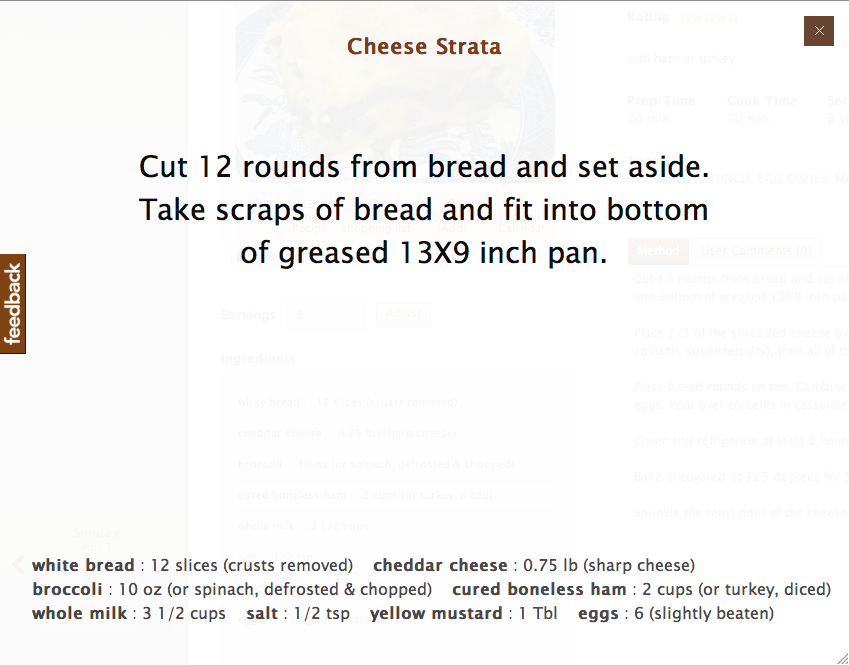
Kitchen Mode feature for KitchenPC
The Firesay enabled KitchenPC experience is quite simple. Once you have the browser plugin installed, you can load any recipe on the site. You’ll now notice a little Firesay command widget at the bottom of the screen whenever Firesay is listening for commands. It’ll display a list of available commands for whatever context you’re in. While in the recipe viewer, you can say “Firesay, Start Cooking.” KitchenPC will then shift into a “full screen” theater mode that is optimized for kitchen use. Only the information you need is displayed, and the fonts are huge so you can read the screen from ten feet away or so.
KitchenPC is able to break down recipes into steps automatically, and the first step is displayed on the screen and read out loud using a synthesized voice. The user can say “Firesay, Next Step” to advance to the next step, or “Firesay, Repeat Step” if they miss something and don’t want to have to glance up at the screen.
I’ve done a lot of testing and the voice commands actually work surprisingly well! I can be anywhere in the room and still have great results. In fact, one time I stepped out of the room into the hallway and it still worked.
What I most like about this partnership is this is the first feature (hopefully of many to come) that really starts to target my initial vision of bringing the power of the personal computer into the kitchen. Though not many users have PCs set up in the kitchen, hopefully this sort of innovation will start to change that. For now, I can see this feature being used on laptops and tablets while cooks are busy chopping up onions or searing steak. According to Ehud, there will soon be versions of Firesay that run on iPhones and iPads too.
You can learn more about hands-free operation on KitchenPC by clicking here. I’d love to hear your opinions on this feature, or any ideas on how I can make it more useful as well!
I thought I’d give a quick plug to an amazing web service I found recently, GetClicky.com. Since the launch of KitchenPC, I’ve been using Google Analytics to monitor site usage and generate statistics on what my users are up to. An entrepreneur friend of mine recommended I check out Clicky, and I absolutely love this thing!
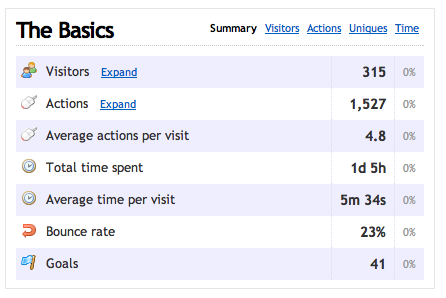
My visitors over the last 7 days
Like Google Analytics, Clicky is easily installed just by including a JavaScript file on each page on your site. However, one of the main differences is the information you get is in real time. With Google, it would take about 24 hours for new data to show up on their servers, but with Clicky you’re able to “spy” on your users in real time. The Clicky website shows you how many users are currently online and allows you to get a timeline to see what each one is up to.
Another huge benefit of Clicky is rather than just showing a bunch of IP addresses, Clicky will show the actual KitchenPC usernames of my users on the activity feed (provided they’re logged in of course.) I can see my top users, how many times they’ve logged on, and drill in to each session to see what they did on my site. All I need to do is emit a JavaScript variable on the page that provides the user’s name and email, and Clicky will log this value automatically.
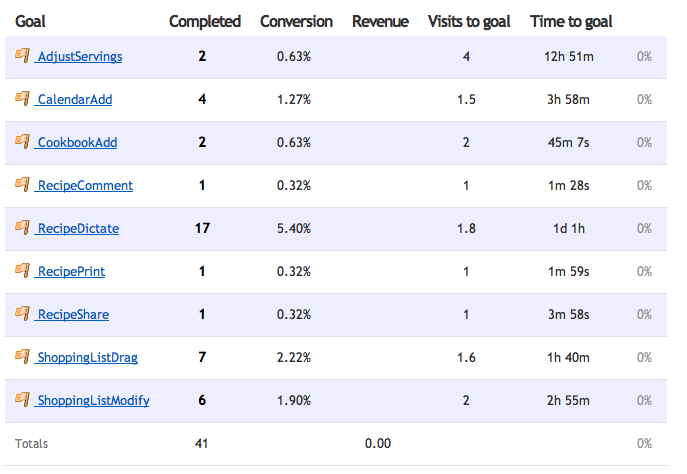
Various goals on KitchenPC
In addition to that, Clicky provides a feature called “Goals”. A goal is something you want users to do, such as using a site feature or purchasing an item online. You can log a goal with a simple JavaScript call to “clicky.goal()” and pass in a goal name. These goals will appear at the top of each session, and you can get stats on each goal such as what percentage of your users reached that goal, and the average time it takes a user to do so. I’ve set goals for various KitchenPC features such as dragging a recipe to the shopping list, adding a recipe to the calendar, subscribing to another user, adding a recipe to their cookbook, adjusting the serving size on a recipe, and more. Though I can mine some of this data from my own database, I now have a graphical overview that’s much easier to work with. Plus, now I can really show how users are using my features (eg, do they use drag and drop or click the “Add” button?)
Clicky provides a basic free service with the standard logging features, as well as some premium level packages starting at around $30 per year. New users also get a 30 day free trial of the Pro account so they can really play around with all the advanced features before signing up. It didn’t take me very long to figure out this was definitely a service I didn’t mind paying for, and the price was quite reasonable.
Anyway, that’s my plug for today. If you run a website, go check it out!
Tuesday evening, I decided to check out an event called eDate. eDate is somewhat like speed dating, but pairs up entrepreneurs with potential law firms, marketing gurus, investment specialists, technologists, and more. You get ten minutes each with two experts of your choice, and also get to mingle with all the attendees in a non-formal setting as well.
I went with a friend of mine and his business partner who are also doing a startup and we all had a fantastic time. The event was very well organized and had free snacks and drinks, including wine. I decided to meet with a legal expert and a marketing firm. I’ve had a lot of questions around setting up a formal corporate entity, how shares work, transferring the KitchenPC intellectual property, and potentially being set up so I can bring in outside funding. Coincidently, I recognized one of the law firms (Ashbaugh Beal) in attendance and decided to meet with them. Rick Beal personally helped me out quite a bit several years ago with a rather large insurance claim involving wind, two trees, my house, and gravity. I figured I could at least go and name drop.
Regarding legal work, it’s something that eventually needs to be done to make any company “official.” KitchenPC is an LLC in Washington State, but I’ve always filed “No Activity” and not really used it for anything. What I’ve learned since is there’s quite a bit of controversy in the field around deferring payments for cash-starved startups as well as firms taking equity stakes in these companies. Traditionally, it would be considered unethical and a conflict of interest for a legal firm to own shares in a startup they represent. For example, if Ashbaugh Beal owned shares in KitchenPC, and one of their other clients is my biggest competitor, the advice they gave that client might be biased by the fact they have an interest in my success as well. Other law firms (mostly the big ones in the bay area who are used to dealing with dot-coms) say this is a bunch of bologna and have no problem doing these sorts of arrangement. Ashbaugh Beal is among the former group, however I’m hoping if I were to still work with them we could work out some sort of deferred payment plan.
I also met with a guy named Adam who works at Odd Dog Media. I wanted to chat with him about cheap ways to get users on to my site. So far, my user acquisition strategy has been to “get lucky” by getting blog mentions and other press, which causes random spikes every so often. Other strategies I’ve found, such as ad campaigns, Facebook marketing, YouTube videos, etc all seem too expensive per user acquisition and perhaps not a very efficient use of money. I really liked Adam and would love tot meet up with him again. He had all sorts of great ideas for the site, including developing an embeddable widget that other bloggers can embed in their HTML to show recipes and meal plans for my site. He says he and his team get together on Fridays for beer and to toss around ideas, and invited me to join in one of these weeks. I’m hoping he’ll let me take him up on that offer.
I also decided to bring along several full-page glossy print-outs of my website (big thanks to my friend Ken, who will of course never read this, for having those done for me!) This turned out to be a great idea and everyone loved seeing them. Describing your website is one thing, but actually being able to show what it looks like really helps you connect people to the idea. As they say, a picture is worth a thousand words. I received nothing but positive comments on the design. I’ll definitely be taking these with me to future meet-ups as well.
Since I got spots one and three (there were eight rounds), I was finished early. However, due to some of the experts not being fully booked, I was able to grab several openings which provided me with two free dates! I chatted with a finance guy who talked to me a bit about taxes and how to write-off some of my debt, and also with Perkins Coie, another well-known Seattle law firm. Perkins is huge in the startup world, and has absolutely no problem with taking shares in a startup in exchange for legal services. Typically, they charge about $2,500 for setting up a corp in Deleware, and then take between 0.75% and 1.5% of your company in return for around $30,000 in deferred legal services. The payback is tied in to your first round of funding. This deal sounded rather typical from what I’ve heard. Big law firms are also known to help open doors for you.
Even though I stuffed my wallet with a huge stack of KitchenPC business cards before I left, I still managed to run out. One thing that came as a surprise is several people who I talked to had heard of my site, so apparently I’m getting more well known at least in the entrepreneur community. Hooray for very slow progress!
After spending quite a bit of effort working on SEO lately, I’ve noticed an unforeseen problem that this optimization has created. With more and more users finding my site through search engine queries for recipes, the entry point into the site has shifted. Normally, we think of the home page as being the first page a user sees when they reach your site. Thus, the home page will capture the user’s attention within seconds, look the prettiest, and really sell the product. It’s the home page that you do A/B testing on and allot most of your initial dev time to.
As a content site, a lot of users will find my site through one of the 10,000+ recipe links that I put out there on search engines. A user may search for “chicken recipes” and come across this little gem. This page, in this case, would be the first impression the user gets of KitchenPC. The problem with this page was it just wasn’t designed to really sell KitchenPC as a product. The user has no idea what my site is, except for a place where recipes live.
If you’re a long time reader, you know that these recipe “permalinks” were a feature I added a bit after launch to promote recipes on the site without requiring a user to have to create an account and logon. It also gave Google something to crawl since Google can’t reach the secure pages. The home page, back then, was nothing more than a “please sign up!” message and a quick blurb about what the site does. I never had the money for a clever video or the time to do a site tutorial, so I figured I could attract users through recipe links. This worked relatively well, however the static recipe page design was built to be completely static content without any of the real KitchenPC features. It only displayed the raw recipe data, unlike the site’s “popup” recipe viewer which had all sorts of great functionality like “Create shopping list”, “Adjust serving size”, and “Add To Calendar.” Someone looking at this static recipe page would have no idea that these features existed, and very few users would know they had to logon, go dig up the same recipe using search, and then they could work with the recipe using the meal planner tools.

Some of the new features on the static recipe pages
Thus, I’ve spent the last couple nights porting a large chunk of the “rich” KitchenPC recipe viewer features over to this page. The result is near feature parity between the popup recipe viewer and the static recipe viewer. As of 20 minutes ago, the following features are now available on the static recipe pages:
- Email Recipe
- Create Shopping List
- Add to Cookbook
- Add to Calendar
- View/Add Recipe Comments
- Adjust Serving Size
I’m still a bit short of complete parity. For example, you can’t yet rate a recipe on this page (I need to refactor a bunch of the rating code before I can implement this correctly, but hopefully soon.) Creating a shopping list will also overwrite your existing shopping list without warning, rather than prompting you if there’s existing items like the popup version does. This is because I don’t load the user’s shopping list into memory on this page. The page also doesn’t provide the ability to remove the recipe from the cookbook if it’s already there. However, these minor issues will be fixed in due time. The point of this work was to advertise to new visitors what the site can do.
Suffice to say, when new users stumble across the site through search engines, Facebook Likes, and Twitter posts, they’ll definitely notice KitchenPC provides a lot more meal planning tools that they wouldn’t otherwise know existed. Hopefully this will result in a few more signups in the coming weeks!
One of the things I’ve noticed about Google is they have the ability to format certain types of results depending on what type of content the page is displaying. If you search for “spinach quiche”, you’ll get several results that Google recognizes as recipes and it will display them nicely. You’ll see a picture of the dish, the “star” rating, how many reviews the recipe has, and even the total preparation time. That’s pretty sweet! However, Google apparently doesn’t like KitchenPC too much as my results would get displayed like any other page. In other words, Google didn’t treat my content as recipe content. Boo!

Results from AllRecipes.com look great!
It’s been on my list to get to the bottom of this and figure out exactly what sites like AllRecipes are doing that I’m not. After all, I have all this data available so why not display it on search result listings? Recently, I got the perfect excuse to dig a bit deeper into this. Recently, Google announced new features to make searching for recipes even more powerful. Now, users can filter down search results to only recipe content, exclude recipes based on cook time or calories, and even check “Yes/No” boxes based on what ingredients they have to find that perfect recipe. So I decided to spend the evening researching what Google calls “Rich Snippets.”
Google will display a “rich snippet” for your page if it finds certain types of markup embedded in your HTML. Google recognizes several standards, namely microdata, RDFa and microformats. These technologies all basically work in the same way; by embedding certain markup that will be ignored by browser rendering but recognized by any parser looking for this data.
Google will support any of these formats to recognize recipe data in a website and parse out various properties. In fact, there’s an excellent tutorial on exactly how to do this with the three major formats here. I looked briefly at the different options, and eventually chose to go with the hRecipe microformat since that’s what AllRecipes was using and it seemed to be the most adopted standard. I also see AllRecipes results displayed nicely in Bing, so I know Bing also supports this format.
Modifying the HTML was fairly straight forward. You can surround information with span tags of a certain class to indicate what they are. In certain circumstances, you want to display information in one way (such as display 4 star images in a row to indicate a rating) but provide the data to be parsed in another way (such as 4.0). You can do that with an empty span tag with the correct data in the title attribute.

How KPC results will look according to Google's testing tool
Google, of course, provides a Rich Snippets Testing Tool to preview your content to make sure everything gets parsed right. Rather than modifying a bunch of my code, I instead saved a recipe to a static file called test.htm on my web server so I could modify that in Notepad until I got everything working right. I then migrating the changes back over to the source code when everything was displaying the way I wanted.
Though it will probably take a few weeks for Google to update their index, hopefully now KitchenPC results will show up when users are using Google’s new recipe searching tools. That is if I’m not drowned out by the millions of AllRecipes results that will usually bubble to the top of the first page. Sigh.
KitchenPC attempts to construct the perfect shopping list by taking into account the various forms an ingredient may be used across multiple recipes and converting those amounts into the form said ingredient would usually be purchased in at a grocery store. This works fairly well in theory, as your shopping list will say “all-purpose flour: 9oz” and as you browse the baking aisle at the store, all the various bags of flour will indicate their size in ounces. If the shopping list expressed flour in cups, you’d really have no idea how much flour you need and just buy a large bag just in case. This problem would be compounded if you were cooking large portions of recipes and needed like 465 cups or something.
The flour example “sells” nicely because almost every recipe uses flour in a volumetric form and almost every flour brand sells flour by weight. Actually, pretty much everything that isn’t a liquid is sold in weight as the volume can shift and settle during transit. However, it became clear that every ingredient in the database isn’t so cut and dry. For example, tomatoes are also sold by weight and will be weighed by the cashier at checkout. Your grocery store doesn’t really care if you buy a bunch of small tomatoes or a few large tomatoes, the total weight is what will be ringed up. A KitchenPC user, however, might not like shopping for “13.5oz of tomatoes” though. Imagine a scenario where a user adds a recipe that calls for 3 tomatoes, and another recipe that calls for 2 tomatoes. What they would probably enjoy seeing on their shopping list is “tomatoes: 5”. With the current implementation, what they’ll instead see is “tomatoes: 22oz” – Well great, now they have to either guess how many tomatoes that is, or use those hanging scales at the grocery store like some little old lady. Ok, to be honest I’ve never actually witnessed anyone using those scales but I imagine they’re only used by little old ladies who are also the same ones holding up the line with eight million coupons to give to the cashier.
That’s no good.
The solution? Well, this sounds like another opportunity to use my new and improved (actually just improved) form conversion engine that went online a few days ago. This code gives me the opportunity to convert pretty much anything in the database to anything else I want. Two modifications were made to the shopping list.

Tooltip for an ingredient in the shopping list widget
First, when you hover over an ingredient in your shopping list, KitchenPC attempts to express it in other helpful ways. For example, if the ingredient is expressed in weight and there’s a default volumetric form available, it will show that conversion in the tooltip. If the ingredient is expressed in whole units (such as bananas,) KitchenPC will show the actual weight of bananas you require. This would hopefully prevent someone from not buying enough bananas for recipes that call for “mashed bananas” because the bananas they bought were all too small.
Second, the printed version of the shopping list has a new column for these estimates as well. Hopefully, this will make reading the printed shopping list at the store much easier.
I actually would like to go a step further with this design to make it even more powerful. One feature I have in mind is a rich “hover-over” panel that pops up when you move the mouse over an ingredient anywhere on the site, similar to hovering over someone’s name on Facebook. This panel would show convenient equivalent amount information, as well as a picture of the ingredient (pulled in from Google’s Image Search API) and quick links to find other recipes that use that ingredient.

Printed shopping list
Another improvement this new code allows me to do is start to cater the unit types in the shopping list to really target what the user wants rather than cater to programmatic limitations. The real reason that ingredients such as “red tomatoes” are listed in weight by default is the system was designed to eventually integrate in with online vendors. The shopping list schema needed weight information because that’s what a third party vendor would require within the order information. This technical requirement is now less than necessary as weight conversions can be done on the fly. In theory, I can connect to a third party vendor and “order” tomatoes in either weight, or whole tomatoes; whatever the vendor accepts. For this reason, I plan on actually changing many of the KitchenPC fruits and vegetables over to whole units when appropriate.
These new features are now live on the website for those who want to check them out, but keep in mind a lot of the database metadata isn’t really “optimized” yet to really take advantage of this ability, so some ingredients will be a bit off or not display estimated amounts. Hopefully, one of these days I’ll get the chance to go fix up the database; or at least the more common ingredients.
Enjoy!
One of the innovative aspects of KitchenPC is its ability to convert and aggregate ingredients from one form into another. For example, chopped tomatoes and whole tomatoes can be tallied up and added to a shopping list expressed in weight. Since a grocery store sells tomatoes by weight, you probably want that on your shopping list and not “5 cups chopped tomatoes.” This “form conversion engine” is essential to not only accurate and meaningful shopping lists, but the meal planner as well. If I say I have 3 tomatoes that I want to use up, the modeler can consider recipes that use tomatoes in chopped form, whole, or by weight. Without this collection of ingredient metadata, KitchenPC would be relegated to your average recipe database with wanna-be shopping and planning tools that don’t really work.
The first version of the form conversion engine was extremely basic, and provided just enough functionality to prove the initial concept of a recipe website that innovated around this sort of ability. However, the engine lacked certain functionality. Primarily, it was only able to represent conversion ratios through weight. For example, a form (1 cup of chopped tomatoes) would have a weight, always expressed in grams. Since tomatoes were sold in weight, we could calculate how many “grams” of tomatoes you’d have to buy so that, when chopped, would give you x cups. This worked for units as well, such as “1 slice of cheddar cheese” weighs about 28 grams, thus if you needed 4 slices of cheese, we can add this ingredient expressed in weight to your shopping list.
However, this design didn’t support the less popular conversions, such as items sold in whole unit or in liquid form. I could not represent “two scoops of vanilla ice cream is equal to one cup. ” If there was an ingredient used by weight but sold in volume (I have no idea what this would be!), then that sort of conversion path could not be represented either.
Earlier this week, I took some time to improve the conversion engine to allow these sorts of conversions. The database can now store conversion coefficients in any unit (weight, volume or whole unit) and convert to any other unit, as long as a conversion path can be found. This allows me to add some new units such as “squirts of Hershey’s Syrup” and “splashes of soy sauce.” Though the database doesn’t yet make much use of this far more powerful conversion engine, you can expect some new unit types for the more popular ingredients in the near future.
Going through this code (which was among the oldest code in the KitchenPC source depot) also gave me the opportunity to do a lot more testing on the less common conversion paths. I noticed converting from volume to whole unit (such as 1cup chopped onions = x whole onions) simply never worked, it just happens that this conversion path is not surfaced through any current ingredient in the database. I wrote several new unit tests that now offer complete code coverage for every conversion type (no matter how silly) by mocking up fake ingredients and forms to convert.
If I did my job right, you won’t notice any change at all in KitchenPC. Your shopping list will be as accurate as it’s always been, and digging up meal plans based on what’s in your pantry should be as smooth as ever. Keep an eye out for new units being added to existing ingredients, and let me know if you notice any problems or have any feedback on how I can improve the existing database.
This evening I decided to stay home and hack around with some KitchenPC code, as I’ve neglected to really do much in the technical realm lately. What better way to get back into a coding groove than to implement a few features that have been requested by real-life users? I had time to address three of these issues, and figured I’d write a bit about each before going to bed.
Calendar Scroll Back
A problem with the calendar, as voiced by at least two people, is you can only scroll forward in time but not backwards. Apparently, people want to scroll back in their history to see what they’ve made in the past. Sometimes, people just want to jog their memory of what they’ve eaten recently, or perhaps send a recently cooked recipe to a friend. Other people might forget they had something planned even though they purchased ingredients for it, and have to scroll back to see. Whatever the reason, it was a great example of a bad assumption on my part during the initial design. I had even gone out of my way to add explicit code to prevent people from scrolling back earlier than the current date, and toggling the visibility of scroll buttons based on the current date range. The lesson learned is not to limit your users through arbitrary boundaries that have no technical or business justification.
Total Result Count

See? KitchenPC has plenty of chicken recipes!
One of the comments from the UserTesting.com video was that my site doesn’t contain enough recipes. While this is probably a valid opinion, I believe the impression the tester got was skewed due to my search result limitations. I limit the results of any query to 100 recipes so as not to generate too much HTML or too much data being serialized across the wire. While the ideal solution is to implement paging, this seemed not necessary for an MVP as most users never bother searching past the first page of a search engine. I figured they can just narrow down their search criteria easier than digging through 100 recipes to find what they’re looking for. The drawback of this approach was exemplified when the user commented that my site apparently only has 100 chicken recipes, when in fact I have easily fifteen times that amount. The fix was to publicize the actual database count of the query, while making it clear to the user that only the first 100 matches are being displayed.
For those who care, I ran across a great PostgreSQL function called OVER() that allows me to very easily get the total database count even when using a LIMIT clause in the query without having to return multiple tables. This made it incredibly easy for me to gain access to this data and include it in the UI.
Sortable Results Page
Another comment on the UserTesting.com video was about the arbitrary way recipes were displayed. In my defense, the results were sorted by rating; it just happened that nothing on that page had been rated by any user yet. There was no UI indication that any sort order was applied to the results, and the user became frustrated scrolling through the recipes trying to find what she was looking for. Well, not only did I fix this by adding sort direction arrows to the page, but I added the ability for the user to toggle both the sort column and sort direction by clicking on the column header.

Chicken recipes ordered by descending cook time
Allowing the user to sort the results allows them to easily locate the recipes they’re interested in. It also provides the secondary benefit of allowing the user access to recipes that might have not been otherwise displayed. For example, if the user searched for “chicken” and got all 1,500 results, they would only see the top 100 chicken recipes with the highest rating. If they then sorted the results by prep time, they could then see the top 100 lowest prep times regardless of the rating; in other words, I sort the total result set and not just the recipes displayed on the page. True, I have to hit the database again to re-sort but I figure it’s a pretty good solution while I have a relatively small amount of data in the database.
So, not too bad for a Friday night eh? I’m planning on round 2 of improvements this weekend, as this will hopefully pave the way for some major feature redesign coming up in the next few months. Stay tuned!
Today, FundingUniverse (now called Lendio) held what will perhaps be the last CrowdPitch; an event which I’ve blogged about a few times in the past that allows startups to pitch their ideas in front of a live audience. Since the company is pivoting to take on a role in business lending and minimize their involvement in equity investments, events such as CrowdPitch most likely don’t really fit in with their new direction. This is sad because CrowdPitch has been one of my favorite entrepreneurial events. Hopefully other events will spring up to offer a similar environment where startups can pitch their ideas in front of a panel of judges and get this sort of valuable feedback.
As usual, I’ll go through the six presenters and share my notes on what I thought of their presentations.
Community Technology Group, Inc
To be honest with you, I have almost no idea what this company does. The presenter covered the problem, something about there being too many social networking avenues for advertisers to connect with potential customers, so quickly that I was unable to take notes and really grasp what the overall vision was. However, this company seems to be geared around pushing targeted ads to people based on private data it has access to. What was interesting (or scary) about this particular startup was they’re using a hardware component to connect with customers at the place of business. For example, a restaurant or bar could have these touch-screen panels that would be Internet connected and run a Flash based application to allow customers to interact with other customers as well as social networking sites. This would integrate with Facebook Places and Foursquare, and apparently tie into other data living on the Internet. I guess the only way I can really grok this is to think of it as a more interactive advertising kiosk.
In my opinion, the pitch needs a lot of work to really convey what they’re doing and to illustrate the scenario that they’re going after. What happens when I walk into a bar with one of these devices? Can I check in? Can I see if my friends are here? Does it tell me about drink specials I might like based on information it’s collected about me? I want to be painted a picture. I also see this as a massively difficult business to get involved with, mostly because anything advertising related is extremely competitive and execution is far more important than ideas. It’s also unclear to me whether people might want or use this, and if bars and restaurants would want this in their places of business.
Panel: The panel feedback was mostly positive (they, perhaps, understood the pitch better than I did) as well as constructive. One panel judge questioned if this idea would actually scale, since it would require a huge sales force traveling all over the country to sell these devices to bars and restaurants, as well as deal with manufacturers to advertise their products through this advertising network. Building a merchant pipeline is extremely difficult to do, and there needed to be a reliable way to measure the ROI on this sort of advertising vehicle. As for the users, they really wanted to see a market demand (do people in bars want to connect with strangers?) and what exactly is the killer app for this platform? What is the primary use case?
Though I was not too into the pitch itself, I think the company could go places if executed correctly. But as I said before, advertising is such a huge business there’s already Internet giants that have the muscle to drown these guys if they wanted to.
Info Ark Data Technologies
Info Ark offers optical data archival by combining a carbon metal disc (M-Disc™) with a searching and indexing algorithm that allows you to quickly search the contents of that disc. The typical scenario would be I would logon to their site, upload a bunch of data, then for $40 bucks they mail me one of these apparently indestructible discs that I can save in my underground vault. Rather than burning my data onto DVD myself, I would then have a much more reliable media and be able to search through it very quickly.
I absolutely hated both the pitch and the idea. I’ll start with the pitch. The presenter was far, far too aggressive and reminded me of an insurance salesman. He also made claims that were completely unfounded and not backed up with any data. For example, he claimed this was a better solution than storing your data in the cloud, since it offered more reliability and would be easier to search your data. Well, the cloud file hosting solutions I know replicate your data redundantly and can even store it in several places around the planet, ensuring not even a nuclear bomb will disrupt a single bit of your precious data. He claimed you could only search by filename using these hosted solutions as well, something I also have a hard time believing. Even GMail gives me fulltext searching across gigs of email in milliseconds. He also claimed his search algorithm was the best thing since sliced bread, and was 10x faster than Oracle. I’ve done enough DB work to know that data indexing speeds are almost impossible to reliably measure, plus any modern algorithm can easily search across gigabytes of data in a matter of milliseconds.
The reason I don’t really like the product is because I don’t see any value in it. A searchable CD? Big deal; if data backup is the scenario, I can restore the data and then index it in any way I feel like. A backup or data archival solution that is truly failsafe must employ multiple strategies. For example, I create daily backups of the KitchenPC database using Rackspace CloudFiles. I trust them enough to know those backups are replicated and the chances of that data being wiped out is extremely minuscule. At home, I host my KitchenPC source code on servers with RAID-5 arrays and backup to a NAS with 4 redundant hard drives. At least weekly, I burn the super important KitchenPC data (mainly source code and a database dump) to a DVD and keep it in a fireproof safe. If any one of these things failed, I’d still be fine. In fact, one of the four hard drives on my NAS died a few months ago and I lost no data and it was a breeze to replace. Perhaps some companies might find a use case for this product, but I would definitely not pay $40 bucks to backup a few gigs of data and have it mailed to me.
Panel: The panel echoed a lot of my impressions as well. Do people really use optical storage? There was almost no explanation of this “super fast searchable index”. Can it index only text documents? Can I index video or images, or embed metadata into my content? The judge from AWS really called him on his aggressive “salesman” tactics, saying that his pitch didn’t “feel credible” to a technical audience. His advice was to “detune some of this aggressiveness.” Another judge pointed out a flaw with the claim that these carbon metal discs can last 100 years or more. Even in 20 years, will there be hardware around to read optical discs? You can’t even read a 5 ¼” disk anymore. Will the searching software even run on future computer hardware? With cloud storage, these would not be problems because the data would be abstracted from the physical storage medium.
Montavo
Montavo is yet another advertising startup (yes, it’s a hot space these days) that allows users to find great deals using their mobile phones. They handle both push advertising (“You should buy our shoes”) and pull advertising (“I need shoes, where can I go around here?”). Their main value proposition is an ability to close the loop on advertising effectiveness. It was once said that you’ll waste 50% of your advertising budget, but you don’t know which 50% that is. If I see a TV commercial for a website, and then go to that website, they don’t really know that I went there because of that specific TV commercial (unless they ask me, which would be annoying). The idea behind this company is to be able to tell advertisers exactly how effective their ads are, without requiring any interaction between the customer and the store. However, they didn’t really convince me how they could reliably do this.
From what I understand, the scenario is this: I might load up their mobile application and say “Find me a good deal on dress pants around here.” I could browse various categories depending on what I’m shopping for, and then find a sale on pants at a local Nordstrom. I then go to the store, and buy the pants and somehow the app notices I went to Nordstrom and their sales computer tells their backend that I bought those pants. However, what I was unclear on is how the app really knows for sure that I walked into a Nordstrom. I can’t even get Yelp to figure out where I am unless I pick from a list of nearby locations. The GPS data on phones simply isn’t reliable enough to track someone down to the store level. Perhaps they’re putting WiFi tags in these stores that the app can pick up on, but in a crowded area this could still be ambiguous. I see no way of really doing this without the customer reporting back their purchases to the app.
The value they give these businesses is very accurate sales trends and graphs showing how effective a certain ad or sale was and how much money they’ve made based on their margins. I can see this as being useful, but an almost impossible business to get off the ground. This is another of what I call “chicken and egg” businesses. Sure, the data might be valuable to the advertiser if there was enough of it; if half the people walking into your store were using this app, you might be able to mine some great data out of it. However, users probably won’t start using this app until there’s a good deal of content available in their area, and advertisers aren’t going to “pay” for this data unless it’s statically relevant (represents a large percentage of their customers). This is yet another business idea where step 1 is “Get everyone to use this app.” It seems to me that I’ve heard of this idea many times, but I’ve still yet to see any attempt cross the chasm into mainstream.
Panel: One judge says there were many interesting claims, but they need to show more about what’s going on under the hood. This was probably a reference to the same curiosity I had about how the app tracks what stores you’re going to without any user/store interaction. The fact that this company has a patent pending should give them the freedom to provide all sorts of details about how the system works under the covers. Like the previous advertising company, it was once again pointed out that advertising networks are extremely difficult to build and requires many people involved. This space is exploding which means they’re competing with other very well positioned companies. It was also pointed out that the problem doesn’t really need to be sold, people have been trying to solve this for ages; the company should focus on why they’re in the best position to execute.
Neuwaukum Industries, Inc.
This company is addressing the problem of worker fatalities on job sites. Every year, there’s an average of 292 fatalities due to workers not being able to see around them and not being alert. Most of these fatalities are caused by being backed into and run over my trucks that are going under 5MPH. Their solution is to mount mirrors onto hard hats that allow the wearer to see behind them. If adjusted correctly, this will not distract the worker from performing other tasks, but will simply widen the view of their peripheral vision that the brain already monitors subconsciously.
They already have thousands of these devices in use today, and there’s never been an accident with a worker who has been wearing one. There’s also a UW Engineering study showing the effectiveness of this system. They are the primary manufacturer of these devices (there was one other competing manufacturer that has since gone out of business) and they have connections to all the distributors. Their goal is to lobby the government to make wearing these a law, and it seems they are making progress in this area. They did claim they will be unable to meet their sales goals without these new laws.
Panel: One judge asked for more details about why their competitor went out of business. They should have provided more detail about that, and explained why that situation doesn’t apply to them. It was also pointed out that angel investors hate regulated industries which means they might have issues raising capital. The idea that their business model might not be viable unless these devices were required by law was also a huge red flag, and it was suggested the company work on a way to succeed without any new laws.
SittingAround
SittingAround aims to revolutionize baby sitting in America by allowing parents to form “babysitting cooperatives”. The problem is babysitting is expensive. This website allows people to “trade” baby sitting duties with other parents. The benefit of this would be that your children would be supervised by other parents (not, say, some random high school student) and also provide built in “play-dates” with other children. One thing I liked about this company was it wasn’t trying to be a new social network. They recognized immediately that no one wants to be “matched” or linked up with other parents on the Internet, and would rather interact with parents they already know. However, then what does the site actually do? From what I gathered, it would provide tools for these “babysitting cooperatives” to manage schedules and provides easy to use software for things related to these functions. It was really unclear to me what this site would provide that people couldn’t just setup on their own using a document sharing site or a wiki.
I think the strengths of the founders are more in marketing (the presenter had a BA from Harvard in Marketing, so I trust she knows what she’s doing) which would hopefully aid in getting this sort of business off the ground. I think it will really depend on listening to customers and being able to build a tool that they would want to pay $15/yr for. There’s definitely a huge market for this though. Around a quarter of parents have at least heard of babysitting cooperatives and two thirds of those asked were interested in this idea. The marketing strategy was also interesting. Any blog that writes about them gets a year free (I guess this includes me now?) and they also wrote a book on the subject which ties into their website. There’s 10 million families in this market, and they seek to charge $15/yr for their website. They’re looking for $200,000 in funding; 60% will be used for marketing, 30% for development, and 10% for legal and administrative costs.
I thought this pitch was the best from the group, it was well structured and organized. The presenter was friendly and likable. I wish she would have gone into more detail about the actual features of the site and what value they’re giving to parents. I’d have liked to see a small demo or at least some screen captures of their site. Right now, their site SittingAround.com appears to be a place holder or a private beta.
Panel: One judge wanted to see more data around whether parents are really interested in this model, and wanted to see more use cases for how this site could really be used. Their plan seems to be starting local and then building out nationally later this year, which is extremely aggressive. Doing local, then multi-local, then national might be a more realistic goal. I think overall, the judges wanted to see more information on the product and what it actually provides as a service.
TonightsOutfit
Well, to be fair I ran into the presenter at the launch party for OnCompare a week or so ago so I already had a lot more details about the company than probably anyone else in the room. Tonight’s Outfit is attempting to tackle the problem of what to wear. People that are trying to decide what to wear (for a date, job interview, going to a club, etc) could post several photos of various outfits on Facebook and have their friends vote on which one they like the best. Users can also just browse the site if they like “looking at people” and vote on what they like the best as well.
They have some interesting ideas on how to monetize this, such as providing links to the apparel companies or stores, and also providing sponsored polls with professional models. There could also be consulting services to help people improve their wardrobe or learn how to dress better. Having used the site a bit myself, I do like the idea since I know it’s pretty addictive to look at strangers and vote on what they’re wearing (same reason HotOrNot was such an overnight success). However, to me this just seems like a trendy website with a monetization model hacked onto it with absolutely no research showing this site could make any money at all. These guys might build some trendy new site that gets a million hits, but I have absolutely no reason to trust them to come up with a monetization model that would work. At the very least, I think they’ll create a fun site that a lot of people will waste a lot of time on.
Panel: The pitch didn’t really come across as well put together. Since the pitch is only 5 minutes, there’s no reason why the presenter can’t practice the pitch over and over again for an hour until it really flows smoothly. The slide deck did have a screen shot of the site, which was criticized for needing quite a bit of core template work. It was also pointed out that the presenter put a lot of the interesting data too far back in the slide deck and should start with these sorts of interesting numbers and perhaps a screen shot of the site. Another judge mirrored my thoughts exactly, saying this is a fun idea but it wasn’t clear there’s a business here. He did point out that there’s absolutely nothing wrong with building a fun product and seeing where it takes you. A better route might be to convince potential investors that the team is capable of building an awesome product, and not focusing on the business itself so much.
Results
My money went to SittingAround, since I thought the pitch was the best and I trusted the team’s marketing background to really develop a product like that. I also gave some money to TonightsOutfit just because I’ve actually used the site a bit and think they have a shot at being some random Internet craze (though I doubt they’ll strike marketing deals without bringing in some experts.)
The winner turned out to be SittingAround, which I’d have to agree was the best overall pitch even though it’s not a business idea I can completely connect with since I’m not a parent.
Hopefully there will be more CrowdPitch events, or other events like it in the future, and I look forward to blogging about them too. Thanks for reading!
 KitchenPC