So, I bank with Fidelity.com and use one of their credit cards for the majority of my purchases. Their credit cards are issued by FIA Card Services (MBNA), which was of course acquired by Bank of America in 2006; my current theory is it’s actually impossible not to have a credit card owned by Bank of America. FIA’s online payment system is a textbook example of usability gone wrong.
Gripe Number 1
Rather than a normal human-being style logon with a username and password box, they’ve decided to divide the logon process into two pages. On the first page, you enter your username. You then click “Sign-in” and get a brand new page where you enter your password. Of course, the password textbox is not given focus by default and it’s nowhere near the top of the tab order, so you have to grab your mouse and click on it. Paul Fitts is turning over in his ergonomically perfected coffin I’m sure. After typing in your password, you can press enter to logon. Nowhere do they have the ability to save your login info, retain your session, or do anything that might be helpful to minimize this ridiculously protracted logon ritual. Pretty much the only thing I ever do on this site is pay my credit card balance in full. Being without a job and living off savings, I have no reason to keep a positive credit card balance. I’m allowed three online payments per month, so I have to juggle them around strategically as not to incur any unnecessary finance charges. The online payment experience is also designed to make use of as many unnecessary steps as possible, which leads me to gripe number two.
Gripe Number 2
From the home page (after their non-sensical logon rigmarole), you have to go through the following steps to make an online payment:
- Click which credit card you want to drill into (even though I only have one)
- Click Pay Online
- Go to a page that shows absolutely no new information, and click Pay This Account
You’re now at the page where you can pay your credit card balance, and presented with a Payment Date, which defaults to the date at the way end of your billing cycle. It’s not as if I’m here to maybe make a payment today, or anything. So now I have to click on this and change the date to today’s date. The payment amount textbox is, of course, blank, so hopefully you have a great memory for numbers or you wrote down what your credit card balance was 3 pages back. No where on this page does it say either the minimum payment due or the current balance.
I can, of course, see why they do these things. FIA would rather I make my payments as late as possible, insuring more charges will have passed their grace period. Not knowing what my balance is will provide a higher likelihood of me not paying my card in full.
So enough with this, I decided I just want to automatically pay my balance every 14 days. Luckily, they have an “Auto-Pay” feature that should do exactly that, right? Wrong. This would be gripe three.
Gripe Number 3
The auto-pay feature allows you to pay your bill automatically either bi-weekly, monthly, bi-monthly, or semi-annually. It has one box that says “Payment amount $:” where you can enter in the dollar amount to pay. I decided to type in $5,000 here since my bi-weekly credit card charges would never exceed this amount. The logical programmer side of me figured if my balance was under $5,000, they would simply pay the current balance on the card. WRONG!
A few weeks later I decided to check on this. When I logged on, I saw that my credit card bill was now negative $4,100! They had swiped five grand from my checking account! There were three more payments setup staggered every other week for another five grand a piece.
So let me get this straight, FIA. To use your auto-pay feature, you have to magically know what your balance will be? And if it’s under, they simply take the money anyway and leave you with a negative credit card balance? It was then I realized this feature has absolutely nothing to do with customer convenience, it is simply designed to deter anyone from paying off a credit card, and hopefully leave people automatically making minimum payments on their exorbitant credit card balances for as long as possible. I have no choice but to remember to logon every few weeks, jump through these hoops and pay off my card in full. At this point, I’m thinking I should just go back to using a debit card.
The lesson here? When designing a UI, don’t be evil. You’ll just annoy bloggers who will write about your gratuitous usability sleaze.
Back in January, I was approached by a company called Nuiti Labs who is the maker of a popular Firefox plugin called Firesay. Firesay enables users to control their web browser with their voice just by saying things such as “Open Tab” or “Go To Facebook.” While these sorts of things have been around as far back as I can remember (yeesh, I think they had these programs for Windows 3.1!), they’ve never really seemed to catch on. I suppose people are just too used to using a mouse or keyboard to interact with computers. However, suppose there was a scenario where it really did make more sense to use voice controlled technology; that’s what Ehud Halberstam from Nuiti wanted to talk with me about over coffee in Kirkland one afternoon.
This Israeli-based company was hard at work on their next version of Firesay, which would support the Google Chrome web-browser. This product “spin-off” would be branded as “Firesay In-Page” and was no longer a plugin just to control the browser, but was an entire API that allowed the website itself to harness this technology. Web sites could now provide a whole new experience to their users by offering voice controlled functionality and text-to-speech feedback. Ehud was quite interested in exploring the possibilities of kitchen related scenarios, and stumbled across KitchenPC during his investigation.
A partnership was definitely mutually beneficial. Nuiti would have a great recipe site to showcase their product, providing a real use case and not just theoretical examples for marketing purposes. KitchenPC would get to “ride their PR wave” and hopefully get a flood of traffic through their product launch. Though “people who install browser plugins” is hardly my target demographic, I figured I’d at least get some of the techie chef crowd interested.
We spent the last couple months working on the required KitchenPC changes, and I’m happy to finally be able to announce today the launch of a Firesay enabled KitchenPC!
Firesay hands-free web browsing for KitchenPC
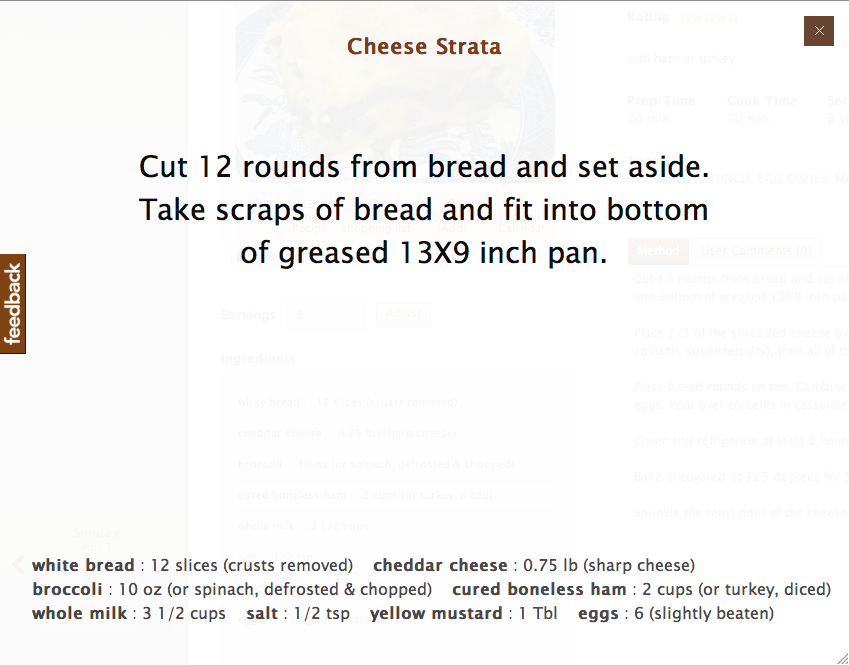
Kitchen Mode feature for KitchenPC
The Firesay enabled KitchenPC experience is quite simple. Once you have the browser plugin installed, you can load any recipe on the site. You’ll now notice a little Firesay command widget at the bottom of the screen whenever Firesay is listening for commands. It’ll display a list of available commands for whatever context you’re in. While in the recipe viewer, you can say “Firesay, Start Cooking.” KitchenPC will then shift into a “full screen” theater mode that is optimized for kitchen use. Only the information you need is displayed, and the fonts are huge so you can read the screen from ten feet away or so.
KitchenPC is able to break down recipes into steps automatically, and the first step is displayed on the screen and read out loud using a synthesized voice. The user can say “Firesay, Next Step” to advance to the next step, or “Firesay, Repeat Step” if they miss something and don’t want to have to glance up at the screen.
I’ve done a lot of testing and the voice commands actually work surprisingly well! I can be anywhere in the room and still have great results. In fact, one time I stepped out of the room into the hallway and it still worked.
What I most like about this partnership is this is the first feature (hopefully of many to come) that really starts to target my initial vision of bringing the power of the personal computer into the kitchen. Though not many users have PCs set up in the kitchen, hopefully this sort of innovation will start to change that. For now, I can see this feature being used on laptops and tablets while cooks are busy chopping up onions or searing steak. According to Ehud, there will soon be versions of Firesay that run on iPhones and iPads too.
You can learn more about hands-free operation on KitchenPC by clicking here. I’d love to hear your opinions on this feature, or any ideas on how I can make it more useful as well!
I thought I’d give a quick plug to an amazing web service I found recently, GetClicky.com. Since the launch of KitchenPC, I’ve been using Google Analytics to monitor site usage and generate statistics on what my users are up to. An entrepreneur friend of mine recommended I check out Clicky, and I absolutely love this thing!
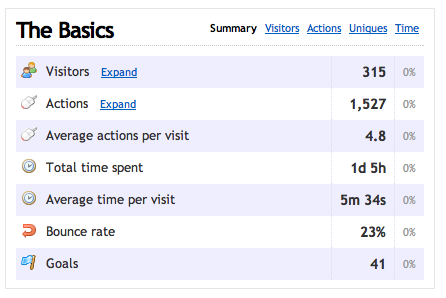
My visitors over the last 7 days
Like Google Analytics, Clicky is easily installed just by including a JavaScript file on each page on your site. However, one of the main differences is the information you get is in real time. With Google, it would take about 24 hours for new data to show up on their servers, but with Clicky you’re able to “spy” on your users in real time. The Clicky website shows you how many users are currently online and allows you to get a timeline to see what each one is up to.
Another huge benefit of Clicky is rather than just showing a bunch of IP addresses, Clicky will show the actual KitchenPC usernames of my users on the activity feed (provided they’re logged in of course.) I can see my top users, how many times they’ve logged on, and drill in to each session to see what they did on my site. All I need to do is emit a JavaScript variable on the page that provides the user’s name and email, and Clicky will log this value automatically.
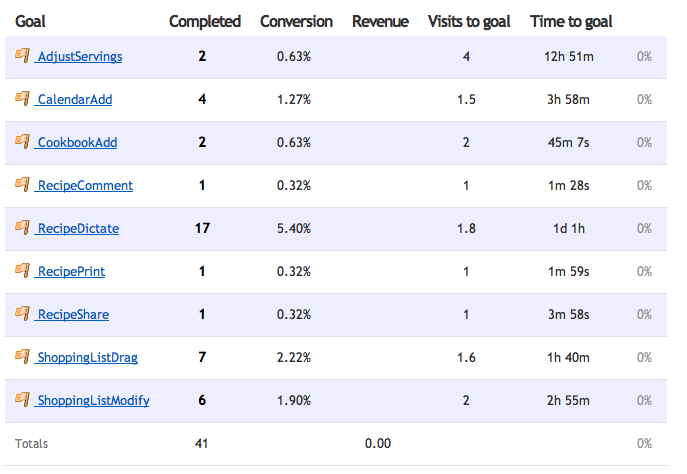
Various goals on KitchenPC
In addition to that, Clicky provides a feature called “Goals”. A goal is something you want users to do, such as using a site feature or purchasing an item online. You can log a goal with a simple JavaScript call to “clicky.goal()” and pass in a goal name. These goals will appear at the top of each session, and you can get stats on each goal such as what percentage of your users reached that goal, and the average time it takes a user to do so. I’ve set goals for various KitchenPC features such as dragging a recipe to the shopping list, adding a recipe to the calendar, subscribing to another user, adding a recipe to their cookbook, adjusting the serving size on a recipe, and more. Though I can mine some of this data from my own database, I now have a graphical overview that’s much easier to work with. Plus, now I can really show how users are using my features (eg, do they use drag and drop or click the “Add” button?)
Clicky provides a basic free service with the standard logging features, as well as some premium level packages starting at around $30 per year. New users also get a 30 day free trial of the Pro account so they can really play around with all the advanced features before signing up. It didn’t take me very long to figure out this was definitely a service I didn’t mind paying for, and the price was quite reasonable.
Anyway, that’s my plug for today. If you run a website, go check it out!
Tuesday evening, I decided to check out an event called eDate. eDate is somewhat like speed dating, but pairs up entrepreneurs with potential law firms, marketing gurus, investment specialists, technologists, and more. You get ten minutes each with two experts of your choice, and also get to mingle with all the attendees in a non-formal setting as well.
I went with a friend of mine and his business partner who are also doing a startup and we all had a fantastic time. The event was very well organized and had free snacks and drinks, including wine. I decided to meet with a legal expert and a marketing firm. I’ve had a lot of questions around setting up a formal corporate entity, how shares work, transferring the KitchenPC intellectual property, and potentially being set up so I can bring in outside funding. Coincidently, I recognized one of the law firms (Ashbaugh Beal) in attendance and decided to meet with them. Rick Beal personally helped me out quite a bit several years ago with a rather large insurance claim involving wind, two trees, my house, and gravity. I figured I could at least go and name drop.
Regarding legal work, it’s something that eventually needs to be done to make any company “official.” KitchenPC is an LLC in Washington State, but I’ve always filed “No Activity” and not really used it for anything. What I’ve learned since is there’s quite a bit of controversy in the field around deferring payments for cash-starved startups as well as firms taking equity stakes in these companies. Traditionally, it would be considered unethical and a conflict of interest for a legal firm to own shares in a startup they represent. For example, if Ashbaugh Beal owned shares in KitchenPC, and one of their other clients is my biggest competitor, the advice they gave that client might be biased by the fact they have an interest in my success as well. Other law firms (mostly the big ones in the bay area who are used to dealing with dot-coms) say this is a bunch of bologna and have no problem doing these sorts of arrangement. Ashbaugh Beal is among the former group, however I’m hoping if I were to still work with them we could work out some sort of deferred payment plan.
I also met with a guy named Adam who works at Odd Dog Media. I wanted to chat with him about cheap ways to get users on to my site. So far, my user acquisition strategy has been to “get lucky” by getting blog mentions and other press, which causes random spikes every so often. Other strategies I’ve found, such as ad campaigns, Facebook marketing, YouTube videos, etc all seem too expensive per user acquisition and perhaps not a very efficient use of money. I really liked Adam and would love tot meet up with him again. He had all sorts of great ideas for the site, including developing an embeddable widget that other bloggers can embed in their HTML to show recipes and meal plans for my site. He says he and his team get together on Fridays for beer and to toss around ideas, and invited me to join in one of these weeks. I’m hoping he’ll let me take him up on that offer.
I also decided to bring along several full-page glossy print-outs of my website (big thanks to my friend Ken, who will of course never read this, for having those done for me!) This turned out to be a great idea and everyone loved seeing them. Describing your website is one thing, but actually being able to show what it looks like really helps you connect people to the idea. As they say, a picture is worth a thousand words. I received nothing but positive comments on the design. I’ll definitely be taking these with me to future meet-ups as well.
Since I got spots one and three (there were eight rounds), I was finished early. However, due to some of the experts not being fully booked, I was able to grab several openings which provided me with two free dates! I chatted with a finance guy who talked to me a bit about taxes and how to write-off some of my debt, and also with Perkins Coie, another well-known Seattle law firm. Perkins is huge in the startup world, and has absolutely no problem with taking shares in a startup in exchange for legal services. Typically, they charge about $2,500 for setting up a corp in Deleware, and then take between 0.75% and 1.5% of your company in return for around $30,000 in deferred legal services. The payback is tied in to your first round of funding. This deal sounded rather typical from what I’ve heard. Big law firms are also known to help open doors for you.
Even though I stuffed my wallet with a huge stack of KitchenPC business cards before I left, I still managed to run out. One thing that came as a surprise is several people who I talked to had heard of my site, so apparently I’m getting more well known at least in the entrepreneur community. Hooray for very slow progress!
After spending quite a bit of effort working on SEO lately, I’ve noticed an unforeseen problem that this optimization has created. With more and more users finding my site through search engine queries for recipes, the entry point into the site has shifted. Normally, we think of the home page as being the first page a user sees when they reach your site. Thus, the home page will capture the user’s attention within seconds, look the prettiest, and really sell the product. It’s the home page that you do A/B testing on and allot most of your initial dev time to.
As a content site, a lot of users will find my site through one of the 10,000+ recipe links that I put out there on search engines. A user may search for “chicken recipes” and come across this little gem. This page, in this case, would be the first impression the user gets of KitchenPC. The problem with this page was it just wasn’t designed to really sell KitchenPC as a product. The user has no idea what my site is, except for a place where recipes live.
If you’re a long time reader, you know that these recipe “permalinks” were a feature I added a bit after launch to promote recipes on the site without requiring a user to have to create an account and logon. It also gave Google something to crawl since Google can’t reach the secure pages. The home page, back then, was nothing more than a “please sign up!” message and a quick blurb about what the site does. I never had the money for a clever video or the time to do a site tutorial, so I figured I could attract users through recipe links. This worked relatively well, however the static recipe page design was built to be completely static content without any of the real KitchenPC features. It only displayed the raw recipe data, unlike the site’s “popup” recipe viewer which had all sorts of great functionality like “Create shopping list”, “Adjust serving size”, and “Add To Calendar.” Someone looking at this static recipe page would have no idea that these features existed, and very few users would know they had to logon, go dig up the same recipe using search, and then they could work with the recipe using the meal planner tools.

Some of the new features on the static recipe pages
Thus, I’ve spent the last couple nights porting a large chunk of the “rich” KitchenPC recipe viewer features over to this page. The result is near feature parity between the popup recipe viewer and the static recipe viewer. As of 20 minutes ago, the following features are now available on the static recipe pages:
- Email Recipe
- Create Shopping List
- Add to Cookbook
- Add to Calendar
- View/Add Recipe Comments
- Adjust Serving Size
I’m still a bit short of complete parity. For example, you can’t yet rate a recipe on this page (I need to refactor a bunch of the rating code before I can implement this correctly, but hopefully soon.) Creating a shopping list will also overwrite your existing shopping list without warning, rather than prompting you if there’s existing items like the popup version does. This is because I don’t load the user’s shopping list into memory on this page. The page also doesn’t provide the ability to remove the recipe from the cookbook if it’s already there. However, these minor issues will be fixed in due time. The point of this work was to advertise to new visitors what the site can do.
Suffice to say, when new users stumble across the site through search engines, Facebook Likes, and Twitter posts, they’ll definitely notice KitchenPC provides a lot more meal planning tools that they wouldn’t otherwise know existed. Hopefully this will result in a few more signups in the coming weeks!
One of the things I’ve noticed about Google is they have the ability to format certain types of results depending on what type of content the page is displaying. If you search for “spinach quiche”, you’ll get several results that Google recognizes as recipes and it will display them nicely. You’ll see a picture of the dish, the “star” rating, how many reviews the recipe has, and even the total preparation time. That’s pretty sweet! However, Google apparently doesn’t like KitchenPC too much as my results would get displayed like any other page. In other words, Google didn’t treat my content as recipe content. Boo!

Results from AllRecipes.com look great!
It’s been on my list to get to the bottom of this and figure out exactly what sites like AllRecipes are doing that I’m not. After all, I have all this data available so why not display it on search result listings? Recently, I got the perfect excuse to dig a bit deeper into this. Recently, Google announced new features to make searching for recipes even more powerful. Now, users can filter down search results to only recipe content, exclude recipes based on cook time or calories, and even check “Yes/No” boxes based on what ingredients they have to find that perfect recipe. So I decided to spend the evening researching what Google calls “Rich Snippets.”
Google will display a “rich snippet” for your page if it finds certain types of markup embedded in your HTML. Google recognizes several standards, namely microdata, RDFa and microformats. These technologies all basically work in the same way; by embedding certain markup that will be ignored by browser rendering but recognized by any parser looking for this data.
Google will support any of these formats to recognize recipe data in a website and parse out various properties. In fact, there’s an excellent tutorial on exactly how to do this with the three major formats here. I looked briefly at the different options, and eventually chose to go with the hRecipe microformat since that’s what AllRecipes was using and it seemed to be the most adopted standard. I also see AllRecipes results displayed nicely in Bing, so I know Bing also supports this format.
Modifying the HTML was fairly straight forward. You can surround information with span tags of a certain class to indicate what they are. In certain circumstances, you want to display information in one way (such as display 4 star images in a row to indicate a rating) but provide the data to be parsed in another way (such as 4.0). You can do that with an empty span tag with the correct data in the title attribute.

How KPC results will look according to Google's testing tool
Google, of course, provides a Rich Snippets Testing Tool to preview your content to make sure everything gets parsed right. Rather than modifying a bunch of my code, I instead saved a recipe to a static file called test.htm on my web server so I could modify that in Notepad until I got everything working right. I then migrating the changes back over to the source code when everything was displaying the way I wanted.
Though it will probably take a few weeks for Google to update their index, hopefully now KitchenPC results will show up when users are using Google’s new recipe searching tools. That is if I’m not drowned out by the millions of AllRecipes results that will usually bubble to the top of the first page. Sigh.
KitchenPC attempts to construct the perfect shopping list by taking into account the various forms an ingredient may be used across multiple recipes and converting those amounts into the form said ingredient would usually be purchased in at a grocery store. This works fairly well in theory, as your shopping list will say “all-purpose flour: 9oz” and as you browse the baking aisle at the store, all the various bags of flour will indicate their size in ounces. If the shopping list expressed flour in cups, you’d really have no idea how much flour you need and just buy a large bag just in case. This problem would be compounded if you were cooking large portions of recipes and needed like 465 cups or something.
The flour example “sells” nicely because almost every recipe uses flour in a volumetric form and almost every flour brand sells flour by weight. Actually, pretty much everything that isn’t a liquid is sold in weight as the volume can shift and settle during transit. However, it became clear that every ingredient in the database isn’t so cut and dry. For example, tomatoes are also sold by weight and will be weighed by the cashier at checkout. Your grocery store doesn’t really care if you buy a bunch of small tomatoes or a few large tomatoes, the total weight is what will be ringed up. A KitchenPC user, however, might not like shopping for “13.5oz of tomatoes” though. Imagine a scenario where a user adds a recipe that calls for 3 tomatoes, and another recipe that calls for 2 tomatoes. What they would probably enjoy seeing on their shopping list is “tomatoes: 5”. With the current implementation, what they’ll instead see is “tomatoes: 22oz” – Well great, now they have to either guess how many tomatoes that is, or use those hanging scales at the grocery store like some little old lady. Ok, to be honest I’ve never actually witnessed anyone using those scales but I imagine they’re only used by little old ladies who are also the same ones holding up the line with eight million coupons to give to the cashier.
That’s no good.
The solution? Well, this sounds like another opportunity to use my new and improved (actually just improved) form conversion engine that went online a few days ago. This code gives me the opportunity to convert pretty much anything in the database to anything else I want. Two modifications were made to the shopping list.

Tooltip for an ingredient in the shopping list widget
First, when you hover over an ingredient in your shopping list, KitchenPC attempts to express it in other helpful ways. For example, if the ingredient is expressed in weight and there’s a default volumetric form available, it will show that conversion in the tooltip. If the ingredient is expressed in whole units (such as bananas,) KitchenPC will show the actual weight of bananas you require. This would hopefully prevent someone from not buying enough bananas for recipes that call for “mashed bananas” because the bananas they bought were all too small.
Second, the printed version of the shopping list has a new column for these estimates as well. Hopefully, this will make reading the printed shopping list at the store much easier.
I actually would like to go a step further with this design to make it even more powerful. One feature I have in mind is a rich “hover-over” panel that pops up when you move the mouse over an ingredient anywhere on the site, similar to hovering over someone’s name on Facebook. This panel would show convenient equivalent amount information, as well as a picture of the ingredient (pulled in from Google’s Image Search API) and quick links to find other recipes that use that ingredient.

Printed shopping list
Another improvement this new code allows me to do is start to cater the unit types in the shopping list to really target what the user wants rather than cater to programmatic limitations. The real reason that ingredients such as “red tomatoes” are listed in weight by default is the system was designed to eventually integrate in with online vendors. The shopping list schema needed weight information because that’s what a third party vendor would require within the order information. This technical requirement is now less than necessary as weight conversions can be done on the fly. In theory, I can connect to a third party vendor and “order” tomatoes in either weight, or whole tomatoes; whatever the vendor accepts. For this reason, I plan on actually changing many of the KitchenPC fruits and vegetables over to whole units when appropriate.
These new features are now live on the website for those who want to check them out, but keep in mind a lot of the database metadata isn’t really “optimized” yet to really take advantage of this ability, so some ingredients will be a bit off or not display estimated amounts. Hopefully, one of these days I’ll get the chance to go fix up the database; or at least the more common ingredients.
Enjoy!
One of the innovative aspects of KitchenPC is its ability to convert and aggregate ingredients from one form into another. For example, chopped tomatoes and whole tomatoes can be tallied up and added to a shopping list expressed in weight. Since a grocery store sells tomatoes by weight, you probably want that on your shopping list and not “5 cups chopped tomatoes.” This “form conversion engine” is essential to not only accurate and meaningful shopping lists, but the meal planner as well. If I say I have 3 tomatoes that I want to use up, the modeler can consider recipes that use tomatoes in chopped form, whole, or by weight. Without this collection of ingredient metadata, KitchenPC would be relegated to your average recipe database with wanna-be shopping and planning tools that don’t really work.
The first version of the form conversion engine was extremely basic, and provided just enough functionality to prove the initial concept of a recipe website that innovated around this sort of ability. However, the engine lacked certain functionality. Primarily, it was only able to represent conversion ratios through weight. For example, a form (1 cup of chopped tomatoes) would have a weight, always expressed in grams. Since tomatoes were sold in weight, we could calculate how many “grams” of tomatoes you’d have to buy so that, when chopped, would give you x cups. This worked for units as well, such as “1 slice of cheddar cheese” weighs about 28 grams, thus if you needed 4 slices of cheese, we can add this ingredient expressed in weight to your shopping list.
However, this design didn’t support the less popular conversions, such as items sold in whole unit or in liquid form. I could not represent “two scoops of vanilla ice cream is equal to one cup. ” If there was an ingredient used by weight but sold in volume (I have no idea what this would be!), then that sort of conversion path could not be represented either.
Earlier this week, I took some time to improve the conversion engine to allow these sorts of conversions. The database can now store conversion coefficients in any unit (weight, volume or whole unit) and convert to any other unit, as long as a conversion path can be found. This allows me to add some new units such as “squirts of Hershey’s Syrup” and “splashes of soy sauce.” Though the database doesn’t yet make much use of this far more powerful conversion engine, you can expect some new unit types for the more popular ingredients in the near future.
Going through this code (which was among the oldest code in the KitchenPC source depot) also gave me the opportunity to do a lot more testing on the less common conversion paths. I noticed converting from volume to whole unit (such as 1cup chopped onions = x whole onions) simply never worked, it just happens that this conversion path is not surfaced through any current ingredient in the database. I wrote several new unit tests that now offer complete code coverage for every conversion type (no matter how silly) by mocking up fake ingredients and forms to convert.
If I did my job right, you won’t notice any change at all in KitchenPC. Your shopping list will be as accurate as it’s always been, and digging up meal plans based on what’s in your pantry should be as smooth as ever. Keep an eye out for new units being added to existing ingredients, and let me know if you notice any problems or have any feedback on how I can improve the existing database.
This evening I decided to stay home and hack around with some KitchenPC code, as I’ve neglected to really do much in the technical realm lately. What better way to get back into a coding groove than to implement a few features that have been requested by real-life users? I had time to address three of these issues, and figured I’d write a bit about each before going to bed.
Calendar Scroll Back
A problem with the calendar, as voiced by at least two people, is you can only scroll forward in time but not backwards. Apparently, people want to scroll back in their history to see what they’ve made in the past. Sometimes, people just want to jog their memory of what they’ve eaten recently, or perhaps send a recently cooked recipe to a friend. Other people might forget they had something planned even though they purchased ingredients for it, and have to scroll back to see. Whatever the reason, it was a great example of a bad assumption on my part during the initial design. I had even gone out of my way to add explicit code to prevent people from scrolling back earlier than the current date, and toggling the visibility of scroll buttons based on the current date range. The lesson learned is not to limit your users through arbitrary boundaries that have no technical or business justification.
Total Result Count

See? KitchenPC has plenty of chicken recipes!
One of the comments from the UserTesting.com video was that my site doesn’t contain enough recipes. While this is probably a valid opinion, I believe the impression the tester got was skewed due to my search result limitations. I limit the results of any query to 100 recipes so as not to generate too much HTML or too much data being serialized across the wire. While the ideal solution is to implement paging, this seemed not necessary for an MVP as most users never bother searching past the first page of a search engine. I figured they can just narrow down their search criteria easier than digging through 100 recipes to find what they’re looking for. The drawback of this approach was exemplified when the user commented that my site apparently only has 100 chicken recipes, when in fact I have easily fifteen times that amount. The fix was to publicize the actual database count of the query, while making it clear to the user that only the first 100 matches are being displayed.
For those who care, I ran across a great PostgreSQL function called OVER() that allows me to very easily get the total database count even when using a LIMIT clause in the query without having to return multiple tables. This made it incredibly easy for me to gain access to this data and include it in the UI.
Sortable Results Page
Another comment on the UserTesting.com video was about the arbitrary way recipes were displayed. In my defense, the results were sorted by rating; it just happened that nothing on that page had been rated by any user yet. There was no UI indication that any sort order was applied to the results, and the user became frustrated scrolling through the recipes trying to find what she was looking for. Well, not only did I fix this by adding sort direction arrows to the page, but I added the ability for the user to toggle both the sort column and sort direction by clicking on the column header.

Chicken recipes ordered by descending cook time
Allowing the user to sort the results allows them to easily locate the recipes they’re interested in. It also provides the secondary benefit of allowing the user access to recipes that might have not been otherwise displayed. For example, if the user searched for “chicken” and got all 1,500 results, they would only see the top 100 chicken recipes with the highest rating. If they then sorted the results by prep time, they could then see the top 100 lowest prep times regardless of the rating; in other words, I sort the total result set and not just the recipes displayed on the page. True, I have to hit the database again to re-sort but I figure it’s a pretty good solution while I have a relatively small amount of data in the database.
So, not too bad for a Friday night eh? I’m planning on round 2 of improvements this weekend, as this will hopefully pave the way for some major feature redesign coming up in the next few months. Stay tuned!

