Let’s face it. We’re all a little bit lazy sometimes, especially when it comes to cooking. How many times have you opened the fridge door, poked around inside, and tried to cobble together a recipe on the fly with the ingredients before your eyes. Usually, in disgust you’ll close the door only to re-open it again five minutes later hoping that the mythical fridge gremlins have restocked your refrigerator with better items.
 The new KitchenPC will attempt to help people facing this problem with a feature that allows users to search for recipes that use only “common ingredients.” What can we make out of the ingredients an average household is likely to have on hand? Now, the only question is what is a common ingredient?
I asked a few potential users how they would define common ingredients and, of course, got differing potential answers.
My vote is for eggs and stuff you have on hand. I don’t want to go to the store in order to make dinner tonight! – User A
Common to me is anything you can buy at a local grocery store. – User B
So, there are two trains of thought on the subject. The first is that common means “I’m likely to already have it.” These are the people who might see the feature as allowing them to search for recipes they can make right now, without having to put on pants. The second meaning is more analogous with a common name. A common ingredient is one that the average person is familiar with. You could find it in a grocery store within a minute or two, and you don’t have to look it up on Wikipedia first.
One can assume the first definition is a subset of the second. An ingredient the average person has in their cupboards is most likely one that they’ve actually heard of, otherwise what on earth is it doing in their cupboard? However, though even the chef with the most basic culinary vocabulary is familiar with a watermelon, how likely are you to have one sitting on your kitchen counter right now?
Possible Solutions
By now, it should be obvious that there is no black and white definition of ingredient commonality. It means different things to different people of different cultures, backgrounds and dietary preferences. Which leads me to believe that it’s more useful to use a sliding scale rather than a Boolean value. Salt is the most popular ingredient on KitchenPC, and almost every single reader has some in their kitchen right now. This ingredient should have a very high commonality rating. Milk and eggs would probably be right up there as well, but not everyone consumes dairy and not everyone keeps eggs on hand at all times. Goose liver would of course be towards the bottom of the scale.
Using the average score of the combined ingredients, it would be possible to score an entire recipe as well. From this average, I could most likely determine how likely it is that you could make a given recipe without having to go to the store, or even how likely it is for such a trip to be an easy excursion, without you having to make a side trip to an exotic meat shop. Results could even be shown in order of commonality, with those containing the most common ingredients at the top of the list.
Does Common Mean Popular?
While it would be possible to go through the entire KitchenPC ingredient database and come up with a score for each one, perhaps there’s a better way. One hypothesis would be that there exists a correlation between how common an ingredient is with how many recipes it’s used in. Having well over 50,000 recipes in the database now, I’m in a pretty good position to test this. So let’s look at the top 20 most used ingredients in the KitchenPC database:
|
|
| See Top 1,000 Here | |
Looking at this list, do you have most or all of these ingredients in your kitchen right now? At any one time, are you more likely to have one of the higher scoring ingredients in your kitchen? I’d say in general, this holds true for me. I always have salt and sugar on hand, I usually have eggs, I often have onions, and only occasionally have any lemons to juice.
With this said, I think it would be reasonable to use this trend data within KitchenPC to figure out a score for each ingredient. It would certainly be faster than going through each one by hand.
Then What Is a Common Recipe?
Obviously, a recipe’s average ranking on the list above would indicate how common that recipe was. The recipe, “Big Bowl of Salt” would of course be the most common recipe ever. However, we still need to define what is and is not a common recipe, as the search interface is simply a check box. This most likely means we need to choose a maximum ranking for ingredients used in that recipe. For example, if a recipe contains any ingredient with a score over x, that recipe can’t be common. Even if this recipe calls for “Salt, Sugar, Eggs and alligator tail”, it simply cannot be considered a common recipe.
The good news is that this cut-off point can be tailored as the database grows and changes. Users don’t want to be flooded with thousands of results, but if this number is set too low, that might be just as bad. How many recipes can you make with the top ten list above? Not many, though this is perhaps a great time to share one of my favorite breakfast recipes.
Thoughts?
I’d love to get some feedback on how the “Show Common Recipes Only” feature should work, and what you’d expect to get out of it. Am I on the right track, or is this feature completely useless?
Lately, I’ve been trying to bring order to chaos. It turns out it’s not very easy to prioritize 2.3 million parse errors across half a million recipes. I know that a 3% success rate is nowhere near where I want to be, but I also know that trying to manually address every issue would be an exercise in futility.
That begs the question: Where can I spend my time to get the most return?
In my last post, I went over some of the errors due to missing NLP data as well as the top ten parse errors. Luckily, out of the top 1,000 parse errors, over 60% could be fixed with zero changes to the engine.
Unfortunately, there are still a lot of errors that cannot be fixed simply by adding new ingredients, synonyms or ingredient form mappings. These are things that will require actual changes to the NLP engine and perhaps even the underlying architecture of KitchenPC itself.
Missing Amounts
First, I noticed a huge number of parse errors where the ingredients simply had no amounts listed. For example, pepper to taste came up quite a bit. I ran the following SQL query to attempt to estimate how popular these ingredients are.
select count(distinct PageId) from Indexer.ParseErrors where usage !~ '\\d+';
For those unfamiliar with Postgres, this provides a count of the number of crawled pages where an ingredient usage does not match the regular expression \d+ (meaning anything that does not contain any numbers.)
This yielded 167,890 recipes that were not being processed due to missing amounts. Ouch! This is well over 30% of the crawled data made useless since KitchenPC requires amounts. Can I really live with this?
I’ve decided the answer is no. Thus, KitchenPC needs to be designed to handle these recipes in some way that still makes sense. I found two options for this.
Option 1 was to assume a default amount on a per ingredient basis. For example, every time the parser ran into “pepper to taste”, I could assume an amount of one tablespoon. This amount would be added to the shopping list, however the recipes would simply say “pepper to taste” and indicate no amount. This would avoid massive architectural changes to both the code base and the database since there would still be real numbers under the covers. However, it would also require me to provide default amounts for potentially hundreds or even thousands of ingredients, some of which are almost impossible to estimate.
Option 2 was even scarier. This was to make KitchenPC work without ingredient amounts. However, what would this mean for ingredient aggregation? How would the “What Can I Make?” feature work with these recipes?
In the end, I decided to go with the second option. I like the idea of KitchenPC being a bit less strict. Recipes need to be natural, and not restrictive. The technology needs to adapt to how humans express themselves, not the other way around.
It took an entire evening, but I was able to successfully redesign the KitchenPC database and business objects to allow the concept of a null amount. But how about the shopping list and modeler?
The modeler was actually fairly easy. It will consider a recipe that has an unspecified amount of a listed ingredient, and score it at 25% efficiency. For example, if you have 12 eggs, it will treat a recipe that has “eggs” as a recipe that requires “3 eggs”. Why special case the scoring for this? Well, if I treated “eggs” recipes as a perfect score, it would force these recipes to bubble to the top of the results and overpower recipes that specify an exact number of eggs. Plus, if 25% doesn’t work too well, I can fine tune this constant until I’m happy with the results.
The shopping list was a bit more difficult. What happens if you combine one recipe that calls for “3 eggs” and one that just calls for “eggs”? Obviously, I can’t just show “3 eggs” as this would not be enough. I didn’t want to show “3 eggs” and then a note telling the user they might need more as well. In the end, I decided the only approach that makes any sense is to simply lose precision. In other words, KitchenPC does not have the information it requires to aggregate an amount, thus it cannot. Combining “3 eggs” and “eggs” will yield the shopping list item “eggs” and that’s that.
I think these changes will make KitchenPC a more flexible site, and be able to handle more types of recipes. In the end, most users won’t care a whole lot about amounts on every ingredient in their shopping list, and the pre-built meal plans will of course only contain perfect recipes.
Range Amounts
Another very typical parse error was range amounts. An example of this would be something like “2-3 cups of flour.” I was able to get a rough estimate of these using:
select count(distinct PageId) from Indexer.ParseErrors
where usage ~ $$^\s*\d+\s*\-\s*\d+$$;
For those unfamiliar with the $$Foo$$ syntax in Postgres, this provides a way to represent a string constant without having to escape anything. Perfect for regular expressions!
This yielded 50,407 recipes that include at least one ingredient with a range amount. Not quite as prevalent as null amounts, but still worth fixing.
For this one, I also considered a few different options. First, I could average the amount. This would be a change to the parser itself, and only affect the NLP engine. The average amount would be stored in the database, and nothing else would change. Similarly, I could also just take the high amount as well.
For the same reasons as the null ingredient amounts, I decided against this. Making KitchenPC flexible and able to display recipes in the way they were written is important. So once again, the database and backend need to be redesigned to handle this.
This work item has not yet been completed, but will involve storing a high and low value in the database and adding code at the NLP engine level to parse and extract these amounts.
In this case, shopping list aggregation will be easy. Simply aggregate the high amount, as that’s the worst case – better to buy too much than too little. The modeler is also pretty easy; just assume the average or the high amount and call it good.
Multiple Ingredients
Right now, the top parse error is salt and pepper. There’s also a good amount of other ingredients that can be parsed as multiple ingredients, however I’m not quite sure on the best approach to fix this.
It could possibly be done at the parser level. If an ingredient could not be parsed, but it contained the word or, the parser could split on that word and try to parse each side separately. Though I know for a fact I need to handlesalt and pepper since it occurs in over 20,000 recipes, I still haven’t decided if I want a general solution for these types of ingredient usages. This one seems to be a one-off case that happens to be very popular.
Now What?
Hopefully, fixing these design limitations as well as tackling missing NLP vocabulary will eventually start increasing the success rate of the indexer. If not, well I might have to re-assess the overall strategy.
I’m a bit depressed that this particular task is slowing down the launch of the new website. Everything else is ready to go, I just need the content and the categorization! Sigh. Hopefully stuff will start to turn around soon and work in my favor.
Over the past couple weeks, I’ve had a spider crawling around the Internet (for some reason, I imagine this spider wearing a chef’s toque) looking for recipes to download. Last I checked, it had downloaded just under half a million recipes totally around 48,000 megabytes of data. However, as I’ve mentioned before this is a raw HTML response from the web server. Extracting the actual recipe data from it, and normalizing it into a form which KitchenPC can work with, will be the next major challenge. That’s where the indexer fits in, which I’ll be talking about today.
In principal, the indexer is quite simple. It queries the database for a list of pages that have not yet been linked to a produced recipe ID. It will load a thousand pages at once, as not to use up too much memory but also avoid having to issue a new SELECT for each page, as the indexer can process around 20-30 pages per second.
Once the HTML is loaded into memory, the first job is to parse it; similar to how a web browser would parse HTML into a Document Object Model. In the .NET world, the standard parser for HTML is the HTML Agility Pack. Honestly, I find this parser rather disappointing, especially compared to the raw awesomeness of BeautifulSoup (the Python based HTML parser I use for my crawler.) The library is stable, but hasn’t really been updated in over two years, and the documentation is almost non-existent. The interface is all XPath based, and poorly implemented at that. It’s difficult to find nodes partially matching what you’re looking for, or containing a specific CSS class.
To get around this, I wrote a series of extension methods for the Agility Pack that allow me to recursively walk each node, run an anonymous function against it, and return a collection of nodes where this function returns true. I then created wrappers around this method for common tasks such as finding a node below a parent node that contains a certain class.
I’m hoping these improvements to Agility Pack can someday be released back into the community, as I think they greatly improve the library. Though this would probably be done as an extension DLL or be directly compiled in to the main library, part of me wants to write a full .NET port of BeautifulSoup, which might be a bit challenging due to Soup’s pythonic architecture.
Once the DOM is parsed, I can then start extracting hRecipe specific content. This is where things get difficult.
Where Things Get Difficult
The hRecipe Microformat spec is a complete disaster.
A major issue is most sites only bother to embed these microformat tags so Google will display rich snippets for their results. This is made evident by the fact that these sites will only implement enough of the spec to satisfy the information on the rich snippet. The recipe title, description, prep/cook times, and rating will be implemented perfectly, and the method, ingredients, and other more detailed aspects of the recipe will be lackadaisically slapped together. For example, the hRecipe spec calls for the method to be tagged with the instructions class, but AllRecipes chooses to use directions instead.
A lot of the tags allow for arbitrary text. For example, the yield tag which describes how many servings the recipe makes. Many sites use difficult to parse text here, such as “a whole cake” or “3 to 4 servings”. In other words, there is no standard way to express the servings, which KitchenPC uses to allow serving size adjustments in the UI.
The hRecipe spec also lacks standard fields for ratings, comments, or specific durations. You might be wondering then, how Google will show this information in their rich snippet. Well, that’s because Google has proposed their own additions to the hRecipe standard. The Google additions allow specific cook times and prep times, as well as review information such as total votes and average rating. Many of Google’s additions are also supported by ZipList, which also has its own interpretation of the microformat.
Due to Google’s weight, most sites will craft their content in a way that will appease Google, thus I took the route of modeling my parser after theirs. With any luck, these additions will eventually become part of the official hRecipe spec anyway.
if (Site == “AllRecipes”) { //Le sigh
The good news is that if your content is perfectly hRecipe compliant (an emphesis on if as I’ve yet to see this site,) my parser will be able to extract recipe content perfectly. Perhaps Opera should get into the recipe site business.
In reality, there was absolutely no way to avoid special casing all the major recipe web sites to handle the random chaos they threw at me.
To solve this problem, I decided to implement a flexible architecture that allowed me to override individual behaviors while parsing any site. I first wrote a base class called hRecipeParser:
class hRecipeParser : IParser
{
   // Parses HTML exactly to hRecipe spec
}
This class has various virtual methods such as ParseTitle, ParseServings and ParseRating. The base implementation will parse these properties from the HTML per spec, however this behavior can be overridden by a subclass. That way, I can subclass the hRecipeParser class for other sites that conform to this standard:
   [Parser("www.food.com")]
   class FoodDotComParser : hRecipeParser
   {
      protected override byte ParseServings(HtmlNode document)
      {
         // Food.com hides its serving size in a hidden input tag
      }
   }
I also took the approach to build a ParserFactory. This method can look at a Page record in the database, figure out the base URL the data came from, and then find and instantiate the correct parser subclass, if available, using reflection. For example, if the Page URL was http://www.food.com/Recipes/Yummy_Cake/, the ParserFactory would look at the base URL, http://www.food.com, and search for an IParser implementation that is tagged with the attribute [Parser(“www.food.com”)]. If there is none, it will return an instance of the default parser. This allows me to quickly add new parsers as I start to crawl more and more sites.
Enter Chef Watson
The real work that goes on with recipe parsing is parsing the actual ingredient usages. Compared to that, everything else is pretty straight forward.
This is, of course, done with my natural language parser which also powers a lot of the new KitchenPC UI. Parsing through literally millions of ingredient usages is the final test of Chef Watson’s culinary knowledge, so it was quite important to be able to log its progress, catalog its errors, and quickly be able to prioritize where it can be improved.
Every time the indexer comes across an ingredient usage it doesn’t understand, it logs it to a database table called ParseErrors. This table contains two text fields. The first field is the exact text that couldn’t be parsed, such as “5 large watermelons“. The second field is a hash of that text, with irrelevent data such as numbers stripped out, i.e. “# large watermelons“. This hash is very important when it comes to figuring out how to improve the NLP vocabulary. Obviously, fixing “5 large watermelons” would also fix “2 large watermelons”, thus the number is converted to a generic pound sign. This allows me to run queries, such as:
select hash, count(*) from Indexer.ParseErrors group by hash order by count desc limit 1000
Which would give me the top 1,000 missing ingredients. Obviously, I don’t want to spend time fixing ingredients if they’re only used by 1 out of 100,000 recipes.
The indexer also updates the Pages table with relevent information on that page, such as the number of missing ingredients (which would allow me to see how many recipes I can almost parse) and any runtime exceptions that occured when parsing that page, including a full stack trace.
When a recipe can be parsed, a KitchenPC recipe object is created in the main database, and the Pages table links to that.
So Run It Already!
I decided to test it out on the first 10,000 pages in the database, just to see how I was doing so far. The results were quite disappointing. Most of the pages were from AllRecipes, as that was the first site I crawled. Out of 10,000 recipes, only 1,504 of them could be fully parsed. I guess I had a long ways to go.
One interesting trend I noticed was the top missing ingredient was the text “ ” – That’s right, the HTML non-breaking space entity. This was found 864 times within 10,000 recipes. Apparently, AllRecipes has random “empty” ingredients in their HTML which are of course tagged with the hRecipe Ingredient class. Obviously, I would have to sanitize this input and strip out these sorts of null ingredients. Sigh.
After that, I spent quite a bit of time improving logging code, error catching, and also re-factoring the code to allow it to load 1,000 recipes at a time, as obviously I don’t have the memory to load in 48 gigs of HTML from the database at once. It was finally time to let it run on the entire database, without limit. This took somewhere around 7 hours (I’ll add timers for the next run so I can get an exact measurement).
These results were even more depressing. The successfully parsed recipes was hovering slightly over 3%, with 1,954,836 ingredient parsing errors. There’s a few theories for why this was much less successful than the 15% figure from the first run. The first is my NLP vocabulary was initially built around sample data from AllRecipes, so obviously Chef Watson is very good with the types of ingredients AllRecipes might have. However, AllRecipes only accounts for about 10% of my total cache. The second theory is that something is going terribly wrong parsing Food.com recipes, which is a massive chunk of the database. Perhaps they stick weird HTML codes in their ingredients list, or some sort of recurring exception keeps happening. With any luck, I can make some small adjustments that will yield a much higher success rate, after a little detective work.
No Blog Post Would Be Complete Without a Top 10 List!
Now that I’ve attempted to parse nearly half a million recipes on the Internet, I figure it would be fun to include a list of the top ten hashed ingredient usages that Chef Watson was unable to figure out.
| # | Hashed Usage | Times Found |
| 1 | salt and pepper | 18,107 |
| 2 | salt | 15,601 |
| 3 | # garlic cloves, minced | 14,678 |
| 4 | # large eggs | 10,349 |
| 5 | pepper | 7,822 |
| 6 | # garlic clove, minced | 6,315 |
| 7 | # garlic clove | 4,532 |
| 8 | # medium onion, chopped | 4,482 |
| 9 | # large egg | 4,131 |
| 10 | # teaspoon fresh ground black pepper | 3,688 |
A lot of these are pretty easy to fix, such as large eggs and garlic cloves. However, the pattern you’ll notice is a good chunk of these ingredients have no amount. For example, salt and pepper or just pepper. Unfortunately, KitchenPC needs amounts for ingredients, since the whole system is built around that concept! I think I need to spend some time re-considering this limitation, as I might potentially be missing out on tens of thousands of recipes if I can’t address this issue. One possibility would be to special case spices and be able to handle these “to taste” usages.
There’s currently 68 ingredient hashes that occured over 1,000 times and well over 1,000 hashes that occur over 100 times. What truly scares me is the 656,528 hashes that only occurred once. Surely, fixing all those by hand would be an exercise in data entry futility!
So Now What?
It will be interesting to see the returns in success rate after fixing, say, the top 100 or even top 1,000 ingredient hashes. It’s tough to say where the point of dimishing returns will be; that point where continuing to fix parse errors will not be worth the return in newly available recipes. I’m also hoping that there’s some grander architectural changes I can make to the indexer itself. For example, a way to ignore bogus data that doesn’t really mean anything. I’m still hoping for that one easy fix that causes the success rate to rocket up 20% or so.
My goal is to get 100,000 recipes in the database for launch, which would mean a success rate of about 20%. Right now, that seems like a tall order.
Spiders have existed for millions of years, as one of the most diverse members of the animal kingdom. Relatively recently, their digital counterparts also started crawling over a different kind of web, attempting to find every last web page on the Internet. This has been a tool used by search engines since the early days of the Internet, employing hundreds of thousands of servers which do nothing all day but surf the web.
Fortunately, KitchenPC doesn’t need to index the entire Internet, however as a recipe search engine, it needs an automated way to search for recipes online and cache them locally to provide users with the ability to locate recipes quickly and easily.
Since I’ve never worked for a search engine company, I had pretty much zero experience building a web crawler. I made a few mistakes along the way, which I’ve decided might be helpful or at least interesting enough to write a two-part blog series on.
My implementation is divided into two separate processes. The first process does nothing but crawl websites, slurping any HTML it can find into a database. The second process processes that database and attempts to parse any recipes it can find out of that HTML data. This post will go into details about that first process.
The First Attempt
Having very little experience in this field, I decided it best to use something already available and preferably open source to actually crawl websites. Knowing I wasn’t the first one to have such a need, I looked into a few platforms that do this sort of thing. The one I decided upon is called Scrapy, and is a Python based framework for writing fast, efficient and scalable crawlers.
Scrapy is very quick to get up and running, even if you have next to zero Python knowledge, and is also very well documented. It has various behaviors built in, such as the ability to read sitemaps, follow any link it finds, and honor robots.txt restrictions. Of course you can also override any of these behaviors, and use as little or as much of it as you’d like.
Scrapy has the ability to parse HTML and extract only the data it needs out of each webpage it finds. That data can be serialized as XML or JSON, or just dumped out to the console. One of the first mistakes I made was attempting to extract the actual recipe data at this stage. The documented way of parsing HTML with Scrapy is using a built in DOM parser that offers an XPath style navigator. Though this might be useful for crawling a site where the format is exactly known, I found this too limited in my case.
 My case is somewhat special, as I’m not exactly trying to crawl a specific site in particular. Instead, I want to crawl any site that exposes data using the hRecipe Microformat. Web and SEO experts will know this is a special markup that allows parsers to extract specific data from a website, abstracted from the layout itself. For example, certain sections of HTML can be tagged as a recipe title, an ingredient, a rating, etc. If you’ve ever searched for recipes on Google and seen a result such as the chocolate chip cookie recipe above, this is because the site encodes its data in this format.
The issue is the hRecipe specification is unfinished, incomplete, and implemented differently on almost every site I’ve found. It also creates various situations where a single XPath query wouldn’t be able to handle any valid hRecipe markup. I’ll get more into this in Part 2.
So instead I ripped out the default DOM parser in Scrapy and decided to go with a more powerful one instead. This parser might be familiar to other Python coders; BeautifulSoup. BeautifulSoup not only has one of the coolest names, it’s hands down the best HTML parser I’ve ever used – on any platform. Rather than static XPath expressions, you’re able to really craft an expression using the power of Python. For example, if I wanted to find all hyperlinks with a Class attribute of Test that contained the word “foo” somewhere in the title, I could do something like:
soup.FindAll("a", new { Class = "Test", Title = new Regex("foo") }); BeautifulSoup is actually so cool, I’m tempted to write a .NET port of it if I ever find the time for such side projects.
No Soup For Me
Unfortunately, BeautifulSoup still had some issues. I’m quite sure it would technically be possible to write an hRecipe parser in Python, but my Python is a bit weak and I kept running into little edge cases that were very difficult to work around. For example, some recipe sites put HTML markup inside the recipe title, and this became hard to convert to raw text.
A huge reason why I halted efforts on this route was to avoid a Python reliance in the future. Eventually, I’d like users to be able to add recipes to menus either by pasting in a URL directly or by using a browser extension that’s able to recognize recipe websites automatically. Since I don’t want to have to call into Python code on the website, it became clear that I eventually needed to migrate my recipe parsing code to C#.
There’s also one other huge issue. I was bound to screw up. Crawling hundreds of thousands of webpages and extracting recipe information is something that takes weeks or even months. Suppose I forgot one little piece of metadata, or later on I improved my parser to do x, y and z? Surely, I didn’t want to have to re-crawl all those websites over again. At this point, I made the decision to use Scrapy to simply store the entire HTML response rather than trying to parse anything at all. That way I could handle the recipe extraction as a separate process offline, and redo it as many times as I wanted without re-downloading gigs of data from the Internet.
A Somewhat Working Design
I now had a design that worked pretty well. Scrapy would crawl a website, following any link it could find, and whenever it came across a page with the word hrecipe in the HTML, it would dump that HTML to a Postgres database I had setup for indexing.
At least I could now start crawling, a process I knew needed to get underway as soon as possible. I let the default Scrapy crawler run (which is able to download the Sitemap as well as follow any links it finds in the HTML) on a couple major websites.
After about two weeks running nonstop, I had about 20,000 recipes in the database. That is until a bit of wind knocked out the power to my house.
Oh Noes!
I had one small design flaw with my crawler. If it were interrupted for whatever reason, it had no way to resume where it left off. I really didn’t want to waste another two weeks starting over again, so I decided to take that opportunity to improve the design a bit.
First off, the crawler was far too slow. Looking at the output, I noticed that most pages the crawler was finding were not recipes at all. For example, some of the more popular recipes would have 50 or 60 pages of comments, so I would find myself crawling URLs such as /Recipes/Foo/Comment.aspx?page=37 and what not. Surely there had to be a better way.
Another huge issue surfaced when I started looking at the URLs in the SQL database as well. Scrapy is smart enough to not crawl the same URL twice, but it’s only as reliable as the uniqueness of the URL itself. Out of the 20,000 or so recipes I had, I noticed a lot were of the same recipe only with different URL parameters. These URLs might be something like /Recipes/Cake.aspx?src=home and /Recipes/Cake.aspx?src=comment. There were also some URLs that redirected to another already existing URL, and Scrapy would only know about the first URL. Long story short, I had somewhere around 9,000 recipes that were a part of a duplicate set, and they were incredibly hard to get rid of. I ended up just getting rid of these, as I didn’t trust the integrity of the data.
At this point, I came to the conclusion that deep-crawling any site was the wrong approach. Though this might work well for a search engine like Google, which simply lists all the pages that match a given query, it does not work well for a recipe search engine where I want to display each recipe only once.
Finally, a Working Design!
Most sites export a list of their URLs through a Sitemap file located in the root directory. Search engines use this file as a “starting point” to crawl a site, and also discover pages that might not be linked to from elsewhere. Luckily, the major recipe websites provide a list of most, if not all, of the recipes on their site.
I decided to download the Sitemap files of several major recipe websites, remove any patterns that were not actual recipes, and then add this list to a Queue table in my database. I just did this by hand, though it could be easily automated later on. Rather than follow any link found, I would now just query the Queue table. This allowed me to create a SQL view called Pending, which returns the rows from Queue that do not have a matching record in the Pages table, meaning they have not yet been crawled. I also return the rows in Pending in a random order, as not to pound on a single site too much at once.
I then modified my Scrapy script to SELECT * From Pending and start its work. Now if the power went out again, the script could be resumed right where it left off!

100,000 Recipes Crawled!
This design was far more efficient. In less than a day, I was already back at the 20,000 mark, which took me over two weeks to get to the first time. After about a week or so, I had parsed over 100,000 recipes from various sites on the Internet for a total of about 16 billion bytes of data downloaded.
Finally, I had a working crawler that would efficiently gather recipes from the Internet, have the ability to start and stop at any time, and save HTML in a database to be parsed later down the line.
A Few Ideas
Obviously, this is just a rough prototype of a fully automated crawler that would require no human interaction and support any number of websites. I already have a few ideas in mind that would make this crawler even better.
First off, the crawler needs to be able to re-crawl a URL after a certain period. I might want to re-check a URL after 30 days or so, and if the recipe has been changed, import the new HTML and update the existing linked recipe on KitchenPC. Right now, I store timestamps for everything so it wouldn’t be too much work to modify the Pending view to also return URLs that were already crawled, but have a LastCrawled date of more than 30 days ago.
Second, disk space is potentially an issue if I truly want to index millions of recipes. Luckily, Postgres will TOAST these rows automatically, compressing the data if possible. The 16 gigs I’ve crawled only take up about 7 gigs on the disk. I’ve considered using a byte array in the database instead, and storing the HTML data as a compressed gzip stream, however I’m unsure if I’d get any better compression out of that.
Though storing the entire HTML has its advantages, it might be overkill especially once the parser itself is relatively stable. I could potentially modify the crawler to only store the HTML related to the hRecipe microformat itself. This would save considerable disk space, while still allowing me to re-parse recipes if my indexing code changed.
I’m also still worried about duplicate recipes. One solution would be to implement a hash algorithm at the recipe level. I could combine the ingredients, title, description, method, etc and calculate an MD5 hash of the data. I would store this hash within the Recipes table, and check to see if the hash already existed before adding a new recipe to KitchenPC. I spent quite a bit of time mucking with Sitemaps in a text editor (some of them millions of lines long!) attempting to remove duplicate recipes or irrelevant URLs, all because I was so nervous about having the same recipe twice in KitchenPC. Adding this hashing check would definitely ease my fears.
Stay Tuned!
In the next post, I’ll be talking about the actual indexer. This code is written in C#, and is able to actually parse the HTML obtained from the web crawler into valid KitchenPC formatted recipes. Exciting stuff!
These days, much of the time that I would like to devote to working on my web crawler has been usurped by randomizations with pre-made meal plans. I fret that I’m woefully behind on my goal of having ten pre-made meal plans (one for each category) by launch; though I have been moderately successful in getting some friends, as well as some in the professional realm, to assist with this project. One thing I have not been able to get much assistance with is recipe photography.
It’s very important to me to have ten really good, well tested and well thought-out meal plans for launch. I want to show off what the site can do with these plans. I want to individually advertise each of these plans on Facebook and Google. I want whatever press I can muster up for launch to eat these plans up, and keep users coming back for more.
Obviously, one of the keys to good recipe content is good recipe pictures. Unfortunately, most of the content I’m getting from nutritionists and dieticians is in the form of a Word document or PDF, and usually sans pictures. I’ve had a little luck getting some friends to try some of the recipes out and snap some shots, however this approach would result in me losing friends faster than achieving my goals.
Yesterday, I decided to try a new approach. Yes, once again, Amazon’s Mechanical Turk service.
Those who frequently peruse my ramblings might be asking, “But Mike? Didn’t you try out Mechanical Turk before and declare it a scam-ridden wasteland of automated succubots, ensuring any user dumb enough to use it would surely spend more time cleaning up the mess it created than any time savings yielded?”
Well, yes I probably did say something similar to that. But this is different! Let me tell you why!
Protip: Ignore Amazon when they tell you Turk is designed for short, quick repetitive tasks.
When I tried Mechanical Turk before, I was using it for ingredient matching. For example, I’d upload a list of ingredient usages found across thousands of recipes. The goal would be to match something like “4 cups of shredded cheddar cheese” to the number 4, the unit “cups” and the “shredded” form of “cheddar cheese”. This was somewhat of a crowd sourced version of the natural language parsing technology I have since developed.
This approach failed because the results would be tainted by scammers that are hoping to make a quick buck. I’m quite certain some of them are running automated scripts to just fill out random answers to any Turk HIT they can find. This caused issues such as over 1,000 HITs getting matched with Captain Crunch cereal. This created a mess that was nearly as difficult to clean up as the BP oil spill.
Turk experts would chime in here saying building a reliable team of workers is something that doesn’t just happen overnight. I should have tests to pass first, approve each worker individually, assign each HIT to multiple workers to ensure a consensus, blah blah blah. Unfortunately, I had time for none of that so I’ve instead declared Mechanical Turk to be a bad fit for that particular task. It turned out writing a natural language parser was a lot more geeky anyway.
So, I gave this another shot with recipe pictures. Who wouldn’t want to cook a recipe and take a picture of it for money, right? I decided to start out with a meal plan being developed by Say I Do Nutrition Services in Seattle. This plan has seven recipes, and I already had pictures for two of them. I created five Mechanical Turk HITs that basically said, “Cook this recipe, take a picture of it, make sure it’s not a crappy picture or I’ll reject it, and don’t just steal a picture of something similar online because I’ll know.”
I gave each worker 12 hours to complete the job after they accepted the HIT, allowing people to make it for their families for dinner last night. Oh, and I also restricted the work force to only those in the U.S. I’m not racist or xenophobic or anything, I just think most of the scams and bot-thingies are going on over seas, perhaps funded by fake Nigerian princes. For this job, I require nice southern housewives trying to feed their two-and-a-half kids.
I also paid $20 a HIT, which I think should more than cover all the ingredients involved.
The Results

NOT Beef Stew
Within about 20 minutes, I got one HIT completed for a beef stew recipe. Considering that recipe takes four hours to cook, I knew it was a fake. Sure enough, attached to the HIT was a link to a random picture on the Internet of a sandwich. Mmm, sandwich. But no, this was not what I was hoping for. Within a few clicks, I was able to reject the HIT, sending it back to the available HIT pool for someone else, as well as block the user so they could bother me no more with their sandwich-based trickery. Only worrying about five HITs was far easier to manage, so this slight detour was hardly annoying and perhaps slightly entertaining.
One thing that Mechanical Turk lacks is the ability to see how many workers have accepted a HIT. In fact, you get no feedback at all until they actually submit the results. For this reason, nothing happened for about five hours.

Broiled Salmon
Then, all evening, I started getting various pictures submitted of each of the five recipes. A lot of the submissions contained a dozen or more pictures, from various angles and lighting. Several were very artistic, such as the recipe for wine stew included a glass of red wine next to it. A few included comments saying how much they enjoyed the recipe, and that this was the best job they’ve ever found on Mechanical Turk. I had absolutely no problems with any of the photos submitted, and I added all five workers to a custom group so I can use them again later.
Bonus!
Another highlight of this approach was free advertising. Not only did I see a huge spike in website traffic right after I posted the HITs, I also got a few unsolicited emails, such as this one:
I wouldn’t be able to make the meal though I would love to. I just wanted to let you know that I am impressed with the recipe site and will be using it in the future! Thank you!
Several of the workers also said they loved the site and would be coming back as well. This makes sense, of course, as the posted job seeks the exact same target demographic as my website itself does; people who can and love to cook. Not only did I get photos for all five recipes, I also got a few new users for the site!
Though this approach is a bit expensive, at $100 bucks for 5 recipe photos, it might be the best way to get ten meal plans up and ready for launch. I don’t think going much lower than $20 per recipe would yield the quality I expect, plus I think it’s fair to at least cover the cost of the ingredients.
With that said, I think I’ll try to cook as many recipes as I can myself, and continue to pester friends and family to help out as well, but knowing I can quickly get photos of any leftover recipes I have within a day definitely lifts away a lot of the stress associated with building this content.
 Flank Steak |
 Wine Stew |
 Salmon Stir Fry |
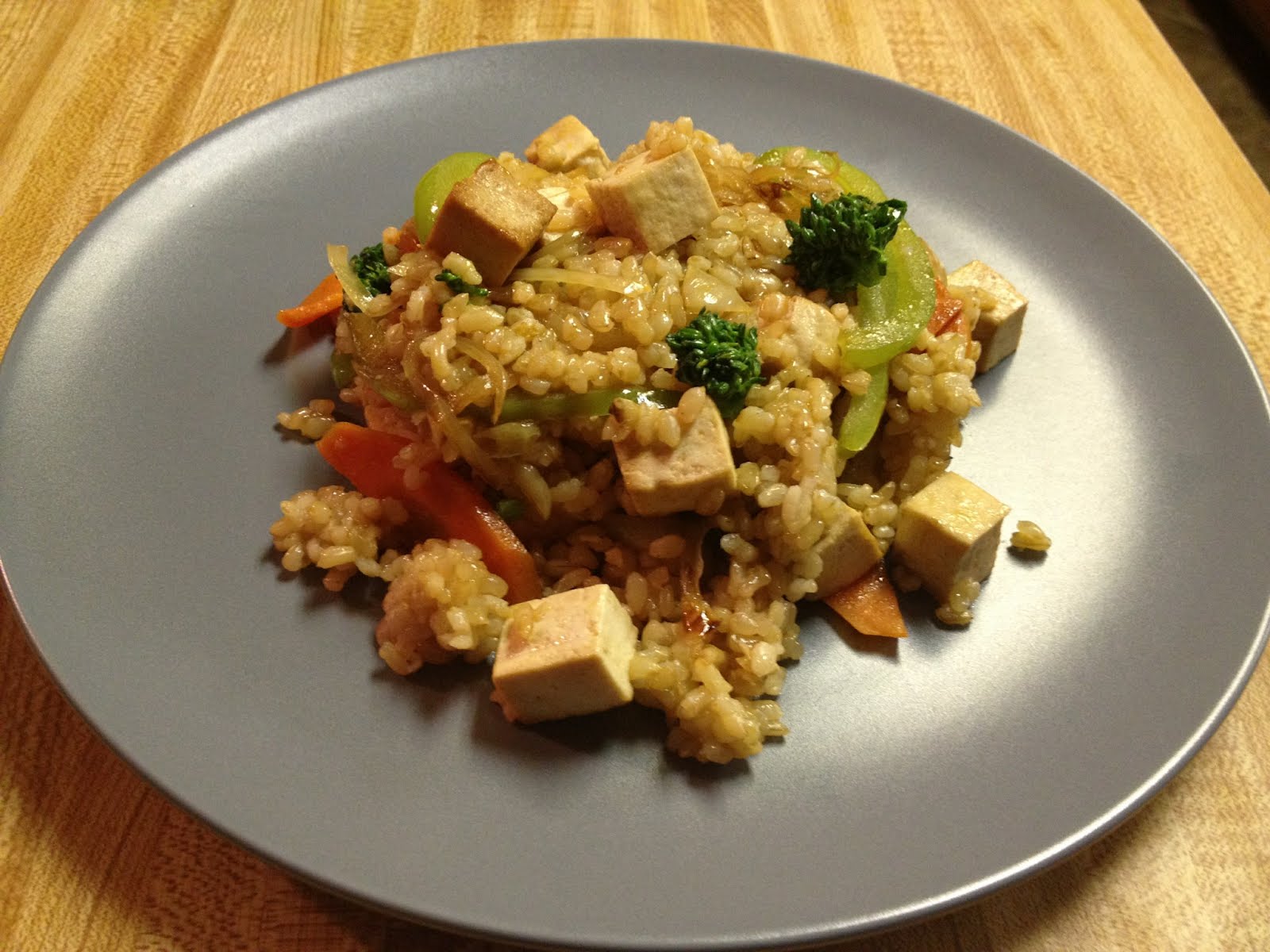 Tofu Stir Fry |
Those who know me know I’m a huge fan of PostgreSQL. In fact, KitchenPC uses it exclusively for all its database needs. Recently, I developed a solution to easily facilitate the moving of data between my production database and staging database, as the latter is currently being used to test the re-invention of the site.
Since the two database schemas are often slightly different, traditional approaches of exporting and importing database dumps simply don’t work very well, and would be cumbersome if I simply wanted to pull in a few rows of data. In fact, one scenario in particular where this ability comes in handy is creating meal plans. Those who have recently volunteered to help me build these plans are able to enter in recipes using the current implementation of the site, and I can then quickly run a single SQL query to pull in all new recipes from production into my staging database. To do this, I’m using a PostgreSQL package called DBLink. I figured I’d write a quick tutorial on how to set this up, in case anyone runs into a similar need.
Step 1: Setup DBLink
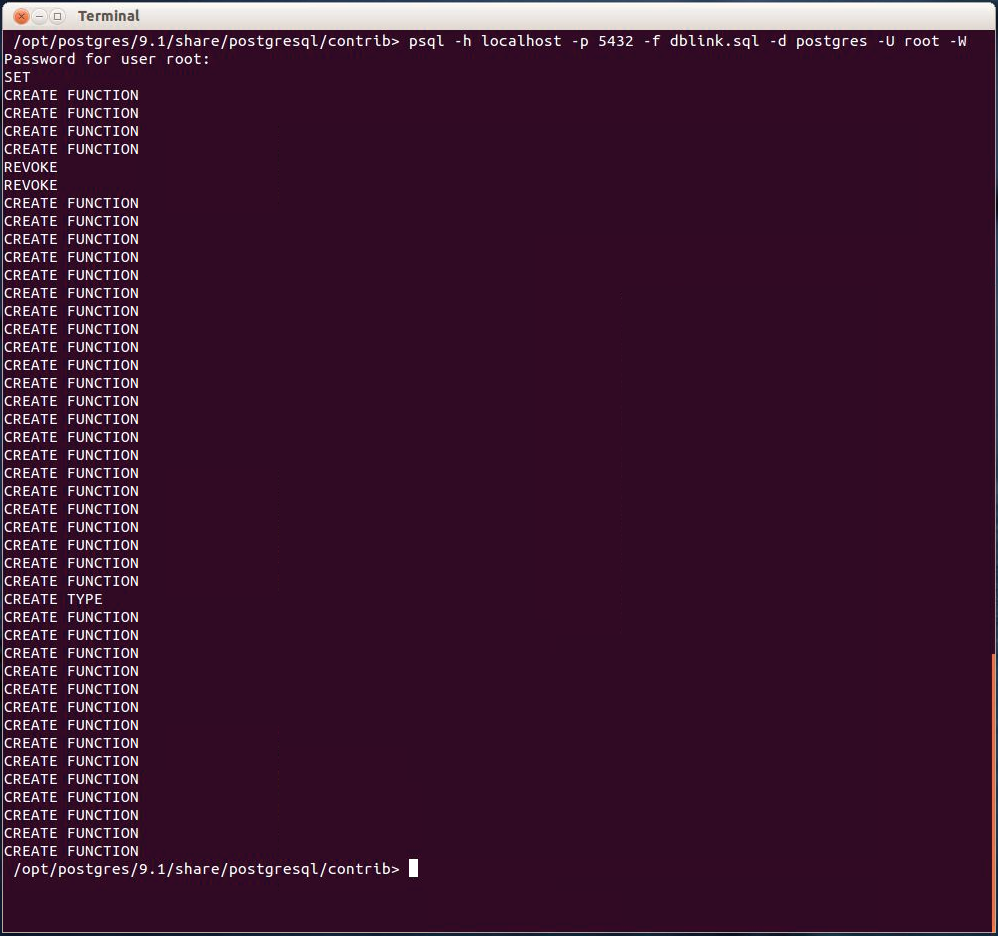
Running the dblink.sql script
With Postgres 9.0 and above, the binary modules required for linking across databases are installed by default. However, you’ll need to run a SQL script to create the necessary functions to access them from your database. This SQL script is called dblink.sql and should exist on both Windows and Unix installations of Postgres in the contrib directory. Depending on your OS and installation, you might have to install a separate contrib package to get this file. For example, on Ubuntu you can install the necessary package using:
sudo apt-get install postgresql-contrib
Once you find dblink.sql, you can simply run the file using psql, or your query tool of choice. This command will look something like:
psql -h localhost -p 5432 -f dblink.sql -d dbname -U root -W
The -h option specifies the hostname and should use the local instance by default. The -p option specifies the port, which will usually be 5432. The -f option tells psql to run the SQL commands in a file. It is assumed you’ll be running this command from the contrib directory, so I didn’t fully qualify the path. Replace dbname with the database you’d like to create the dblink functions in, and you can replace root with any user with sufficient privileges in this database.
When you run this command, you will hopefully see something like the picture above.
Step 2: Making Sure It Works
Next, open up your favorite database program, such as pgAdmin, and connect to your database. You should now be able to run a command such as:
select * from dblink(
   'hostaddr=10.0.0.1 dbname=ProductionDB user=Website password=secret',
   'select * from users')
as t1(
  userid uuid,
  email varchar(50),
  alias varchar(50),
  fullname varchar(50),
  password varchar(100)
);
The dblink function above takes two parameters. The first is a connection string and the second is a SQL command to run on the remote server. You’ll also need to specify the columns and data types being returned by your query.
Once you get to this point, the rest is easy!
The KitchenPC Implementation of DBLink
What I chose to do was create a new DB schema called ProdLink that mirrors the table schema of production. Within this schema, I create a series of views that return the matching data from the remote database. First, I create the schema:
CREATE SCHEMA ProdLink;
Next, I create a VIEW within this schema for each table. For example:
CREATE OR REPLACE VIEW ProdLink.Recipes AS
  select * from dblink(
    'hostaddr=1.2.3.4 dbname=KitchenPC user=mike password=pwd',
    'select * from Recipes')
  as t1(
    recipeid uuid,
    title varchar(100),
    description varchar(255),
    dateentered timestamptz,
    imageurl varchar(100),
    credit varchar(100),
    crediturl varchar(255),
    servingsize smallint,
    preptime smallint,
    cooktime smallint,
    rating smallint,
    steps text,
    ownerid uuid,
    publicedit boolean,
    textsearch tsvector);
This view simply runs a query through DBLink to pull in every recipe from the production database. Once that view is created, I can now just run:
SELECT * From ProdLink.Recipes;
and instantly see every recipe in production. Since this is simply a database view, I can now do anything I could with a normal view. For example, if I want to pull in any recipe from production that doesn’t already exist in my staging database, I can run:
INSERT INTO Recipes
  SELECT * FROM ProdLink.Recipes L WHERE NOT EXISTS
    (select 1 from Recipes where Recipes.RecipeId = L.RecipeId);
One nice thing about this method is the schemas between databases can be out of sync, and I can handle this through the INSERT statement itself. I can specify default values for newly created columns, use conditional logic, etc.
After creating a VIEW within the ProdLink schema for each production table, I then created a series of commands to freshen the data in my staging database with production data, which I can run on a daily basis or as I see fit.
My goal is to keep my staging database up to date with the latest data from production so that when the new site launches, I can minimize downtime by simply migrating the staging data itself into the new production database, rather than having to worry about upgrading the old production database to the new schema.
This may or may not be the best way to handle data migration between production and an evolving schema under development, but so far it has worked pretty well for me. It’s quite possible that this may be an awful solution for massive databases, as each of these views is going to “download” all the data every time, however that could probably be improved with some sort of time stamp or watermark. Luckily, I’m not yet to the point where I need to worry about huge amounts of data.
Not a Postgres fan? Other major database systems have similar database linking features, so it’s quite possible to adopt these techniques using your database of choice. However, I’ll leave that up to you!
Yesterday, I spent the afternoon running a second round of usability testing to verify the changes I’ve made over the past few weeks result in an improved perception of the site. Overall, I just have to say wow! The results were an improvement by leaps and bounds, and pretty much all the major issues were addressed. I think I’m finally to the point where I can put this site out into the world and be confident that the average Internet user won’t run away screaming.
This is not to say there were no problems with the second round of testing, because there were. However, the problems I encountered were minor and very easy to remedy.
People Need Buttons
This simple UI fact still just blows my mind. If you provide a text box and nothing to click on after the user enters something, you’ve basically screwed yourself usability wise. People simply don’t press Enter when they’re done typing. It’s good practice to allow them to press enter if they wish, but you absolutely positively need a button next to any text box, no exceptions. Ever.
The simple act of putting a “Go” button next to the keyword search improved the experience by leaps and bounds. Absolutely no one had any problems understanding the design. Absolutely no one confused the Meal icons for submit buttons.
There was one screw-up that still bit me though. Which leads me to my next piece of advice.
Buttons Next to Text Boxes Can and Will Be Confused With Dropdowns
As mentioned in my previous post, I ditched the ingredient auto-complete mechanism for a simple text box that will parse whatever you type in. In case you don’t remember, here’s what the new UI looks like now:

Notice "+" icons next to both ingredient text boxes
The intended design was for users to click on the text box, type something in, then either press Enter or click on the “+” icon to the right of the text box. Wow, did this backfire big time.
9 out of 10 users clicked on the “+” icon first, expecting to see some sort of dropdown or popup to allow them to select an ingredient from a list. The problem with this was clicking on the “+” icon with a blank input did absolutely nothing. That’s right; zilch, no-op, no error message… nothing. Even more disheartening was the fact that 4 out of 10 users never figured it out, and thus were unable to ever use the feature.
The solution?
Very simple, I hope. Now, when you click on the “+” icon and there’s no text input, I set the focus to the text box itself, which of course automatically shows a helpful tooltip on what to enter. This one line of code – input.focus(); – will hopefully remedy this problem.
Seriously, Quit Trying to be Fancy with Non-Standard UI
I also mentioned in my previous post that I ditched the fancy checkmark graphics and went with standard HTML input controls. I was also blown away by the dramatic change of perception that change resulted in as well. 9 out of 10 users immediately used the check boxes to mark off several recipes, rather than going into the recipe viewer to add a recipe to a menu. Most didn’t even pause to think twice about this feature, they simply saw the check boxes they’re used to on the web and knew they could select multiple recipes to add to a menu. This is fantastic!
The one user who failed to use the check boxes I had some other problems with. I felt she rushed through the script, and flat out skipped several of the tasks. I don’t believe she provided feedback that exemplified the average Internet user.
Confusion on De-Queue
The simple re-wording of the “remove from Queue” popup also made a huge difference. 10 out of 10 users understood immediately that the rating was indeed optional. Most simply ignored it and clicked Ok, and a few made comments that indicated they understood they could optionally rate the recipe. However, there was one user who was confused that the recipe rating was pre-filled in with 5 stars rather than blank. I’ve only seen this happen occasionally though (perhaps on certain browsers), so I’m pretty sure it’s a bug rather than a usability issue.
More Options
Like the last test, most people were still lost on how to narrow down recipes to those under 30 minutes, failing to find the “More Options” button. Again, their first instinct was to use the sorting options to manually find these recipes. Since I simplified sorting, I believe the experience was much better, however I’m still giving this area some thought.
With a usability test, users are instructed on tasks to perform. If I tell them to “narrow down recipes to those that can be made in 30 minutes or less,” they immediately know such a task is possible and just have to figure out how to do it. A normal user would simply not know if such a feature existed, and would thus not be confused with what they don’t know how to do. I’ve said before I prefer simplicity over powerful features, and have purposely only exposed the filtering abilities that the majority of surveyed users said they would use. Other features are out of the way as not to clutter the interface with features only 5% of users might ever bother with. Thus, drawing more attention to the “More Options” button is not something I’m convinced is a necessity. If people find it, great! It will be like a treasure chest of new features, buried to await discovery by my most loyal users. On the other hand, maybe making the button brighter and more noticeable might be the way to go still. We’ll see.
People Still Don’t Get “What Can I Make?”
Though people understand that they can enter a few ingredients in, they really don’t seem to understand what the results mean. When I told users to enter “12 eggs, a dozen bananas, and asparagus” to see what they could make, several made comments like “How in the world could you make anything with that?” – obviously assuming I would find a single recipe that utilized such randomness. Others thought that KitchenPC would somehow generate an original recipe on the fly (Icon Chef Watson??) that perhaps infused asparagus purée into banana bread or some such. Wouldn’t that be interesting.
A good chunk of users, once seeing the results, understood the relationship between the input and said results, most providing praise of the feature’s usefulness. Others flat out still didn’t get it, wondering why only five recipes in my database used any of those ingredients. Attempting to explain that this set of five most efficiently uses the ingredients and amounts specified is a challenge, since it’s most likely the most original feature of KitchenPC and users have a hard time identifying with something they’ve never seen before.
I think the only real way to articulate the purpose of the meal planner is to create a popup video that demos the feature and really shows off what the results mean. This will for sure be a weekend project before the site is launched. I’m hoping once I can educate users on the purpose of this feature, it’ll really click with them and keep them coming back for more. Maybe it will start a new Internet trend and other sites will try to copy it!
Next Steps
I also found a few minor bugs while watching the usability tests, but nothing too concerning. Hopefully, these issues will be addressed this weekend.
The next task will be starting to assemble pre-made meal plans. Since this is a huge task, I’m hoping to call upon the powers of the Internet to recruit some help. I’ll be reaching out to bloggers, friends, nutritionists, personal trainers, and other experts to see if I can find some people to put together these plans. In return, they’ll be able to link to their site or product which will hopefully provide some incentive for their work.
If you know of anyone who might be willing to help out, please let me know as well! I’m hoping to get at least 10 pre-made meal plans (at least one in each category) for launch, and hopefully more as time goes on.
While that work is being done, my next technical task is to finish up the web crawler and parser. I need to be able to import tens of thousands of recipes from other recipe websites automatically, hopefully this time providing near perfect accuracy. The recipes on the site right now are simply not good enough and contain too many errors. These recipes need to go! I also need to work on the categorization code that will classify each recipe and tag it correctly, which is probably a topic for another post.
So much work!
Over the past couple weeks, I’ve been working hard on usability improvements for the new version of the site. This effort has been mainly spurred by my recent testing on UserTesting.com, however I also took the opportunity to throw in a few extra bells and whistles inspired by what I had learned.
I figured I’d write a quick post on a few of the changes I made, and why I believe these relatively minor changes will make a huge difference in the next round of testing.
Quit Trying to be Fancy with Non-Standard UI
One of the great things you can do with KitchenPC search results is check off multiple results and save them as menus. This feature is unique to KitchenPC (as far as a I know,) as most search engines just display your search results and say, “good luck” from there. I wanted to make these check boxes big and bold and easy to click on. For this reason, I used huge check mark graphics that would change color as they were clicked. Huge mistake. Pretty much no user even noticed them since they did not look like the typical HTML checkbox people are used to.
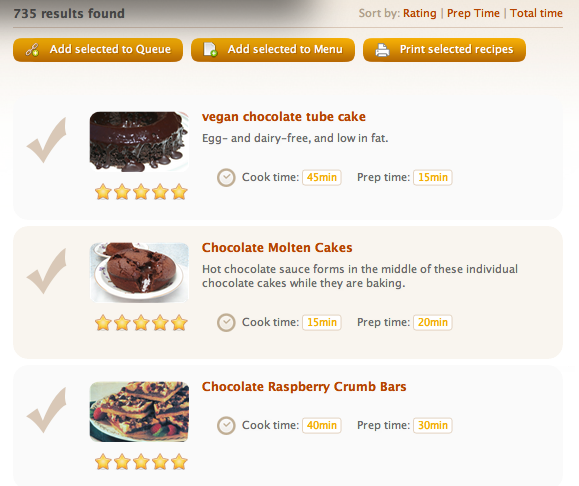 Original Prototype |
 Standard HTML checkboxes |
Not as pretty, but the average user will be more likely to notice they can check on results. I also now include a text blurb above the results mentioning that you can check individual recipes to add them to a menu.
Give Users a Place to Click On
One thing I learned is users love their mice. If you give them a text box, but nothing to click on when they’re done typing, they usually click outside the text box to indicate they’re done. Almost no one will press Enter, or try to tab away. This caused huge issues with my search interface, which efforts to find recipes as you enter data, rather than making you click a “Search” button when you’re done. I decided to stick with the real time result updating, since I believe people will catch on after using the site for a few minutes, but I added buttons to click on near each text input field to provide the illusion of submitting data.
 Original Search UI |
|
Improved Search UI - Now with Buttons! |
There are a few aspects of this interface worth pointing out.
- On the original UI, users would often enter text into the Quick Search and then grab the mouse and click on one of the meal icons below, wanting desperately for that to be some sort of Submit action. This would work okay in certain cases, but cause all sorts of frustration when the user then changed their query and wanted to re-submit. The new UI has a “Go” button to the right of the text box. Clicking “Go” or pressing Enter will update the results. Just for kicks, users can also click on a meal icon to update the results, even if that meal icon is already selected.
- Both the Ingredient Include and Ingredient Exclude lists also now have a “+” icon to add input. Another huge change made here is I completely got rid of the auto-complete mechanism and now parse input through the natural language parsing engine instead. The number of usability issues auto-complete caused was absolutely mind-boggling. Users would refuse to select an item from the list, or just click on something else on the screen when they were done. Without the auto-complete, it’s a little more typing now, but it’s quite obvious how the interface works.
Huh? Why Do I Need to Rate That Recipe?
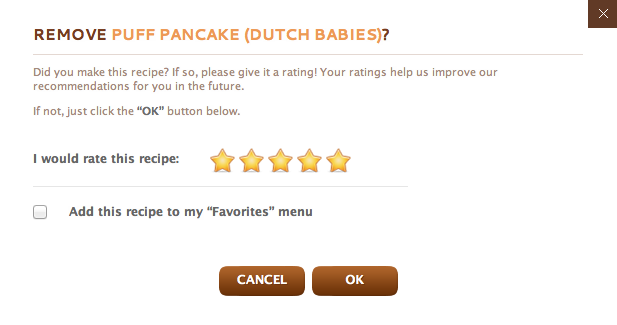
New wording for de-queue dialog
The Queue allows users to queue up recipes that they’re interested in without having to formally organize these recipes into menus. When you de-queue a recipe, it’s assumed that you probably made it and KitchenPC takes this opportunity to ask what you thought of it. This was an attempt to counter the fact that only around 2% of KitchenPC users would ever rate a recipe, since the site can do all sorts of nifty things when it has ratings.
It turned out this assumption was bad, and asking users to rate recipes on de-queue was confusing. Rather than completely doing away with this concept, I attempted to re-word the de-queue dialog to be a bit more clear about what was going on.
Did Clicking On That Do Anything?
 One other common issue that came up was with users adding recipes to a menu, especially when they were creating new menus. When the user would click on “Add To Menu“, then create a new button and click “Ok“, a popup would show, “New Menu Created!” Many users were unclear that the recipe was also added to their newly created menu, so they would try adding it again. It also didn’t help that the recipe viewer doesn’t indicate whether a recipe is added to any menus. I decided to address both issues. First, the popup tip will now say, “This recipe has been added to a new menu.” Second, the recipe viewer itself now shows a count of how many menus the recipe appears in. When a recipe is added to a menu, this count updates instantly (using a cute animation of course) which provides further feedback that the action indeed did something.
Tell Me When I Mess Up!
The problem with text input boxes is it’s very hard to control exactly what the user types in. If this is just a keyword search, this might not matter. If it’s someone’s name or address, this might not matter. However, if it’s an instruction for the server to parse and take action upon, it’s critical that user input is gathered in an expected format. Search parameters such as “Ingredients to include or exclude” as well as the “I have…” text box suffer from this problem.
During testing, a lot of users would enter invalid input in the Ingredient to Include text box. For example, “12 eggs” or even “bananas, eggs, pears“. Since this text box was ruled over by an evil auto-complete system (which would basically ignore you when you messed up,) understanding what was expected was near impossible. Using natural language parsing for each of these inputs is a great step forward (provided my NLP engine actually works well,) but I also decided the user needs more feedback when they enter something that isn’t understood.

Error message if input cannot be parsed
I decided to return an error when an ingredient or ingredient usage could not be parsed, even if it might frustrate users at first. I do log invalid input, so I can keep an eye on what users are typing in and improve the database over time. I also now greet them with a friendly error message that offers to take users to a help page or perhaps a video demonstration on how the feature works. I also changed a lot of the verbiage on the site to make it more clear that ingredients need to be entered one at a time.
Small Fixes go a Long Way
Most of the other changes to the site were minor changes of wording. The Queue page now includes a full description of what the Queue actually is. The Menus page now includes instructions, and tells users they can drag recipes between menus. I’ve also included several new tooltips, and changed the wording of several popups to be more clear and address specific issues that I’ve seen users have.
I also took the opportunity to change the behavior of a couple of site features:
- The Popup Recipe viewer will now “tag along” as you scroll the page up and down. This will hopefully prevent the recipe viewer from getting lost if the user scrolls back up to the top of the page without first closing the viewer. This happened to at least 2 or 3 people during testing, though they did realize their mistake after a few seconds.
- Sort can now only be done in one direction. Allowing users to flip the sort order between ascending and descending sort order only complicates the UI, and provides almost no benefit. After all, why would anyone want to sort “Cook Time” by maximum time first, or see the lowest rated recipes at the top of the list? This allows me to grey out the currently selected sort order, making it a lot more clear what’s going on. I also now show the “Total Time” on each line to be consistent with the fact you can sort by total time.
The next step will be to do yet another usability study with ten more users. I’m confident that the next round will show a massive improvement, but I’m also nervous that I’ll simply uncover a huge list of even more major issues that need to be corrected. I’m sure I could go on forever, hunting for that perfect user interface like Captain Ahab hunting his white whale. With any luck, the next set of usability results will instill me with the confidence I need to declare this UI go for launch, and I can start working on building site content. Fingers crossed!
This morning at around ten, I happened to glance up at the Clicky Chrome Plug-In, which provides me a real-time count of how many people have visited the site today. To my shock and surprise, it was up well over 300! Normally around this time of day, I was lucky to have 40 or 50. Even more shocking was when I logged on to Clicky and saw there was 44 visitors online at that very moment!

Clicky Real-Time Stats
This isn’t the first time the site was rewarded with some generous PR or mention in some high-profile blog, but what was strange was that pretty much all the traffic was either direct (people just typing in http://www.kitchenpc.com in their browser) or through a Google search for “KitchenPC” or “KitchenPC.com.” This led me to believe someone mentioned me either on a TV show or on a radio program, which would require users to type in my address rather than click on some link. But who?
I soon noticed another trend in the traffic. Over half the visitors were around Phoenix, AZ. Apparently, my site was all of a sudden famous there.
A few minutes later, I was notified by email of a new comment made on UserVoice, which I use to allow visitors to provide feedback on the site or feature suggestions. The comment started out, “I have heard on the TV about this [site].”
Oooh, TV show!

Phoenix, AZ traffic today
Since the poster was kind enough to leave their email address, I decided to inquire as to which TV show mentioned the site, and it turned out to be a segment on Fox 10, where a local radio DJ shares her “tip of the day.” Today’s tip was that KitchenPC is a fantastic online meal planning tool. That’s a good tip!
A quick Google search turned up the video which aired today, which I invite you all to watch. Feel free to fast-forward to around the 5 1/2 minute mark if you’re not exactly obsessed with American Idol.
Needless to say, this was a pleasant surprise. I’ve never heard of the show nor was I made aware of this segment in advance. I guess Beth simply stumbled across the site and decided to let her listeners know about it! Though this isn’t perfect timing, as I’m completely re-inventing the site at the moment and thus shy away from too much publicity, it was still completely appreciated. Around 1 in 10 visitors went on to create accounts, and stayed on the site for an average of 5 minutes and 54 seconds with a bounce rate of only 12.9%. For anyone who found the site today, welcome and stick around for exciting new things to come!
Before launching a new version of a website, especially one that radically changes the entire purpose of the site, it’s usually a good idea to go test it out on a few strangers. I’ve found asking friends and family usually results in less than honest feedback, as those are the types who are verbally throttled by their pesky respect for your hard work. Also, the people we get along with are usually the people who think like us too. That’s no good.
A while back, I gave the site UserTesting.com a go and was very pleased with the results. Though they’re a bit pricy, I found the data I were able to ascertain from the experience worth their weight in gold. So back I went for another round, this time going all out and purchasing not one but ten testers to give the new KitchenPC a whirl.
Turns out, my new design is a complete disaster!
The Good
Overall, people have a good first impression of the site. They understand it allows them to find recipes (no one mentioned meal planning, which means my pivot is a success,) and organize the results they find. Almost everyone understood what a “menu” was before even trying out the feature, and several people understood “What Can I Make?” just by the description alone. Very few people had a clue what “Pre-Made Meal Plans” were, but most admitted they were intrigued by the idea and wanted to click on it.
I also got several compliments on the overall look and feel of the site. People said it was simple and straight-forward. One tester even signed up with her real email address, claiming she’d be back.
People seem to connect with the value proposition of KitchenPC. They like the idea of finding recipes and organizing them into menus. They like the idea of finding out what they can make with ingredients they have on hand. They like the idea of saving time and money, and believe KitchenPC can help them do that. This means if KitchenPC can deliver on that promise, there’s a customer base out there waiting.
The Bad
Everything else. The entire search interface was a swing and a miss for strike one. As the title of this post suggests, sometimes I think I’d be better off re-writing the entire thing as a command line tool.
Nine out of ten testers were completely and utterly confused simply by trying to search for recipes, which is somewhat important to really nail being a recipe search engine and all. Though all were eventually able to get recipes to come up, very few were able to successfully narrow down their search to desserts without eggs that could be made in 30 minutes or less.

New search interface, no submit button!
The huge culprit here is the lack of a Submit button on the search interface. I decided to be clever and implement an interface that allows users to narrow down results on the fly, however users just don’t understand this. Not just some users, all users. At least half the testers mistook the “Meal” filter (All, Breakfast, Lunch, Dinner, Dessert) as a submit button. Thus, they would type in something like “Chocolate cake” and click “Dessert“. In their mind, this means “Find me all chocolate cakes in the dessert category.” They would then type in something else in the keyword textbox, and then click on “Dessert” again. Unfortunately, this does absolutely nothing on KitchenPC as these are filter buttons that can be toggled, and not submit buttons.
Five out of ten users tried to type in multiple ingredients in either the “Include” or “Exclude” text boxes as well. For the most part, they would just ignore the auto-complete that would pop up. At least two users would type in an ingredient such as “eggs” and then click elsewhere on the screen rather than pressing enter or clicking on an auto-complete option. A definite trend I noticed is that very few people expect the Enter key to do anything on a website. Most people will look for something to click on once they finish typing. Only a few users were able to successfully narrow down recipes to those that don’t include eggs, and almost all of them were looking for something to click on to update the results.
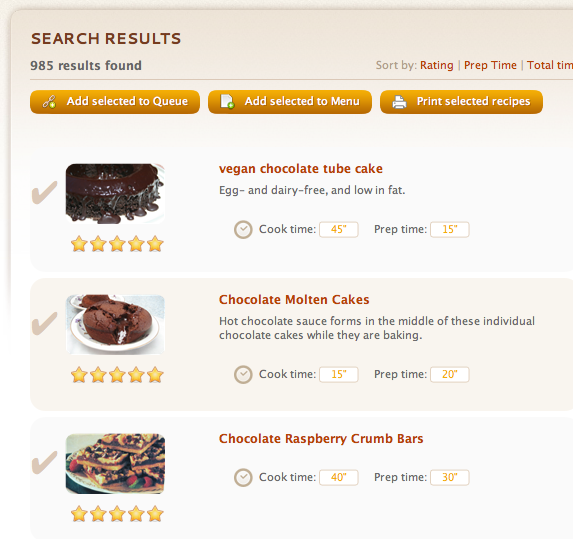
Impossible to see checkboxes
Once users found results, they were tasked to add a few recipes to a menu. Nine out of ten of them completely ignored the checkboxes next to each recipe, and instead used the popup recipe viewer to create a new menu. Adding a new menu was also confusing, as several weren’t sure the creation of the menu would also add the desired recipe to the menu as well. This was because the recipe viewer still shows “Add To Menu” even though the recipe is already in one menu. However, KitchenPC allows a recipe to exist in more than one menu, so in my mind the verbiage is still correct.
Next, users were asked to narrow down recipes to only those that could be made in 30 minutes or less. Only a couple users found the “More Options” button and thought to actually click it. Some finally ran into it by chance after fumbling around for a while. The majority of users tried to sort the results by time, and were completely confused by the sorting experience. This is mostly because I allow users to sort by “Total Time“, but I don’t actually display “Total Time” in the result list anywhere (I only display prep time and cook time). Users were frustrated that they were expected to add up the two numbers in their head to find recipes that met this criteria. One user was confused by the concept of toggling between ascending and descending sort order, since the UI provides no feedback on which direction the recipes are currently sorted in. She was frustrated that each time she clicked on the sort link, the results would change seemingly at random.
Next, users were asked what they could make with “12 eggs, a dozen bananas and asparagus.” This was one of the biggest disasters of all. The majority of users never thought to click on the “What Can I Make?” circle at the top, even though several had already mentioned earlier they were intrigued by the feature. Most users simply typed in the list of ingredients and amounts into the “Ingredients to Include” filter, and of course got absolutely nothing helpful. Several users gave up on the task, never once getting to the meal planner page. Those unlucky enough to get past the first step were greeted by the usability catastrophe that awaited them.
On the “What Can I Make” tab, most users attempted to type in all the ingredients at once. I’ve purposely designed KitchenPC to accept any input here without complaint, since the natural language parsing that goes on behind the scenes is so new and I was afraid of frustrating users when I didn’t understand the input. I figured I’d just parse what I could and log everything else so I could fix it behind the scenes. For this reason, if a user does type in “12 eggs, a dozen bananas and asparagus” on one line, the meal planner will still run and take none of those ingredients into consideration, yet yield no errors either. I think this made people think the feature was just broken or useless. A few users did figure out you had to enter the ingredients one at a time, and did get some valid results back.
Only one tester seemed to understand that the ingredients listed on the right were perhaps the aggregate of all the ingredients in the selected recipes, which is the entire point of the feature (to minimize total ingredients.) Obviously, I need to find a good way to educate users on the power of this feature, as no other site really does this.
Users were also asked to add some of the results to the queue. Half the users admitted they had no idea what the queue was, but several made some correct assumptions about the feature or at least admitted they were interested in it. I think even one user mentioned “Netflix”, which is why I chose the word “queue” in the first place.
Again, users did not use the checkboxes to select recipes to add to the queue, but added them one at a time using the recipe viewer. Unfortunately, the recipe viewer uses the caption “Plan To Make” instead of “Add To Queue“, which caused a lot of confusion. Several users then noticed the “Add selected to queue” button near the recipe list, and then finally noticed the checkboxes (usually grumbling that the checkboxes were difficult to see.)
On the queue page, users had to remove an item from their queue. They easily found the red X to remove the item, but most users were confounded by what came next. You see, the queue was designed to allow users to temporarily store recipes they were interested in before organizing those recipes into a menu. This is probably why the recipe viewer calls it “Plan to Make.” The intended design is for users to try out the recipe, then “de-queue” it and possibly add it to an official menu if they liked it. For this reason, I nag the user to rate the recipe when they remove it from the queue, since only around 2% of users decide to rate recipes on their own.
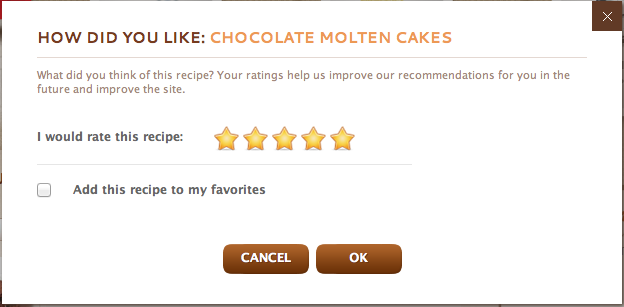
De-Queue popup
Unfortunately, the appearance of a rating dialog only leads to mass confusion. Though a few users just ignored it completely and pressed the “Ok” button without selecting a rating, 3 different testers simply had no idea what to do. Most would just hit Cancel thinking they clicked on the wrong thing. One user even opened the dialog 4 of 5 times before figuring out the rating was simply optional.
The last thing users were asked to do was go to the menu page. Fortunately, people understand menus and really like the idea. On this page, they were asked to move a recipe from one menu to another. 8 out of 10 users immediately tried to drag and drop a recipe from one menu to another, however at least a couple were confused because they “missed” the drop area and then assumed there was some other way to do it. To one user, it never occurred to her to try to drag a recipe (even though she was actively hovering over a tooltip that says “You can drag this recipe to another menu”) so her instinct was to click on the recipe and select “Add to Menu” again. In theory, this should work well (though the recipe would be added to the new menu, not moved from the old menu.) However, since the page requires a refresh before the newly added recipes would show up, she figured the feature wasn’t working as she saw no indication the recipe was moved. This also caused some bugs to surface with “out of date” menus in the UI, causing a few embarrassing script errors as well.
9 out of 10 users were immediately able to rename a menu simply by clicking on the title, and the remaining user eventually figured it out after trying to right click on things. All users were able to print a menu too, however there seems to be a bug on Firefox that prevents the print dialog from actually coming up.
Overall, it seems I have a lot of work to do. So, what needs to change?
First off, the search page needs a “Submit” button. There at least needs to be a “Go” button next to the keyword text box so users have something to click on. The meal filters need to be labeled as such to avoid confusion. The ingredient inclusion and exclusion text boxes need to make it clear to enter one ingredient at a time, and the interface needs to be more forgiving when users tab away without selecting an item or pressing enter. I’m actually thinking of just removing the auto-complete mechanism all together, since it has always just felt clunky.
Sorting needs to make more sense and show which direction results are being sorted in. Either “Total Time” should be removed from the sorting options, or I should display the total time for each recipe in the list.
There needs to be visual cues when search results are updated, especially for those users lacking the sufficient screen real estate to see both the search interface and result list on the screen at once.
The checkboxes need to be made more obvious, or I need to use standard (albiet ugly) HTML check boxes instead. My original design used standard check boxes, but I absolutely hated how they looked. The fact that 100% of web users are trained to recognize a standard checkbox might outweigh my fetish for visual appeal.
When a new menu is created, a popup needs to explicitly state how many recipes were added to the menu, and the recipe viewer needs to visually indicate if the displayed recipe is part of one or more menus.
The queue page needs a full description of what the queue is, and the Queue top menu link needs a tooltip such as “Click here to learn about the queue!”
The “What Can I Make” feature needs to clarify that only a single ingredient should be entered at a time, and provide a submit button rather than assuming users will hit enter. Perhaps there should be some subtle UI indication if an ingredient is not understood.
When removing a recipe from the queue, I should either not ask the user to rate the recipe, or make it abundantly clear that the rating is optional, or provide a special button that says “I did not make this!” or something.
Drag and drop between menus needs to work better, and users should be able to drop anywhere in the menu, not just on the title bar. Perhaps once the user starts dragging (which almost everyone intuitively does), the UI can change and guide them visually in some way.
The Surprising
Several things really surprised me about the feedback I got. First was how dependent the average user is on the mouse. When people are done typing, they want to click on things. They do not assume they can press enter. Power users and programmers are the ones that like keyboard shortcuts for things.
I was also very surprised at the sheer number of people who understand drag and drop. Even more surprising was the reaction they had after drag and drop worked. They would usually shout “Wow! I didn’t expect that would work!” or something similar. Which is odd, since why would your first instinct be to try something that you don’t think will work.
What I Will Do Next Time
Unfortunately, the feedback shows that I’m nowhere close to having this site ready to launch any time in the near future. This also means I will need to do a second round of usability testing after fixing the major issues that were uncovered.
I think a bit of the confusion was caused by the script itself. The instructions for the testers might have been a bit too vague. For example, I asked them what they could make with “12 eggs”, but I didn’t tell them to click on “What Can I Make?” This meant the user knew it could be done, but had to figure out how to actually do it. A typical user might not try typing in “12 eggs” into the “Ingredients to Include” textbox on their own. I felt it was an expensive way to learn this mistake as well. Several testers never even got to the “What Can I Make?” tab so I lost a lot of potential feedback on it. I think it might have been smart to “test out” the script on a friend first (for free) to make sure I was communicating each step clearly.
So, with that said I guess there’s nothing left to do but get back to work! Though these results were quite discouraging, they did show definitive patterns. If each user fumbled on completely different tasks, that would be one thing. However, there are clear parts of the interface that every single person failed miserably on, and these things absolutely have to be fixed. I’m definitely glad I know about these things now rather than launching the site to huge fanfare, only to wonder why no one came back.
 KitchenPC