In February, IBM placed its newest supercomputer, Watson, up against the two winningest Jeopardy! contestants in a man-versus-machine showdown. Watson easily bested its rivals, demonstrating a very real future for natural language interaction between humans and computers. Traditionally, computers have only been truly competent while processing explicit, concise instructions void of the ambiguities and “common-sense” references that litter human languages. This limitation in technology is really the basis for all difficulties interacting with machines. It’s the reason we yell at computers when they do what we say and not what we mean. It’s the reason for your mother calling you up to ask why “her Internet” is not working. It’s the subject of much comedy as well, as we can all relate to these experiences. Then again, it’s also the reason why us software engineers get paid the big bucks. If anyone could just open up Visual Studio and have a nice chat with the computer about their new idea, perhaps I’d have to find a different line of work.
KitchenPC is all about data organization. Specifically, the organization and categorization of recipes. Until KitchenPC is able to really understand a recipe, it cannot pivot this data into interesting results for the user. The problem is, recipes are written in human languages and cannot be easily parsed by a computer. In other words, recipes have to be converted from “human-ese” to a disciplined and precise format that KitchenPC can make sense of. Up until now, I’ve been using people to do this translation. Hired people, users, friends, myself; all going through a painstakingly slow process to read a recipe and enter the exact same information back into KitchenPC, while clarifying any part of the recipe in which KitchenPC may not understand. Over the last couple weeks, I’ve been trying out a new approach that may change all this; teaching KitchenPC how to understand the raw recipes themselves. Just like Watson understanding Jeopardy! questions, this requires a deep understanding of natural language, grammar, and common-sense. It requires a lot of insight into how the human brain breaks down instructions and fills in assumptions based on previous knowledge it has acquired.
Luckily, I can limit my domain to the culinary arts. KitchenPC does not need to know how to assemble IKEA furniture (I fret no computer would be able to understand that!) – and its vocabulary doesn’t need to encompass the entire English grammar, only that which is useful to baking a cake. KitchenPC must be able to break down references to common ingredients and make the same assumptions about its use as a typical chef. In this article, I’d like to share a few of the challenges I ran across while building Chef Watson.
My Test Data
Building a parser is a bit like teaching a child; it starts out with the ability to learn, but a very basic knowledge. At first, the parser says “Why?” a lot and you have to teach it. However, you first must give your parser a world to explore. I decided to download several thousand recipes from various websites and build a database of about 2,600 distinct ingredient usages as a set of test cases. Each time the parser wasn’t able to understand one, it would stop and ask for clarification. I would have to figure out exactly what it doesn’t understand and add the correct words or phrases to its vocabulary. This was by far the most pain staking part of the process. Along the way, I developed some specialize tools to expedite this part of the process.
Basic Ingredient Grammar
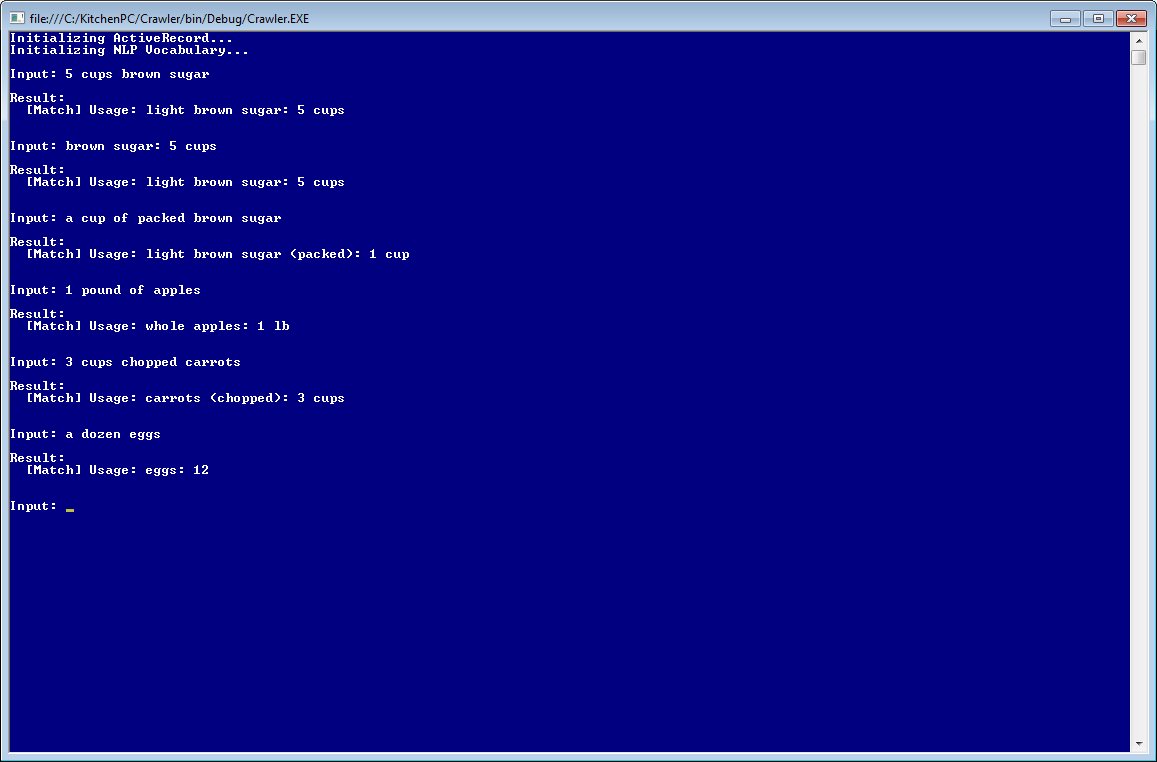
Basic ingredient parsing
Luckily, most ingredient usages can be expressed with a finite set of grammatical templates. Often this is something like “an amount”, then “a unit” followed by a name of an ingredient. For example, “5 cups brown sugar”. However, this ingredient could also be expressed as “5 cups of brown sugar” or “brown sugar: 5 cups.” The first step for my parser was to build a template engine that allowed me to define the different ways an ingredient could be expressed, without worrying about the vocabulary for each individual token quite yet. This was rather like building a regular expression parser, where I could test if a phrase was a match for a given grammatical template. Rather than rip apart the input trying to decipher what’s what, you can now just loop through your templates and test for a match. If there’s no match, move on to the next template.
Like I said, a good parser needs to create an abstraction between grammar and vocabulary. Each component of this gramar needs to support any number of synonyms that increase the matching power of that template. Such as a match for amount could be satisfied by 1, 1 1/2, one, or the indefinite article “a“. The unit cups might be cup, or the abbreviation “c.” Pounds could be expressed as pound, lb, or lbs.
An ingredient might also be clarified with adjectives, such as “5 cups packed brown sugar” or “3 cups chopped carrots”. The parser needs to know how the different words pair up. “packed” brown sugar has a higher density than unpacked brown sugar, thus five cups is effectively more in terms of weight. KitchenPC already has a massive database of ingredients and forms that it uses to do conversions and build shopping lists, or search for matching recipes based on available amounts. In my case, it was just a matter of parsing out the various phrases in the input and matching them to a database of known possibilities. If the amount was expressed in weight, I would look for a “weight” form for the ingredient (8oz brown sugar.) If the amount was expressed in volume, I’d look for a volumetric form (1 cup brown sugar.) So far, so good.
Two-phase approach
The solution I found to work the best was a two-phase matching approach. First, try to understand all the words you come across. Make sure they’re all part of your vocabulary, and they match at least one gramatical template. If you run into extra words that aren’t in any of your dictionaries, error out. Once you have this, then try to construct a valid ingredient usage by assembling the match data. “purple walrus” does not match any known template, so there’s no point in attempting to create an ingredient usage based on that input. “5 milk” does match a valid template (the amount ingredient template), but since the ingredient “milk” does not have a default “whole unit” measurement, the parsed input cannot be constructed into a valid ingredient usage. Worry about each problem separately; build a data structure that describes the input you’ve collected, then construct a validated result based on that input.
You say tomato, I say red tomato
Unfortunately, my database only has a single name for each ingredient. Recipes might call for “flour” when it really means “all-purpose flour.” It may call for “glace cherries” which I would call “candied cherries.” This required me to build a rather large synonym database which mapped common names of various ingredients together, and also could be used to set defaults for generic ingredients (for example, “milk” would be mapped to “2% milk”)
This also came in handy for parsing out random adjectives. For example, “3 ripe bananas” should be parsed as “bananas: 3” with a prep note of “ripe.” For this reason, ingredient synonyms can optionally contain a prep note to use when that alias is parsed. This came in handy for ingredient synonyms such as “boiling water” or “room temperature butter.” You want to link these to their root ingredient, but you don’t want to lose the qualifying adjectives for the reader.
Then there’s the issue of plural versus singular (1 cherry or 5 cherries). I first considered stemming the input first, but it was both tough to find a suitable NLP dictionary of stems that worked well for me, and suffix stripping algorithms caused all sorts of chaos in my tests. This might be a good approach for a more general natural language parser, but since I’m confined to a very known set of vocabulary, I just decided to handle plurals and singulars as regular ingredient synonyms. It took a bit more time to build, but I trust the results a lot more.
A clove of lettuce and a head of garlic?
Some ingredients can be expressed in units applicable to only those ingredients. A mapping of custom units had to be built so the parser could understand these types of units. My approach was to build a list of all known units (heads, slices, cloves, etc) and once parsed, be relatable to an ingredient form. If no relation was found (such as a clove of cheese), the parser would error out.
Preparing your ingredients
Many ingredient usages have a preparation step that is actually not relevant to the ingredient or form expressed. Such as “3 carrots, sliced” would mean to take 3 whole carrots, then slice them. The fact that you slice them doesn’t alter the measurement or form the way that “3 cups sliced carrots” would. However, the word “sliced” must be preserved as a preparation instruction (which KitchenPC calls a “prep note.”)
I took the approach that an adjective that occurred after the ingredient would be interpreted as a prep note and not a form. For example, “3 cups of cherries, pitted” would call for 3 cups of whole cherries measured, then taken out of the measuring cup and pitted. Where-as “3 cups of pitted cherries” would want you to pit a bunch of cherries until you filled up 3 cups.
I decided against treating anything after a “comma” as a prep note, since this could yield false positives which could completely change the meaning of the ingredient. I value accuracy over sheer parsing percentage, so I’d rather drop the match than parse it incorrectly. For this reason, I created a dictionary of approved prep notes. I decided to allow any ingredient form to also be a prep note. For example, “shredded” is a form of cheese, thus I would allow the prep format “8oz cheese, shredded” (which of course yields the result “cheese: 8oz (shredded)” and has nothing at all to do with the “shredded” form of cheese.)
Now for the weird stuff
So, this all works pretty well if everyone decides to use proper formatting for all their ingredients, and only uses forms with their logical units of measurement. You’d probably run into very few problems parsing professional cook books with these methods, and I was able to get a parsing accuracy of over 90% with this alone. But we can do better, right?
My parser will first attempt to generate a match with the rules above, however if no match is found, I look at the match data again and try to make a few assumptions based on common sense. I call this code path “anomalous parsing.”
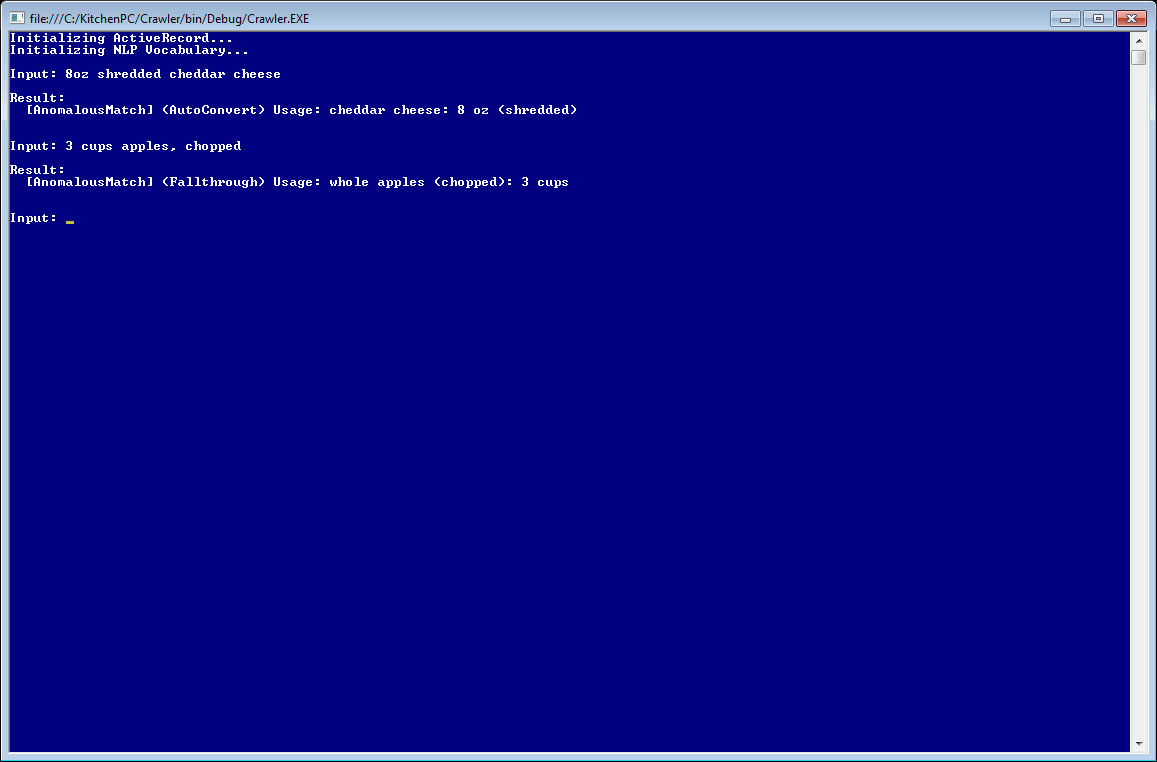
Anomalous parsing
The first anomaly this “sub-parser” can handle is called “prep to form fall-through.” This basically allows a prep note to clarify which form it refers to, and works only with volumetric usages if no default volumetric pairing is known. Confused? Okay, let me provide some examples.
The usage “3 cups apples” is invalid, since whole apples doesn’t have a default volumetric form. You’d have to say “3 cups chopped apples” or “3 cups sliced apples” for it to know what you were talking about. However, if the usage was expressed as “3 cups apples, chopped” then most humans would understand that as “3 cups of chopped apples”, though it would be considered extremely sloppy. However, if you were to say “3 cups grapes, chopped” then “grapes” does in fact have a default volumetric form (you can fill up a measuring cup with grapes very easily.) Thus, this usage would be parsed as “3 cups of whole grapes” with a prep note of “chopped.” Prep to form fall-through only comes in handy when the prep note perfectly matches a known form and the only other option would be to error out.
The second anomaly parser handles mismatched unit types. I call this “auto-form conversion.” A parsed form is tightly coupled with a set of units that the form can be expressed in. For example, “shredded cheese” is assumed to be expressed in volume, such as “5 cups shredded cheese.” However, what if I said, “8oz shredded cheese?” A normal person born on this planet would know what I was talking about: take 8oz of cheese, then shred it. An ounce of cheese is an ounce of cheese no matter what you do to it, thus “shredded” is actually a prep note in this case. If a valid assumption can be made about a form, even if the unit type is incompatible, we can convert this usage into another form.
There would be two possibilities to “correct” this usage. The first would be to convert “8oz shredded cheese” into cups, and get roughly 2 cups. However, this would result in a bunch of weird irrational numbers all over the place and really confuse a lot of people. The other approach is to reinterpret the usage as “weight” and demote the word shredded into a prep note. I took the latter approach, and parse “8oz shredded cheese” as “cheese: 8oz (shredded)”
Auto-form conversions are also applicable to whole units. For example, “3 mashed bananas” would be interpretted as “3 whole bananas” with a prep note of “mashed.”
If both the regular parser and anomalous parser fail, I return an error indicating exactly where it failed and what aspects could not be parsed.
But wait, it gets even more ridiculous!
With my parser so far, I was able to get around 97% match accuracy with my sample data which was fantastic! However, I noticed a lot of the same ingredients were throwing the parser for a loop. These ingredients had something in common with each other; and posed a huge challenge to overcome.
Some ingredients are actually a preparation or modification of another existing ingredient, to which further forms may be yielded from. Huh? Take for example, “3 cups of finely ground graham cracker crumbs.” Yes, that’s a real use-case from my test data. In this case, the ingredient is “graham cracker crumbs”, however graham cracker crumbs are something that can be derived from whole graham crackers, by violently smashing them with your fist. There are several examples of these “prepared ingredients” that I came across, mostly in the “crumbs” variety. Egg yolks and egg whites come to mind, as do chocolate squares (a square broken off from a whole chocolate bar.)
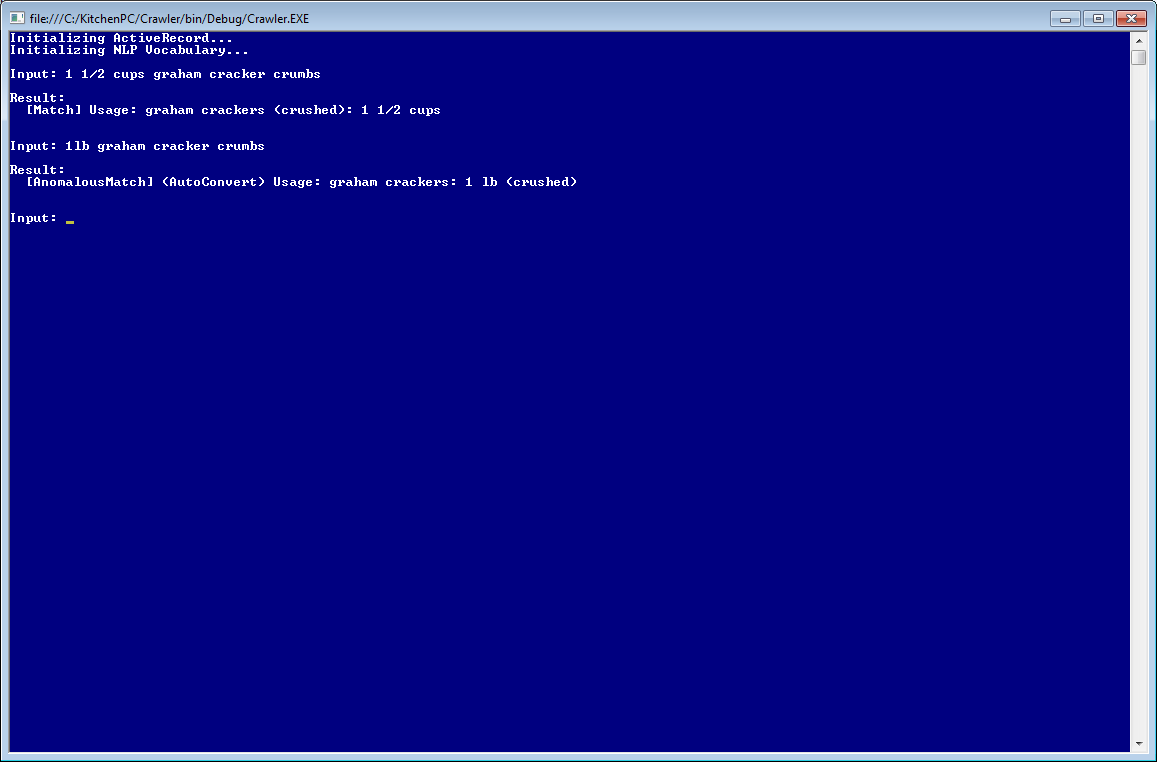
Sub-Ingredient Parsing
My first approach to solve this problem failed miserably. I attempted to make “crumbs” a synonym for the “crushed” form of graham crackers, and then added a template to handle the form immediately following the ingredient. This blew up in my face by yielding a mess of false positives, and also breaks when a further form is specified before the ingredient (such as “finely ground”)
I thought long and hard about how to interpret these anomalies. One way would be to enter these in as real ingredients, so that they could have actual forms and be parsed as such, and then modify the ingredient aggregation code to convert from form to sub-ingredient to real ingredient. This would be a huge architectural change that would affect the entire site. Not worth it.
Luckily, there’s very few of these anomalies. In fact, so few that I came up with a hacky approach that allows me to handle these one-off cases without polluting the rest of the code. I basically handle these things in the grammar template layer. I’m able to store anomalous usages in the database and transcribe them to “what the user actually meant.” Thus, in the database exists a row for “graham cracker crumbs” that links to “graham crackers” and the form “crushed.” When the parser runs into the phrase “graham cracker crumbs”, it rearranges the input so that it gets treated as “crushed graham crackers” instead. After this interception, the normal parser can take over from there. In other words, “3 cups graham cracker crumbs” will be seen by the usage assembler as “3 cups crushed graham crackers”, just as if the user typed that in, and yield a result of “graham crackers (crushed): 3 cups”
The important thing to note here is I include the entire phrase, and not just the word “crumbs.” This allows me to further link entire phrases such as “finely ground graham cracker crumbs” to a finely ground form type. I’m not too worried about a huge number of combinations as these are very rare and will be used as a last resort. One way to think about this feature is an automatic “find and replace” for whatever the user entered.
The benefit of this approach is I can define any number of these one-off cases and basically correct any arbitrary weirdness on the fly to something that makes sense. So long as KitchenPC is internally able to represent the concept of that usage, I can now instruct the parser to handle anything. Pretty cool, huh?
What’s next?
One thing I really like about this parser is it errors on the side of caution. If it doesn’t understand exactly what the user said, the match is dropped. The last thing I would want is to import recipes incorrectly and have a bunch of flakey recipes. It also acts as a “filter” of sorts to weed out crap recipes; if you don’t care enough to write recipes correctly using clear and concise ingredient usages, I really don’t want your recipe on my site. There’s enough recipes out there on the Internet to scrape, I can ignore the ones with “some sort of meat” or “35 purple M&Ms”
Right now, I have a success rate of just over 98% and every single one of those matches has been validated. I figure for any given recipe, my chances of being able to import that recipe is 0.98n where n is the average number of ingredients in a recipe. If we say there’s an average of 10 ingredients per recipe (that’s just a wild guess), that puts me at around 80% or so.
This would make for a mighty fine recipe scraper which could comb the Internet for hundreds of thousands of recipes to import, making my previously hired work-force completely an utterly obsolete. This pleases me to no end. I’m hoping to implement a crawler that will make use of this parsing engine in the coming weeks.
The parser will also lend itself to many UI improvements. This might entail a different “version” of the parser that would allow for a bit more ambiguity. For example, it might accept anything after a comma to be a prep note, or make more guesses about how forms could be converted. This parser would only assist a user, rather than completely validating input. Elements of the UI could be filled out automatically with the information the parser is able to grasp, and the rest could be filled in or corrected by a user. This would make features such as pasting in several ingredients at a time possible, as well as bulk adding items to your shopping list, pantry, or meal planner. This parser will be vetted through the crawler, but eventually exposed through several extremely useful usability improvements on the site.
I also hope to show off the parser a bit more, perhaps with some video showing the various test harnesses I’ve created for the parser or perhaps an interactive demo where my readers can play “stump the parser.” Stay tuned!
Update: The KitchenPC Natural Language Parser has been made open-source, along with most of the core KitchenPC code. Read about this here!
This evening I decided to make a quick little code change to KitchenPC. It only took about 20 minutes, but I think it makes a huge difference in how people will see the site.
The majority of my visitors who go to the home page are not logged in. They see a generic version of the home page with a few suggested recipes (basically just a query for random recipes with a five-star rating that also have images) and an empty shopping list. There’s also a mocked-up News Feed section with one hard-coded item that says “See what your friends are up to”, enticing them to create an account. Since user subscriptions are extremely rare on the site, I decided to use the news feed area to show recent happenings. Users who are not logged on will now see the last 30 events that took place on the site. For logged on users, the News Feed will behave exactly the same.
To avoid too much clutter, I only show new recipes, modified recipes, five-star ratings, and comments on recipes. I don’t show anything “personal” such as calendars or cookbooks, or new subscriptions.
I think this sort of information makes the site look a little more “active”; as if people are actually home. Maybe seeing other activity on the site will create more buzz and excitement, and foster a sense of community. Of course, it there’s only a few posts a week, the strategy could backfire and create the illusion that nobody is home.
What’s your take on the change?
Ever since the days of Kozmo.com and HomeGrocer, I’ve been fascinated by the idea of online grocery shopping. Something just seems so convenient about the food I need showing up at my house, eliminating the need for wandering the aisles of the grocery store like a lost puppy. Contrary to popular belief, I’m pretty sure the “professionals” can pick out better pears than I can too. Everyone has always figured online grocery shopping would be the next huge thing, WebVan even managed to raise somewhere north of $900 million dollars in VC funding to build such an infrastructure, with nothing but pure speculation to back up their business plan. Of course, what everyone thought would someday be the norm turned out to be a passing fad, and led to the spiraling death of many early dot-com giants.
My early prototypes for KitchenPC were based on this idea of allowing users to purchase groceries online. The scenarios were perfect; users would plan out their meals, generate very accurate shopping lists complete with the exact amounts they needed to buy, and KitchenPC would “shop” for them utilizing various connected grocery vendors, figuring out what products to buy in what quantities automatically. I even created a fake online grocery store called MikeMart with several hundred products. The shopping algorithms involved were also somewhat interesting, and perhaps unique in this space. For example, if the user needed 1.5 pounds of cheese, and the store sold cheese in half pound SKUs and 1 pound SKUs, what would be placed in the cart by default? Three half-pound blocks of cheese would meet the exact requirements of the shopping list, however what if two one-pound blocks were cheaper per pound? If the user kept changing the default “three half-pound blocks” to “two one-pound blocks”, I would notice this trend and flag the user as a “bulk shopper”, i.e. one who appreciates a good deal when they see it. The next time, KitchenPC would find them the best deal on cheese per pound even if it meant buying more cheese than they need.
The revenue model around this idea was also completely revolutionary. First, KitchenPC would be analogous in the online grocery business to what Expedia did for online flight booking. I would not have to be bothered with the expense and logistics of the groceries themselves. No warehouses, no refrigerated delivery trucks, and none of the other things that caused the downfall of such business ventures of yore. Instead, I’d add value onto other businesses by taking on the meal planning and recipe aspect and letting grocers do what grocers do best. In exchange, I would charge these online vendors a certain percentage of orders placed through my site.
The second revenue model based around this concept is similar to shelf placement in grocery stores. Grocery stores are smart enough to place the most revenue generating items at eye-level on the shelves, even offering the spots to manufacturers who pay them. There’s an entire industry along this subject. I would be able to do the same on a virtual scale. If a user needs cheese, the grocery store could promote their own brand of cheese through KitchenPC, and this brand would be the default choice in the cart. The user could of course change this if they fancied another brand, but if the user completed the checkout with this “promoted” cheese, I would charge the sponsor a few cents. This is already superior to banner ads and other traditional online marketing, since product manufacturers or grocery stores would be guaranteed that their marketing dollar had a positive return. For example, Kraft could simply send me twenty-bucks and I’d hold it in an account. Each time someone bought a Kraft product promoted on my site, I’d deduct a nickel from that amount. There would be no set minimum or maximum, and when the balance reached zero I’d simply stop promoting that product. Multiple promotions could be cycled randomly, or targeted to certain users based on an analysis of what types of products they tended to buy. A wise man once said, “You’ll waste half your advertising budget but you won’t know which half.” – KitchenPC would beg to differ.
A third revenue model was based around data collection. Every time you swipe your member rewards card at the grocery store, all you’re doing is feeding valuable trend data into their database. If there’s a correlation between shoppers who buy product X and product Y, if you buy product X you might get a coupon for product Y. Manufacturers pay a lot of money for these sorts of data. The data I could collect would be about quantity. If you walk into a grocery store today and buy 10 pounds of flour, they don’t know if you’re a professional baker and will use all this flour the next day, or if you’re just stocking up because it was on sale. As KitchenPC has access to your meal plan, I would know exactly how much flour you needed and how much you actually purchased. I could develop trend models around different incentives to get shoppers to buy more of a product than what they need. These sorts of data could be sold to manufacturers who are trying to figure out price points and size SKUs for various products. I could tell Kraft, “Hey Kraft, if you made a 3/4lb SKU of cheddar cheese at price x, I predict this number of people would buy it.”
So, I had all this working and it was pretty cool stuff. I even considering going into the public beta with the MikeMart integration just to try to attract some potential partners. However, after taking a more realistic look at the initial user survey I decided the feature must be cut. The Polish designers were already at the upper end of my budget for web design, and porting that UI over would only add to the expense. Plus, out of the 300+ people I surveyed, only around 30% of them had ever bought groceries online. Out of that 30%, the majority of them had only tried it out once, or would purchase groceries online every few months for major events. I only found 6 people (out of over 300) who said they purchased groceries online on a regular basis. These sorts of data simply don’t justify a massive undertaking for online grocery store integration. Plus, the revenue models just didn’t scale. Everything I had planned revolved around the majority of users purchasing their groceries online, and I just didn’t see that happening; at least not right away.
Another huge deal breaker was the chicken and egg problem involving getting grocers to sign up. From a technical point of view, websites had to implement a special web service that conformed to a certain WSDL to allow KitchenPC to search their inventory, transfer order information, look at delivery schedules, etc. Rather than transferring a user to another site, I wanted to provide a seamless experience for placing orders all on KitchenPC. Buying a ticket through Expedia does not require you to have an account on AlaskaAir.com, so a KitchenPC user would not need an account on Safeway or Amazon Fresh or any other store. I could simply transfer all the order information directly and securely. However, any major vendor of groceries was sure not going to talk to me unless I had hundreds of thousands of users and I’d probably need some serious VC connections to even get in the door. At that point, I decided the best approach is to build a great meal planning product first, and then worry about shopping integration later on. Well, I think that “later on” is worth looking at once again, and I’ve also come up with some changes to make this design far simpler; and also allow the chicken and egg to hatch paradoxically simultaneously.
Regarding the minority of Internet users who purchase groceries online, this may be a fact; however, even if that number is still only a few percent, this equates to millions of potential users who would like my site. Marketed correctly and combined with other revenue sources, I think online grocery store integration could still be a viable piece of the revenue puzzle. Plus, the type of person who wants to plan all their meals up front and efficiently use each ingredient overlaps well with the demographic that would want to buy groceries online. They’re busy people and don’t make frequent last minute trips to the grocery store. Imagine finding a week’s worth of meals for your family on Sunday, checking off the ones you like, and clicking a single button to get all the ingredients delivered to your house the next day. Most busy heads of household would love this sort of feature!
Next, it’s exactly the kind of gimmicky feature that ends up making headlines. No one has done this before, so really who cares if it works! I’m sure it would be a CNet article or be mentioned in at least a few major food or parenting blogs. The press alone could drive in a ton of new traffic, even if I only supported a few small mom and pop grocers in the Seattle area.
As for implementation, I have some new ideas up my sleeve. After doing so much work with HTML crawling the last few weeks, I came up with a new paradigm for vendor interaction; simply allow order placement through grocery stores without their permission! The plan would be to scrape their inventory weekly using a crawler and index this information locally, exactly as a search engine would do. I would be able to simulate orders through HTTP directly with the vendor by passing in the user’s data. In exchange, I would charge the user a dollar as a service fee for using KitchenPC. Sure, the user could logon to the site directly and save a dollar, but I would expect most users to rather pay a buck than type in 30 or 40 ingredients one at a time when KitchenPC could match all the products automatically; especially when they’re already entering the credit card data anyway.
Stores could also elect to be “preferred vendors.” A preferred vendor would show up in bold or be highlighted in some way. A preferred vendor would pay that dollar themselves instead of the user. Thus, a user could save a dollar by using a preferred vendor. This would allow my site to integrate with a handful of grocery vendors right away, and then perhaps recruit some preferred vendors down the road especially if I were armed with data showing how much business I’ve been sending them. Eventually, I’d be able to forge relationships with enough vendors to work out the web-service based interaction with the site and could abandon the hacky HTML scraping technique.
Coincidently, I ran into a “Customer Engagement Manager” at a entrepreneur meet-up I went to on Tuesday. She works at a website called MyGofer.com, which specializes in shopping for people. I don’t know much about the company yet, but they appear to be backed by Sears from the looks of things and they provide a service to send out shoppers for you to collect things you need. They seem to collect their own pricing data on various grocery items so you can see how much you’re spending before you place your order. After talking to her a bit about KitchenPC, she said she’d be more than willing to meet up for lunch one of these days to discuss more on the subject. I’ve come across a few of these “personal shopper” businesses on the web recently, which leads me to believe it’s the right time to pursue this sort business venture. Plus, most of the core code for these sorts of features on my site is already done and works quite well.
So when can you expect grocery store integration through KitchenPC? Sadly, I must say not for a while but it’s something I’m definitely going to pursue. I saved the last part of this blog series for somewhat of a “stretch goal” but I thought I’d share this with my readers none the less, at least to create a bit of buzz. Who knows, perhaps the CEO of Safeway is reading and loves the idea. I do think this vision really ties in with online meal planning, and I don’t think there’s another site out on the web that’s in a better position to really nail that goal than KitchenPC. So, it remains a long term goal and definitely one I’m excited about.
I really appreciate everyone who read all five parts of this blog post! Hopefully, you’re as excited as I am about the future of KitchenPC. After taking a year off “work”, whether or not I can continue with KitchenPC full time much longer is up in the air, but at the very least it will remain a part time project of mine to work on as time allows. There’s still such a huge amount of work left to do, but I think I have a much more clear “road map” now; and the site will only get better I promise! Thanks for reading.
In my last post, I talked about revamping the meal planner and making it much easier to understand, using an iterative UI to provide instant results with zero work, allowing users to fine tune and craft the perfect meal plan. This is a great segue into today’s topic.
So, KitchenPC in theory is a great tool. It can help you save money by using up everything in your fridge, it can help you manage your inventory online, it can help you build that perfect meal plan so you can buy 14 ingredients at the store and make a diverse selection of meals for your family for the entire week. It can make sure that chicken you buy for tacos on Monday can be used in a salad on Wednesday, along with the walnuts you’ll use for a dessert topping on Friday. No other site can do this. However, does it matter to the common user? Does using up every last thing really warrant online meal planning? Does the average person care if they throw away 30 cents of lettuce because they never got around to using it? Perhaps not.
The meal planner is targeted at the user who has ingredients now, but doesn’t know what to make with them. I.e., the ingredients are a constant in the equation and the recipes are the variable to be solved for. Another category of user might be the one who doesn’t know what to eat in the first place, let alone what to buy at the grocery store. For this type of user, a database of pre-built meal plans might be a better approach. This is the user who doesn’t really like to cook, they just want to be told what to do. Perhaps they just moved out of their parents house or graduated from college. They don’t really know how to eat, or how to maintain a balanced diet. They don’t know about having a vegetable and a starch and a protein and all that stuff. They just want a set of easy to cook meals that will be healthy and nutritious, but diverse enough to not get bored of the same thing, not call for any weird things, and only require $20 worth of groceries for the entire week. I’d have loved to see a website with those sorts of meal plans online when I first moved out on my own! Instead, I just ordered a lot of pizza.
These pre-built meal plans could also cater to other restrictions. Perhaps vegetarian or vegan meal plans. Gluton-free meal plans. Low-carb or low-fat plans. Recipes that are freezable. Recipes for beginners. Kid-friendly. Holiday or Thanksgiving meal plans. I’m sure you could come up with a dozen categories without much effort. Users would be able to just browse through these plans, find what they want, and immediately generate a shopping list to take to the store on Sunday, and have all the ingredients they need for the entire week. Stay at home moms, just imagine how much time that would save!
Pre-built meal plans are something I’ve been thinking about for months now, so I’ve put quite a bit of thought into it so far. I’ve actually spent a lot of time searching the Internet for “meal plans” and there are surprisingly very few websites that just have any sort pre-built meal plans ready to download. Most of the ones I found are centered around diets, where they want you to sign up for their service. A lot wanted you to call in for a free consultation! I really couldn’t find a single resource out on the Internet that will just help out the guy who has no idea how to eat and wants a simple, easy to follow meal plan for the week.
A few months ago, I got an email from AllRecipes.com advertising their implementation of this exact feature! You may be thinking it was a disappointment or setback for me that AllRecipes developed this feature before I could; absolutely not! First, it proves that AllRecipes, in all their wisdom, believes there’s a market for such a feature. It means their 8 million users were asking for this! Second, it allows me to check out how they did it so I can see what’s great about it and what I think I could improve on.
So AllRecipes charges money for this feature, which already gives me an advantage. I plan on giving this away for free (I’m just a nice guy like that.) Albeit they charge like twenty bucks a year or something, there’s still a lot of friction between free and cheap on the Internet. I also noticed they literally have thousands of these pre-built menus. There’s about 30 different categories, and each one has pages and pages of these menus. It’s information overload and tough to sort through.
Another major problem with their implementation is it appears to be completely random. I see no relationship between the ingredients used in these meal plans. On one example plan, I looked at the shopping list to see what I’d have to buy at the grocery store to make these meals, and it was over 90 items! Who has that kind of time? Even more infuriating, most of the ingredients on this list (for example, parsley) was used in only a single recipe out of ten! So now I have a whole bunch of parsley left over. This is not efficient at all, this is just random recipes that someone thought sounded good.
The KitchenPC experience will be far superior. First, I will be keeping this incredibly simple. There will be only a few key categories, which the user can see all on one page, and click into the category they’re interested in. I plan to only have a small handful of meal plans in each category (maybe 4 or 5 to start out with,) so I won’t even need any sort of search feature. Each of these plans will be highly tested, only contain proven, highly rated recipes, and each recipe will be proof read for errors. Data quality, not quantity will be the main goal here. I honestly don’t think anyone needs thousands of pre-built meal plans.
Next, this feature provides some excellent advertising opportunities. Since I’ll have various meal plan categories, I can target individual demographics through ad keywords. I plan to advertise each recipe plan individually online. Imagine a Facebook ad campaign, targeted at vegetarians, that just said “Click here for a free vegetarian meal plan.” The user would click there and go immediately to the meal plan, no sign up, no extra junk – nothing. This would be a fantastic way of getting new users into the site and exploring for other content. I would also learn a lot about what types of ads work, where to spend my advertising budget, and how to word ads to attract certain types of users.
Unlike the menu feature on AllRecipes, the KitchenPC pre-built meal plans will not live in a vacuum. I actually plan on using the same exact interface to display pre-built meal plans as the interface used to present a custom generated meal plan. It will simply be that the end result happened to be loaded directly from the database, and not generated through calculations. Therefore, when you look at a meal plan, you’ll see the total ingredients used, be able to check and uncheck individual recipes you want to make, and even “Thumbs Down” a recipe to have it replaced on the fly using the modeling engine, exactly as if it were a custom generated meal plan. These are features simply not possible with AllRecipes architecture.
I do plan on getting some help to build these meal plans. A meal plan will be able to contain various metadata, such as a title and description, nutritional information, etc. I also plan on supporting the concept of meal plan sponsoring. I’d like to work with dietitians, nutritionists, and personal trainers to help build these plans. In exchange, they’d be able to link to their website or promote their own product within that meal plan. I’ve already talked to some people in these fields and they’re more than willing to help. One of the nice things about targeting a bunch of niche markets (such as gluton-free meal plans) is you can fairly easily find and talk to someone in that market who’s eager to help you out.
The custom meal plan generator and pre-built meal plan database can eventually be married even further. There would of course be opportunities for a user to generate a meal plan themselves, and then “save it” in the pre-built plan database and share it with their friends, post in on their blog, or link to it on Facebook. The intention here is to push KitchenPC in the direction of dealing with intelligent sets of recipes rather than the individual recipe. It’s what will set KitchenPC apart from all the other recipe sites out there. I can honestly say out of all the upcoming features I have planned for the site, pre-built meal plans is the one I’m most excited about.
Ah the dreaded meal planner feature. One of the last features to get implemented, however it’s the first thing I use to explain what’s so cool about KitchenPC. You give it a bunch of ingredients, you tell it how many dishes you want to make, and it spits back an optimal solution ensuring not a single shred of cabbage or ear of corn or slice of bread goes to waste. Tossing so much spoiled food in the garbage is one of the whole reasons I built the site. However, so far users don’t seem to agree. Only 80 people in the last 3 months (0.5% of my visitors) have successfully generated a meal plan. Even more depressing, 350 people (2.1% of visitors) have even gone to the Meal Planner page on the site, meaning the meal planner has nearly an 87% bounce rate. 87% of people who are curious about the meal planner give up and leave before clicking the “Submit” button.
I remember the all-nighters I pulled to write this code. Countless hours in ANTZ Profiler optimizing every instruction and tracking down every little bottleneck. I wrote my own hash table because the .NET one simply wasn’t fast enough for me. It’s the single most heavily engineered feature on the site from a computer science point of view, but a complete and utter market failure.
Yet, I’ve demo’ed this feature several times to a live audience and the reaction is, without a doubt, overwhelmingly positive. Many claim they will immediately start using the site because of this. When I explain the feature to someone who’s never seen the site, they can’t wait to try it out themselves; or they have a friend or family member who needs to hear about it. This gives me hope that there is a real problem to solve here, and I refuse to give up on this feature quite yet. These potential users, who have never used the site, are excited because they have manifested a vision of what they think the feature is like, in their head. They’re excited about that vision, and there’s a disconnect between this and the actual behavior of the site. This is what needs to be fixed, and I have a few ideas on how.
Let’s first walk through the current meal planner implementation. First, the name “Meal Planner” is not a great name. The whole site is a meal planner, so already this feature is undiscoverable (duh, 2% of my users find it) and should be called, perhaps, “What Can I Make?” or something. However, making various features more visible is a topic for another day. When we get to the page, we see an ugly form with a bunch of text and radio buttons and other such complications. The user is first presented with a choice; they can use items from their pantry, or enter a list of a ingredients they have available. Below that, they’re asked how many recipes they want to find, and are then able to limit these recipes by tag. Below is a radio button sliding scale, which allows the user to find recipes that will use their ingredients most efficiently, or trend towards recipes the site thinks they’ll like. When all this mess is filled out, users hit the “Go!” button to see the results. Only 13% of users who have gone to this page in the last 90 days have clicked the “Go!” button.
So why does this page suck so incredibly bad?
First, no one has a clue as to what it does. The user is hassled to provide information before an unknown result is given. They look at “what ingredients do you have?” and instantly think of the time involved typing in dozens of ingredients in their fridge or pantry. In other words, I require people to do work up front before any reward is given. “Spend time deciphering my UI, and I will give you data that may or may not be useful to you.” Today’s Internet users are ADD, they’ll leave if something doesn’t look pretty or interesting or make sense in under five seconds. They want immediate gratification, even if the data is less than valuable.
While thinking about this behavioral trend, I thought of a TV commercial I saw some time ago. It must have not been very effective, as I can’t remember the name of the company it was for. However, a young couple were looking for a new car. They were surrounded by thousands of cars all driving around them. One of them said, “Well we want a truck.” and all the non-trucks drove off. Then the other said “A red truck!” and all the non-red trucks drove off. In the end, there was one vehicle remaining; of course, exactly what they were looking for. The commercial makes an important point. Weeding through massive amounts of possibilities must be an iterative approach. No one wants to spend 20 minutes filling out a big form explaining what kind of car they’re shopping for.
The redesign of the meal planner page will work something like this: The user goes to the page, and immediately sees 5 recipes. These recipes will have high ratings and also offer an overlap of common ingredients, re-using a lot of the same ingredients and not requiring too large a number of ingredients in total. If the user is logged on, it will take advantage of their own personal ratings, likes and dislikes, blacklisted ingredients, and anything they have stored in their pantry. Either way, the user immediately sees results that make sense to a very common use case and the user has done no work yet!
Now, let’s say the user has 3 tomatoes. They can enter in “3 tomatoes” in a textbox above (hopefully using the NLP engine!) and press enter, and the results slide around and new recipes slide in (just like the cars driving away from the commercial.) The results have been re-calculated to take this new data into account. Next, the user thinks, “but I’m on a diet.” They select the tags dropdown and select “low-fat” and, once again, the results are re-calculated to take this filter. Each time new information is given, the results are updated to become more and more perfect. The data they provide can also be “sticky”, so the same parameters will be used by default next time they login. In fact, the entire Pantry feature is now practically obsolete because ingredient availability data is persisted by the meal planner, and not by a separate Pantry concept.
So where did I go wrong? The engineer side of my brain attempted to solve this problem in the typical “computer science” way; grab all the data up front and generate a perfect result immediately and on the first try. This strategy simply doesn’t work well for a consumer product. People want immediate results, and if they choose to feed in more data for better results, that’s their option. Don’t make your users work, especially when the rewards are not clear.
I haven’t yet really nailed down the exact user interface for the above vision, but the point is the process will be iterative and the “Meal Planner” and “Meal Planner Results” page will be combined into a single full-page interface. Users will still be able to check and uncheck recipes, see the total required ingredients for their selection, and add one or more recipes to the calendar. I plan on doing some wireframe mockups and perhaps some “faked” prototypes to test on real customers. Now when they say “Yea that sounds cool!” I can actually show them a real experience and see if they still think it’s cool.
While re-thinking this feature, I’d like to take the opportunity to throw in a more more improvements. First, I want to make ingredient amounts optional. If you simply want to enter “carrots” and leave out the amount of carrots you have, the modeler will assume an average quantity of carrots that a typical person might possess. This data might be averaged from all carrot containing recipes, or perhaps be an intrinsic part of my database. I’d also like the ability to “Thumbs Down” a single recipe and have it replaced on the fly with a suitable substitute. The modeling engine can run in a special mode, where all the other recipes are “locked” and an ideal replacement is found for just that recipe. This change alone will really give users the chance to find tune the results into the perfect meal plan, and leave the page with meals to plan for the whole week, and an optimal set of groceries to buy to make them.
The redesign also poses some technical challenges. The recipe modeling engine is incredibly CPU intensive, and doesn’t scale well. A web server can handle hundreds of users on the site, but only a couple running the meal planner at the same time. It was engineered in a way where I could even setup separate servers to offload just the modeling engine so it doesn’t slow down the rest of the site. The possibility of running the modeler over and over again each time it gets new data from the user is a bit scary and probably a few breakthroughs will need to happen to support this. There are some interesting “tricks” I can do though. For example, the “public” results (initial results for users who are not logged on) do not actually have to be done on the fly; they could in fact be the same for everyone. I could calculate this set once per day and cache that meal plan in memory. Perhaps common tag filters or even common ingredients could be pre-calculated as well, and several “typical” result-sets could be stored in the database. The actual meal modeler wouldn’t run unless a sufficiently atypical query was given. I also need a way to re-calculate only the portions that have changed. In other words, only the delta between the old parameters and the new parameters need be generated. The CPU is probably doing a lot of the same work between a query with “one tomato” and a query with “one tomato and a pound of ham.” This work should not be repeated if possible.
I think this meal planner redesign, along with really promoting the feature (perhaps with some How To videos or guided feature tutorials) can really make the feature take off. I’m definitely excited to see what this feature can become once the usability kinks are worked out, since the engineer behind it is truly a work of art.
One of the questions I get asked all the time is “When are you doing an iPhone app” or the more assertive, “you really need a mobile app!” Well, this is something I’ve also spent a lot of time thinking about. There are a few challenges, from both a business point of view and the technological point of view, which has thus far delayed the development of a mobile KitchenPC presence.
Is it time yet?
The point of a mobile KitchenPC app would be to extend the functionality of KitchenPC onto the mobile platform. However, this begs the question of whether or not KitchenPC is mature enough as a website to even extend onto another platform. Does it target real problems? Does it have a real, active user base? So far, the answer has been no, which has led me to focus on the actual business side of the problem rather than worry about what platforms I happen to be on.
If the site continues to not go anywhere, it may be time for a major pivot and go in another direction. If that’s the case, I’d just be wasting cycles developing a mobile app right now. If I had thousands of active users managing their cookbooks, organizing their pantry, creating shopping lists and scheduling which recipes to make this week, then I’d have a real thriving business model that can be brought over to new platforms successfully. Right now, I’m still struggling to figure out what the hell I’m doing.
This has not, however, kept me from jotting down ideas and thinking about what I want to bring to the mobile world. During my spare time, I’ve been looking at other competing mobile recipe related apps and trying to think where I can contribute, and more importantly how to take advantage of the KitchenPC platform to do things the other guys can only dream about. During my research so far, I’ve discovered there are really two types of apps in this arena; recipe finding apps, and shopping list organization apps. No one product seems to do both things very well.
First, the major recipe websites have their own apps.
AllRecipes has an iPhone only app (I haven’t used it since I don’t own an iPhone) and an iPad app. Both apps let you dig up recipes, get step-by-step instructions, read reviews, etc. The iPad app has the obvious benefit of being a great companion while in the kitchen, as the device has a big enough screen to read recipes while you work.
Epicurious has a great little mobile app that works on both iPhone, iPad and Android. I really love the interface, and plan to steal a few of their features. Searching is really easy, you can simply browse through categories or search for specific items. The results list is very intuitive; you just see the first result, and can “swipe” through each recipe until you find one you want to drill down into. You can add recipes to your favorites, add them to your shopping list, or even email them. The shopping list doesn’t really seem to aggregate and is grouped by recipe, so this feature is rather clunky. Also, the app doesn’t really appear to tie into the Epicurous site itself (ie, you can’t “logon” with your Epicurious name and password), so I can’t organize recipes on the website and then access shopping lists on the go. It seems the only common link between the mobile app and the website is they happen to share the same database of recipes.
Then, there are shopping list organizers such as OurGroceries and What’s For Dinner? Both are available for the iPhone and Android.
OurGroceries is an app one of my users brought to my attention and she says she uses it quite a bit, and even brought up features she wished it had! It’s heavily geared towards managing grocery lists, and is quite good at it in fact. You can add a new ingredient, and see a quicklist of common things one might find at the grocery store (staples, if you will.) Or, you can type in any text you want with the onscreen keyboard. Once you have your list, you can click on something to cross it off. You’re also able to email your list or send it via a text message. There’s also a list sharing feature that allows you to sync a list between two phones, which could come in handy if your spouse needs to pick something up on the way home from work. However, this app doesn’t really have anything to do with recipes; it just handles shopping lists very well (the shopping lists don’t even have to be about food for that matter!)
What’s For Dinner allows you to search for actual recipes online and create shopping lists from them. They seem to have developed their own little recipe searching backend which will dig up recipes on popular recipe websites. I’m guessing they use microformats as well to extract the ingredients from each recipe. When you have a list of your favorite recipes, you can check or uncheck the ones you’re planning on making in the near future, and see a shopping list of ingredients you need across all the recipes. Of course, it’s unable to aggregate common ingredients very well so that part is a bit cumbersome.
Both of these apps are pretty stand-alone, so everything must be done on your phone to really get any use out of. One of the primary goals for the KitchenPC mobile app will be to tie together the extensive meal planning and organizational features of KitchenPC into a really great mobile app that does everything these other apps do, only better. You’ll be able to logon to your KitchenPC account, see your calendar and shopping list, add new things to your list, and search for recipes within the KitchenPC database. This will allow users to create their data on either their computer or their phone, and access it from either. Unlike the Epicurious and AllRecipes app, it will provide excellent shopping list management features out of the box. Unlike OurGroceries and What’s For Dinner, it will be “backed” by an actual website and allow people to logon to their KitchenPC account (or create a new one) and access their existing data.
However, providing feature parity with these shopping list management tools will probably require some changes to the KitchenPC database. For example, on KitchenPC, to add a new item to your shopping list requires you to find the ingredient, select the form, select a unit, and type in an amount. Translating this to a mobile experience would be horrid, and no one is going to have the patience for that. Two changes I have in mind for the shopping list design is to support custom ingredients and to make amounts optional. You should be able to type in any ingredient into the shopping list (or things like “dishwashing detergent” since the mobile app is more about reminders) and even leave amounts blank. If someone just wants to put “cheese” without specifying how much cheese they need, so be it. Hopefully, some of the NLP features discussed in Part 1 can come in handy. Both major mobile platforms support text to speech, so I can even imagine a scenario where you can speak, “a dozen eggs” into your phone and have that added to your shopping list, the data even normalized in the backend.
In short, the goal of a KitchenPC mobile app is to compete with both recipe apps and shopping list apps, doing a better job than each, while bringing over the power of KitchenPC into the mobile space. It will be a challenging problem for sure!
Technological Challenges
The other problem I’ve been trying to solve first is the question of which platforms to target. Obviously, iPhone is a must and Android is a close second. Windows Mobile (and Windows Phone 7) would be nice, but don’t have the market share to warrant any serious consideration at this time. Unfortunately, all the major platforms require expertise in their proprietary frameworks. iPhone uses iOS, which requires developers to write code in C or Objective-C. Android uses a Java based API, and Windows Mobile is of course all .NET. I’d really need to hire several developers if I had any shot at building native mobile apps across all the platforms.
Luckily, there’s several solutions to this problem that are becoming all the rage these days. First, other companies are developing compilers that can compile other languages into native iPhone apps. Novell developed MonoTouch which is a commercial development platform allowing developers to write iPhone apps in C#. These are native apps so no runtime or anything in required. A compiler for Android was also just recently announced. Maintaining a single C# code base for iPhone, Android and Windows Mobile would definitely be a huge win, so it’s something worth considering. However, since Attachment seems to not be too into the whole Mono project, we’ll see how these things play out.
There’s also platforms such as PhoneGap. I’ve been keeping my eye on this one for a while, and it seems to be growing in popularity. The idea here is to write your mobile app with HTML and JavaScript, and PhoneGap provides a thin “wrapper” that hosts a web browser and exposes local phone functionality to your app via browser extensions. For example, you’d be able to access the phone’s camera or accelerometer via some JavaScript APIs. The PhoneGap guys currently target 6 different mobile platforms, and even offer jQuery extensions to wrap a lot of common phone functionality into APIs familiar to those with a jQuery background. Very cool stuff! Unfortunately, in my opinion these apps are still somewhat hacky. They behave like a mobile website, sluggish and not native feeling. A lot of extra work has to be done to “trick the eye” into making the app look truly native. Furthermore, they’re still running on a remote web server so doing anything without an Internet connection would be difficult.
One last platform that I’ve really excited about is a project called Rhomobile. This platform is truly innovative. After watching an hour long video on the newest version, I was definitely a fan. These guys basically wrote Ruby runtimes for all the major platforms (or used existing open source runtimes when available.) They provide an MVC style framework to write your mobile app in Ruby code, and allow you to compile that code to Android, iPhone, BlackBerry, Windows Mobile and Symbian. These apps are native and don’t require any Internet connectivity to run. They also offer a hosted build server to build and deploy these apps across all the platforms and various app stores.
After developing Qwk.io using Ruby, I feel comfortable enough in this environment to quickly ramp up on the Rhodes framework and test it out in more detail.
I think using one of these frameworks would save me a lot of time, and even if the app wasn’t perfect it would at least be useful enough to attract a user base until I had the resources to build full, native apps on each platform in their native language one at a time.
So when can you expect mobile apps for KitchenPC? It will probably be the next major project after the web crawler, so please email me if you have any ideas or features you want to see in this area.
My long time readers might remember a post titled “Show me the content!” where I talked about various ways to grow content on a content-centric website such as KitchenPC. Crowd sourcing doesn’t work until you first attract the crowd through great content. Hiring people is slow and requires a sizable budget if quality is your goal. Automated data aggregation has vast technical limitations, and has been something I’ve considered to be the Holy Grail of content generation techniques. In fact, this is the one I’m going to talk about today.
Simply crawling every page on various recipe websites is quite easy, and I’ve already prototyped scripts that do just that for several major recipe sites. If my goal was to simply bring in human readable recipes into my site, I’d be done. However, KitchenPC stands apart from other recipe databases in its unique way of indexing and understanding the relationships between recipes and their ingredients. The meal planner can take input such as a pound of cheddar cheese and locate recipes that use cups of shredded cheese, knowing how much of that pound will be used up. Shopping lists can be generated and forms can be converted and aggregated between how the ingredient is used in the recipes and how it’s sold at your local grocery store. For this reason, recipes must be stored and represented in the database in a highly normalized and relational fashion. This allows KitchenPC to have some really kick-ass features, but also makes importing recipes from other sites incredibly difficult.
At the core of this hypothesized recipe crawler would be a natural language parser that could understand and decompile the various recipe ingredients it came across. A recipe might call for “1/4 cup cheddar cheese” – even though you can identify the amount (1/4), the unit (cup) and ingredient (cheddar cheese), a computer has a lot more trouble with this problem. How about “a ripe banana”? In this case, an article (the word “a”) is used in lieu of the number 1, and the ingredient “banana” is qualified with the adjective “ripe.” A parser must understand that grammar and interpret this as “1 banana”, and use the word “ripe” as a prep note for the reader rather than a type of banana sold in stores. Ingredients, of course, can exist with various synonyms as well. “plantains” often, in the United States, refers to the common banana, and don’t get me started on all the various types of berries. Ambiguous quantities such as “one or two tomatoes” of course present further challenges to a parser, as well as combinations of ingredients such as “salt and pepper to taste.”
Over the past few days, I’ve been exploring various NLP technologies for .NET (such as NooJ) and attempting to design a working prototype that can convert at least the most common ingredient usages to their correct KitchenPC normalized form. More importantly, this algorithm has to know when it’s right and not import any data incorrectly. If I had an algorithm that could understand 90% of the recipes it finds online and just skip the ones it isn’t sure on, I’d easily be able to import hundreds of thousands of recipes. However, I don’t want to import a hundred thousand recipes if 10% of them have errors.
Most of the NLP engines I found were either too expensive or were overkill for what I really needed. In the end, I decided to build my own solution from the ground up. After several long nights, I eventually came up with a solution that I’m really happy with. The grammar is completely abstracted from the vocabulary, so I can teach it various ways to parse ingredient usages while being language agnostic. Right now, the algorithm is like a small child that asks its parent when it doesn’t know something. It can understand basic phrases and common descriptions of ingredients, such as “a cup of milk”, since the word “cup” is recognized as a unit, “a” is recognized as an amount, and “milk” is recognized as an ingredient. The grammar “amount unit of ingredient” is a known way to express an ingredient (I call these templates, and there are dozens of them.) However, if the engine runs into a word it doesn’t know, such as “a head of lettuce”, it might ask “What’s a head? And how does this relate to lettuce?” I would then have to explain that, in this context, a head is a unit for this particular ingredient, and link it to the proper forms row in the KitchenPC ingredient database. From that point on, the engine would understand that and be able to then parse “3 heads of lettuce” or “lettuce: 1 head” on its own.
The next goal will be to marry my recipe crawler and the NLP engine, providing this young child with a playground to learn and explore. Whenever it runs into something it doesn’t understand out in the real world, it would record this inquiry in a database and I could go in and answer its questions. Each time an entire recipe can be be understood, the data would be collected and imported into the KitchenPC database. Eventually, the grammar and vocabulary would develop from that of a young Kindergartener into a well-spoken college graduate (hopefully one that graduated from culinary school!)
At this point, I will begin phase two; incorporate this technology to benefit the KitchenPC website itself.
NLP-based User Interfaces
You’ve already seen a few of these around. If you email your friend and say “Want to get lunch tomorrow at 2pm at McCormick & Schmick’s?” – GMail will have a link to add “lunch, 2pm, McCormick & Schmick’s” to your Google Calendar automatically. If you’ve uploaded your résumé to most of the major career websites these days, your résumé is parsed and employment history and skill sets are abstracted so potential employers can search by those fields.
Being able to understand ingredient expressions can pave the way towards rich, intuitive user interfaces on KitchenPC. Rather than having to select each ingredient from a dropdown menu as it’s entered into a recipe, a user can simply copy and paste all the ingredients at once. Any ingredients that are not understood would be flagged for the user to take action, or perhaps ignored so someone could take care of those ingredients manually on the back end. One of the big changes to the “New Recipe” page will be the ability to just paste in a URL from another website, and KItchenPC will fill in everything for you. This, of course, is possible with the magic of microformats, which most every website these days supports.
This NLP engine could also be used to improve the shopping list and pantry. Users could just “type” their shopping list in one big text field, or add “an orange” to the pantry. Want to add a recipe to your calendar? Just add a URL instead, and the recipe will be imported into KitchenPC and scheduled on your calendar in one click. Now you see why this technology is so important to a site like this.
User interface components that use natural language processing would also be a bit more “lax” on an exact match. They could make intelligent guesses (in the event of only a partial template match) and then ask the user to double check to make sure the values are correct, where-as the web crawler would only import the recipe if it were 100% sure it understood the ingredients mentioned. The code is designed to allow for exactly this sort of behavior, since the web crawler would employ only a subset of templates than the website user interface.
So when can you expect all this? Hopefully soon! The core engine is just about done, however it will take many hours of hand holding to expand its vocabulary. I believe I will be able to import a few hundred recipes in the near future, and then this number will grow exponentially as its able to understand more and more recipes. I believe in a matter of months, I will potentially have a hundred thousand recipes in the database.
Why even have a recipe database anymore?
The more clever among you may be asking this question. If KitchenPC can understand virtually every recipe on the Internet, why maintain my own proprietary database of recipes? Why not apply meal planning and scheduling to the plethora of recipe data already out there on the web? In a sense, KitchenPC would turn into a recipe search engine more like Google (albeit, an incredibly advanced search engine with meal plan optimization and scheduling built in.) Recipe data would of course be cached locally (just like all search engines do) and said data would be more transient in nature, updated from time to time. Meal planning features and a quick-view of the recipe would be available through my site, and users can of course click through to the credited site if they wanted to.
This is one of the big pending decisions I foresee in my future. I’d love to not have to worry about my own data, and simply provide a value added experience to Internet-based recipe searches, but at the same time I’d like to do this in a way that still allows users to upload their own private recipes and manage their own personal collections. I think what I end up doing will be a mixture of both, but we’ll see how it pans out and where the line is drawn. The one thing I do know for sure is this NLP parsing technology is one of the major pieces missing to really expand the site into something incredibly valuable, thus getting there is technologically my top priority at the moment.
When the crawler is up and running, I’ll be sure to share some screen shots of how it works and what the import process looks like. I must say, this is perhaps some of the coolest code I’ve written and definitely much more interesting than anything I wrote during my twelve years at Microsoft.
The past few months, I’ve been spending a lot of time analyzing usage patterns, gathering statistics, talking to customers, and compiling the data to help pave the roadway for the next major iteration of KitchenPC. Incontrovertibly, I’ve made some huge mistakes with the site so far and spent countless hours developing features that have been met with luke warm reception at best, insisting there is a market for providing solutions to problems that don’t exist. The meal planner is near impossible to understand, the meal calendar assumes a level of discipline that is almost non-existant in the typical family, and my user interface seems to punish anyone charitable enough to attempt to upload a recipe. To top it off, the typical culinary enthusiast continues to seek their next kitchen conquest through the likes of Google, fearful of a monogamous relationship with any one recipe website in particular.
This post will serve as a prolog to a five part blog series allowing me to share some of my exciting ideas for upcoming major changes to the website. Wait a second, Mike! Aren’t you giving away trade corporate secrets? Shouldn’t these ideas be kept in an underground vault in the CIA, or guarded by a fire breathing dragon? Surely, AllRecipes.com is already digging through your garbage; the world of online recipes is a cut-throat industry, where innovation is king and first to market is always an advantage, right?
I must disagree. Of the myriad reasons I find to blog, this one is paramount; to bring in my user base as a core part of my business process. A two-way dialog must exist between a product and its users, and ideas must see the light of day before they can be vetted. I’d love nothing more than to toss out a random thought and have real users say, “I hate that idea, but what if you solve my problem this way instead.” or “Oh you need to do that today! I can’t wait to tell all my friends!”
KitchenPC is definitely a web-startup to take the “fail early, fail often” approach. Being without the extensive resources required to really dig deep into the customer psyche up front, it’s really the only way for a one-man startup to succeed. I’m just taking my thought process one step further by publicizing my ideas up front (especially the major ones), even at the risk of others copying and executing on them before me. My instinct right now tells me it’s far more dangerous to keep everyone in the dark and announce fully baked features that merely stir a tepid reaction.
So, stay tuned over the next five blog posts to hear about major changes, new features, and the future of KitchenPC! These are exciting times, and I think each will bring the site one step closer to being a major player in the market. Enjoy!
Lately, I’ve been feeling a bit unenthused about KitchenPC and overwhelmed by the sheer amount of work left to be done. Therefore, I’ve decided to take a bit of a break from the business as well as the blog and explore some other things in life. I find myself now a little confused as to which direction my life is going in, which is probably pretty normal for a one-man startup after the first year or so. I figured it might be best to write a blog post on what I’ve been doing lately with my time off during this “vacation” from KitchenPC coding.
Launched a “mini-startup” with a friend
One of my main goals after leaving Microsoft and doing a web start-up was to learn new technologies and expand my technical horizons. For 12 years, I had pretty much been trapped in the Microsoft world; using the latest Microsoft platforms and languages. This meant dot-net, SQL Server, IIS, Windows, etc. Launching KitchenPC let me explore various open source technologies, such as PostgreSQL, but I found myself still only comfortable with the .NET world for the middle tier. It’s more than likely that I’ll find myself involved with other startups in the future, and I wanted to make sure I had at least a little experience working with other platforms.
I figured what better way to do this than to launch a mini-startup, and invited my friend Brooks to help out with the idea. The one rule was we’d build the product using as many technologies unknown to us as possible.
The idea is one that I’d cooked up while working on yet another KitchenPC user survey. Previously, I had been using LimeSurvey which I’d setup on a friend’s server. LimeSurvey is a great open-source PHP-based survey tool, however it’s pretty clunky and cumbersome to use. It’s also overly complicated and creating each question is a multi-step process. The online alternatives are also somewhat overkill. Survey Monkey is the big player in this arena; these guys make somewhere around 30 or 40 million in revenue and have about $100MM in venture funding. Who knew that online surveys were so profitable! However, their business model is somewhat insidious. They offer free surveys, but limit those to 10 questions and 100 respondents. If you want anything more than that, you have to sign up for a recurring billing plan starting at $16 per month. This seems non-ideal for the casual survey creator or entrepreneur that just wants to quickly ask a bunch of people some questions. Thus, Qwk.io was born.
Qwk.io (Pronounced “QUICK-ee-oh”) is designed from the ground up to be the world’s simplest survey tool. There’s no branching logic or paging support or anything. The user interface is simply one gigantic text box. You type in your survey in ASCII text and hit “Save”. You’ll then get two links; one you can give to anyone you want to answer the survey, and another that you keep private which lets you download the results. I use the term download because we don’t even support a UI for seeing the results! The results are downloadable in CSV format, which will load quite nicely in Excel. Why re-invent the wheel when Excel lets you do graphs, pivoting, sorting, and everything else imaginable.
The markup that users can use to describe their survey is also brain-dead simple. You use square-brackets for a checkbox question, parenthesis for a radio button, and three or more underscores for a textbox. You also create question headers by numbering each one. An example of a question could be:
1) Are you reading this blog right now?

( ) Yes

( ) No
2) Tell us what you think about this blog.
_____
Rather than dealing with complicated (and tough to develop) UI for creating surveys, users can just type naturally and “draw” their survey with a mark-up that pretty much visually looks like a survey already. Obviously, when a user follows the public link to take the survey, the text is parsed and transformed into a nice looking HTML form.
So, what about the technology behind it? I took charge of the back-end and Brooks took full ownership of the HTML and CSS. I chose Ruby on Rails to write the code in, since I had read a bit about Ruby on Rails while flying home from Hong Kong in January, and had even re-written one of my KitchenPC internal tools using it. I was very excited about writing and launching a full web-site using this platform. Though I was constantly looking up how to do various things, it only took me about two days to write the entire site from top to bottom. For the database, I explored various options; I wanted to stay away from Postgres because the point of the project was to learn new things. mySQL also seemed silly because our data needs were so simple. I decided to check out MongoDB, which I had heard about but never really explored. I watched a couple videos on it and played around with their “Try it out” online shell. It was quickly obvious that MongoDB was the perfect choice for a site like this. MongoDB is very good at dealing with non-relational data that doesn’t really fit any sort of pre-defined schema. You basically shove JSON formatted data into collections, and then you can retrieve this data through a JSON expression. It’s very cool! Why try to normalize a survey with question numbers, question types, what order each thing is in, etc? MongoDB is also very good at horizontal scaling. You can set up several MongoDB servers and each one can take a chunk of the data (known as sharding in the DB world.) No one server needs to grow too giant, and a hash of the ID will dictate which instance the data will be stored in. Since the data is not relational, replicating data across instances is not really necessary. Suffice to say, after doing this project I’m a huge fan of MongoDB. I even went to a MongoDB meet-up group last week.
For the HTML front-end, we used an open-source project called LESS. LESS allows you to use macros and constants within your CSS files, and “compile” them into real CSS files. Rather than using the same brown color 50 times in your CSS file, you can define a constant for that color code and use it elsewhere in your file. You can also do things like express color codes based on other codes, such as “brown, but make it 20% lighter”. This allows you to very quickly change the entire look of your site by just changing a few root constants. The code is a simple JS file which can be easily run on any platform. You can even run it on the webpage itself! I had heard about LESS from a friend, but never really checked into it until now. Brooks became an instant fan of the product as well, and I’m pretty tempted to re-factor all the KitchenPC CSS files into LESS files as well.
One fact I’m quite proud of is Qwk.io is the first real programming project I’ve done completely on my Mac. No Windows VMs were used at all, no Visual Studio, nothing. 100% Mac created.
To host Qwk.io, we went with Heroku. Heroku is the big rage in the Ruby on Rails world at the moment, and they were just bought out by Salesforce for like a trillion dollars. It’s an absolutely amazing product, and makes deploying Rails applications crazy simple. You can deploy your app by typing a single command line and it only takes a few seconds. You don’t need to deal with machines or server instances, you just slide a scale up and down to tell it how many listeners you want handling HTTP requests. It really couldn’t get any easier than that! For the database, we went with MongoHQ which, like Heroku, is also built on the Amazon cloud. MongoHQ can provision MongoDB instances for you on the fly and makes it really easy to manage the data online. Heroku even has a add-on for MongoHQ which lets you very easily connect a Heroku app to a MongoHQ instance. We’re using the free-tier of both Heroku and MongoHQ for now, so running Qwk.io is free. If we ever get more traffic than the free instances can handle, it’s a simple matter of changing one setting to scale up instantly.
Our plan is to try to re-segment the Survey Monkey dominated market. If the site gets any traction, we’ll start charging a dollar per survey. You won’t pay anything until you actually want to see the results, so users won’t be worried about messing up or having to start over, or if no one answers their survey. There’s also plenty of up-sell opportunities to make more than a buck off a survey, such as custom URLs, custom CSS, custom logos, or emailing services. However, the point being we would charge per survey rather than a monthly fee like Survey Monkey. Hmm, isn’t it strange that all my start-ups seem to compete with monkeys?
The thing I really like about this mini-startup (besides the fact we built the whole thing and launched it in a couple weeks) is it’s a great solution to a very well-known problem. The customer base is well defined and it also markets itself. For every survey created, probably 50 or so people will then come to the site to act on that survey. Ideally, at least one of them will someday come back to create their own survey. It’s quite possible we can gain some momentum while doing very little advertising. Already, a couple hundred surveys have been created and we’ve only told a few people. We’re planning on doing a press-release next week, which will hopefully attract some press and a good spike in traffic.
Did some pro-bono consulting work for other startups
I’ve also been spending some time with other entrepreneur friends of mine listening to their ideas and trying to help out where I can. One thing I’ve learned in the process of building a company is I’m really not too into the “business” aspect of things (marketing, customer research, pitching, going to start-up events, etc) but I absolutely love building the architecture of a start-up from a technical point of view from top to bottom. The more challenging the problem is, the better. I guess this is why startups with a “techie guy” and a “business guy” seem to work so much better. It’s incredibly difficult to wear both hats, and it’s even more difficult to shift between those roles.
One company I’ve been doing some work for is in the business of local shopping. Like Google, they have the need to index product catalogs from various retailers across the web. One of the things I’ve been helping out with is building these sorts of data aggregators while the founder is knee-deep in pitching, networking and raising money for her company. I’ve been very interested in the concept of “web-crawling”, since I’d like to eventually use this sort of technology to steal import recipes from other sites, so doing this work benefits her immediately while it allows me to gain experience that may one day help me out directly.
One tool I started using is called Scrapy. This is a little Python library that makes crawling web-sites and harvesting information incredibly easy. I was able to get my first script up and running and downloading the inventory of a site within about 20 minutes, and I don’t even know Python! Basically, you build an ORM to define what data you want off each page, and define rules for which links to follow. Since your crawler is a Python script, you can use as little or as much as the library as you want.
As I grew more and more comfortable with Python, I was able to build some more elaborate scripts that would read Javascript variables on the page using regular expressions, and process XML data directly from REST methods. It’s also fun to reverse engineer some of these big sites to figure out how they work. So just by helping this one company, I not only gained a potential employment opportunity if they get funding, but I learned a new language and gained experience with web crawlers. Definitely a great deal for me.
I’ve also been meeting up with an old Microsoft friend who left the borg collective along with another drone to do their own web start-up. They’re building a consumer facing website on the .NET stack and using Azure to host. I’ve been able to give them some great advice on full-text search, Facebook integration, and help test their private beta. I’ve also been able to “tag along” during their incorporation process and learned a lot about forming a legal corporate entity, something I’ve had no reason to do yet for KitchenPC. It’s been a great learning experience and a great way to keep in touch with my old Microsoft buddies.
Talking to people about KitchenPC
While away from code, I’ve had a lot of time to reflect on KitchenPC and really step back a bit so I can plan for the future. A few weeks ago, the folks at Odd Dog Media invited me to hang out with them after work and have a few drinks and talk about KitchenPC. These guys are huge fans of the site and are full of ideas for how to really promote my product. I got to really demo what the site can do, and we talked about SEO and various marketing tactics that could apply to KitchenPC or any other web site for that matter. It was also fun to see what goes on behind the scenes at these marketing companies, and being around so many creative minds.
I also met up with a lawyer at Ashbaugh Beal to talk about forming a legal corporation. We talked for over an hour about LLCs, corporations, the difference between C-Corps and S-Corps, the Washington vs Deleware thing, how stock classes work, what it means when shares are diluted, etc. These are a bunch of terms I’ve heard before, but I now feel I have a much better grasp of how this all works. I’m not really ready yet to incorporate, but I think I’ll be more prepared when that time comes. I also feel that if I join another startup, I’m less likely to end up getting screwed from not understanding these terms.
Yesterday, I invited one of my regular customers out for lunch to go over some ideas with her. She talked about how she thought she would use KitchenPC when she first started, and how she actually ends up using it. I told her about the reasons for certain design decisions I made, and why they were right or wrong. I also talked a bit about some big features I’m planning to get her feedback on them. The good news is she was quite receptive to a lot of the big changes I have planned, so I felt like I really have a good grasp on how people are using the product today. I think I have a pretty solid direction for the site now, all that’s left is to go implement these changes and see what happens.
What’s next?
Well, I’m hoping to get back into KitchenPC and blogging – however, lately I’ve been poking around with the idea of going back to work for a while. I budgeted enough money to take a year off, and that year was up on April 15th. I’m hoping to at least take some part time or contract work, hopefully at a smaller company to rebuild part of my dwindling savings. What I’d really love is to get involved with a small but funded start-up in the area who can at least pay me enough to cover my mortgage, and provide me with some challenging problems to solve. Worst case, I’ll take a three-month gig through a contract agency for some fast cash. I brought my résumé up to date, and posted it on a few job websites and have been getting flooded with all sorts of randomness over the past few days. Unfortunately, most of these opportunities are back at Microsoft which I’d prefer to stay far, far away from. However, I don’t really yet have a proven track record with non Microsoft platforms like Ruby and LAMP so I haven’t been able to attract the interest of these sorts of shops.
If I go back to the nine-to-five work life, KitchenPC will most likely turn into more of a weekend project, but I think I have a clear set of goals to work on so hopefully things will continue to get done, albeit slowly. One of my first goals will be to blog about the major changes I have planned for the site and what I’ve learned so far as an entrepreneur. Stay tuned!
So, I bank with Fidelity.com and use one of their credit cards for the majority of my purchases. Their credit cards are issued by FIA Card Services (MBNA), which was of course acquired by Bank of America in 2006; my current theory is it’s actually impossible not to have a credit card owned by Bank of America. FIA’s online payment system is a textbook example of usability gone wrong.
Gripe Number 1
Rather than a normal human-being style logon with a username and password box, they’ve decided to divide the logon process into two pages. On the first page, you enter your username. You then click “Sign-in” and get a brand new page where you enter your password. Of course, the password textbox is not given focus by default and it’s nowhere near the top of the tab order, so you have to grab your mouse and click on it. Paul Fitts is turning over in his ergonomically perfected coffin I’m sure. After typing in your password, you can press enter to logon. Nowhere do they have the ability to save your login info, retain your session, or do anything that might be helpful to minimize this ridiculously protracted logon ritual. Pretty much the only thing I ever do on this site is pay my credit card balance in full. Being without a job and living off savings, I have no reason to keep a positive credit card balance. I’m allowed three online payments per month, so I have to juggle them around strategically as not to incur any unnecessary finance charges. The online payment experience is also designed to make use of as many unnecessary steps as possible, which leads me to gripe number two.
Gripe Number 2
From the home page (after their non-sensical logon rigmarole), you have to go through the following steps to make an online payment:
- Click which credit card you want to drill into (even though I only have one)
- Click Pay Online
- Go to a page that shows absolutely no new information, and click Pay This Account
You’re now at the page where you can pay your credit card balance, and presented with a Payment Date, which defaults to the date at the way end of your billing cycle. It’s not as if I’m here to maybe make a payment today, or anything. So now I have to click on this and change the date to today’s date. The payment amount textbox is, of course, blank, so hopefully you have a great memory for numbers or you wrote down what your credit card balance was 3 pages back. No where on this page does it say either the minimum payment due or the current balance.
I can, of course, see why they do these things. FIA would rather I make my payments as late as possible, insuring more charges will have passed their grace period. Not knowing what my balance is will provide a higher likelihood of me not paying my card in full.
So enough with this, I decided I just want to automatically pay my balance every 14 days. Luckily, they have an “Auto-Pay” feature that should do exactly that, right? Wrong. This would be gripe three.
Gripe Number 3
The auto-pay feature allows you to pay your bill automatically either bi-weekly, monthly, bi-monthly, or semi-annually. It has one box that says “Payment amount $:” where you can enter in the dollar amount to pay. I decided to type in $5,000 here since my bi-weekly credit card charges would never exceed this amount. The logical programmer side of me figured if my balance was under $5,000, they would simply pay the current balance on the card. WRONG!
A few weeks later I decided to check on this. When I logged on, I saw that my credit card bill was now negative $4,100! They had swiped five grand from my checking account! There were three more payments setup staggered every other week for another five grand a piece.
So let me get this straight, FIA. To use your auto-pay feature, you have to magically know what your balance will be? And if it’s under, they simply take the money anyway and leave you with a negative credit card balance? It was then I realized this feature has absolutely nothing to do with customer convenience, it is simply designed to deter anyone from paying off a credit card, and hopefully leave people automatically making minimum payments on their exorbitant credit card balances for as long as possible. I have no choice but to remember to logon every few weeks, jump through these hoops and pay off my card in full. At this point, I’m thinking I should just go back to using a debit card.
The lesson here? When designing a UI, don’t be evil. You’ll just annoy bloggers who will write about your gratuitous usability sleaze.
 KitchenPC