In my last post, I shared my experience with UserTesting.com, a website that offers cheap, crowd-sourced usability testing. In this post, I’ll be sharing with you the results I received for my site as well as my comments on the actual video (I’ve watched it several times!)
The user started out telling me a little bit about herself, which I really enjoyed hearing. I immediately identified her as a great potential user for my site, as she loves to cook and cooks for her husband and three kids. She already uses online recipe websites, and seems to be adventurous in the kitchen; always on the lookout for something new to try. These are all fantastic qualities in a potential user, so either I got lucky or UserTesting.com does a great job matching users to each project.
Right away, I was disappointed by the way my website looks on her computer. She was using 1024×768 resolution, and also had various IE toolbars enabled so my site looked a bit squashed. It might just be that I’m not used to seeing it this way, since I run a super-duper high resolution on all my monitors that only a bald eagle wearing a loupe could possibly make any sense of. She didn’t seem to mind too much though.
She also loved the meatball photo on the home page (I guess I have Merix to thank for that one!) and gave it quite a lot of praise. She had absolutely no problems at all figuring out how to register for the site and logon. She chose not to use the Facebook “one-click” logon; either she didn’t notice it or she’s not a Facebook user. It’s a curious stat, as I’ve noticed a very low percentage of my users have linked to their Facebook account, even though it provides such a simple way to logon and doesn’t require users to remember their password. It makes me think twice about adding other logon mechanisms, such as OpenID.
She also wasn’t too clear on what the various top menu options were, especially “New Recipe.” I believe I can fix this by providing tooltips on each option. The drop down triangles also confused her, however I’ve heard that feedback several times now and have a bug logged to address that issue. I do recall a discussion on whether we should say “New Recipe” or “Upload Recipe”, but we eventually settled on New since Upload had too much of a technical connotation, like you might have to upload files or something.
The next step was to find recipes. I was somewhat surprised her intuition was to click the “Find Recipes” circle icon, but I guess she was drawn to that area through the power of the delicious meatballs. I figured for sure she’d type in something into the “Quick Search” on the upper right, which for all I know was completely invisible to her.
It’s perhaps a good thing she used the advanced search feature, since she provided some feedback on the full search page. It was very clear to me she wasn’t too impressed by the search capabilities of the site. I believe she was hoping for some immediate results, such as top rated recipes on the site or the ability to easily browse by tag. She made it clear that she has a desire to be inspired by a cooking website, and wants creative suggestions rather than being asked to fill out search forms. I would love to accomodate this sort of feedback on the site, but for the beta release I had to stick with a very simple search page.
On the plus side, she had no problems using the search page; she typed in chicken into the keywords and ignored the other search parameters. The results page was something she also wasn’t too pleased with. In fact, I’ll go out on a limb and say she’d have left the site at that point in a real world scenario. First, she was upset she couldn’t sort the results. This is a feature I’ve been meaning to add as well, but just not something I’ve had time to do yet. She mentioned she’d rather see the highest rated recipes at the top of the list; however, little does she know this is the default sorting, it just happens to be that no one has rated any of my chicken recipes yet! She also had the impression that my site doesn’t have that many recipes (she mentioned this twice), however I believe this is because I will only display a maximum of 100 results for any search so that I don’t completely flood the user. She seems to think I only have 100 chicken recipes, when in reality I probably have many times that amount. I have a few ideas in mine on how to fix this. For example, I can say “Displaying top 100 out of xxx recipes” at the top. Even better would be the ability to “page” through the result set, no matter how many recipes turn up. With this said, I still can’t really brag about the number of recipes I have. We just hit 10,000 recipes recently (yay!), where-as the other big sites have hundreds of thousands or even millions. To be fair, it took them years to build this amount of content.
She also had some problems managing such a large result set (which makes me glad I capped this at 100!) She became quite frustrated looking for recipes that she was interested in. I think her mind works best by scrolling through the whole list and remembering a few that she wants to go back to look at, but then when she scrolls back to try to find them she loses her place. Had the results been organized in some logical manner, I think she would have found this easier. Another idea I had is to put “checkboxes” next to each result that the user could check if they wanted to remember certain recipes in the list. However, random checkboxes that had no other purpose might tend to be even more confusing. I cringed during one spot where she closed the recipe viewer and it jumped to the top of the page, making her once again lose her place. In my defense, that’s actually a bug and not supposed to happen. I actually went through quite a bit of effort to make sure I wouldn’t lose your place on the page, since I hate it when sites do that to me. This was actually the entire point of doing a popup recipe viewer rather than navigating to a new page. I will need to fix this at once!
The next task was to add two recipes to the calendar. I was absolutely shocked when her first reaction was to drag the recipe to the calendar bar! Dragging and dropping is a meme that has simply never caught on in the web world, and even a feature I was thinking about cutting since I figured no one uses it. However, it was pretty cool that my site accommodated what came naturally to her. Using this method, she had no problem adding a recipe to the calendar.
She then decided to search for fish recipes. Rather than hitting back, she found the much smaller Change criteria button which I found interesting. I’ve always wondered why so many web pages have Back links on them when you can just as easily use the Back button on your browser, I guess now I know.
When adding the second recipe to the calendar, she decided to see if there was a button she could use instead of dragging. She had some problems finding this, but at the last second she noticed the action toolbar under the recipe image. I guess these buttons are somewhat easy to miss.
The next step was to go to the calendar, which she had no problems finding. She immediately complained about the calendar layout, and frankly I agree with her 100%. I had quite a long debate about this page with my designer, but eventually lost. I’ve simply never liked the look of this page. The problem is fitting a seven column calendar on the page while also having the shopping list widget displayed is simply not doable without horizontal scrollbars (yuck!) If I could take up the full screen (eg Google Calendar,) it might be viable but I just haven’t found a good layout that works. To be honest, I’m having second thoughts about the calendar design as a whole. I have a theory that very few people even want to plan meals to the day. It might be a better idea for people to just drag recipes into buckets for “This week” or “next week” and not have specific days. Perhaps the calendar could even be customizable where users can configure their calendar to display individual days, individual months, or just a freeform “drop box” of random recipes they plan to cook in the near future. Certainly some more thought needs to go into this page, since I think very few users need disciplined meal scheduling that is accurate to the day.
My tester also had no problems creating a shopping list. She seemed to ignore the checkboxes that allow you to select individual days or individual recipes, but quickly found the “Create shopping list for this week” link at the very button and found this to be the most intuitive way to create a shopping list. When she clicked it, I think she was confused that she received no UI feedback. Since she was scrolled to the bottom of the page, she didn’t see that the shopping list widget was populated. I think I should popup an alert saying “Shopping list created!” or something, and perhaps automatically scroll back to the top of the page so users will see the items in the list.
The final action was to print the shopping list, which she had absolutely no problems doing.
Though she had some good comments on the site, I don’t think I’ll be seeing her again. She seemed to view my site as a recipe database, and compared it to AllRecipes, rather than seeing it as a meal planning tool (which is perhaps not a tool she really needs.) She said she was not certain if the shopping list feature would be useful to her, as it might contain a lot of ingredients she already has. She might just be someone who prefers to jot down a shopping list on paper before she goes to the store. She did say she plans her meals in advance though, which leads me to believe she might use the site if it did more to inspire her culinary creativity by intelligently suggesting recipes and allowing her to browse a lot easier.
I think I need to decide if KitchenPC is really a meal planning tool, allowing busy soccer-moms to plan their recipes and organize their shopping list, or a recipe portal to inspire chefs and expand their culinary horizons. I can see a lot of directions I could go if I wanted to attract the latter type of user. My meatball picture could be user-submitted photos of the week, and have links to the featured recipe. I could have video interviews with chefs, cooking articles, and do a lot more on the home page to call out featured recipes and content. However, so many sites are already out there that do such an awesome job at this, I’m not sure if I’m really in the position to compete in that market. I have, however, noticed that pretty much no one out there (including AllRecipes) can really do meal scheduling worth a damn so I’m hoping to really focus on this and do it right. Though I’m a ways off, I’m still quite convinced there’s a market of busy parents who want to plan a week’s worth of meals at a time, go grocery shopping once on Sunday, and stick to a plan during the week. If I can make this scenario brain-dead simple to use and attract those sorts of users, then I think I have myself a viable business model.
Lastly, I’ve decided to post the entire video on my blog for your enjoyment. I checked UserTesting.com’s EULA to see if they had any issues sharing this content, and it turns out they not only allow this, they seem to encourage it! In fact, they provide HTML you can embed on your site to share the video. I decided to just host it myself since their servers are kinda slow, plus I also wanted to be polite and blur out my tester’s email address since she might not appreciate me sharing her PII on my blog :)
Enjoy!
So, I came across a coupon for a free usability test on the website UserTesting.com. For those not familiar with the site, it basically offers crowd-sourced usability testing allowing website developers to get valuable feedback on how a typical user might experience their site. Since I didn’t pay anything for the service, I thought I’d give back a bit by writing up my feedback as a blog post. This topic will be divided into two posts; my experience with UserTesting.com (Part 1), and the feedback I received on my own site from one of their usability testers (Part 2.)
Overall, I thought this site was fantastic. It’s an idea that I’m quite surprised no one has really nailed before (or if they have, it just isn’t something I’ve run across yet.) The premise behind the service is quite simple. You logon, you provide a scenario you want to get feedback on, and one of their testers will accept the project and visit your site.
The “tester” will be using special software that records their screen and allows them to speak into a microphone. This allows the user to walk through the scenario and follow the instructions you provide as they articulate verbally their comments and feedback. The scenario I provided was very simple: Create an account, dig up a couple of recipes, add those recipes to the calendar, and then create a shopping list for the week. UserTesting.com also allows you to filter potential candidates by country (United States, Canada and the U.K.), gender, age range, household income, or computer experience (average web user or expert.) I decided to look for females between age 35 and 45 with average computer expertise, as I felt this most closely matches my typical user. I also mentioned that I’d prefer someone who likes to cook, just because I figured that person would more likely “connect” with the site.
You can also create a list of questions for them to answer in written form after they finish with your site. There’s some common questions filled in automatically for you, but you can change these if you want to ask anything specific. I decided to just leave the questions as-is, since I thought they were all good.
When you finish creating your scenario, you decide how many users you want to test your site (anywhere from 1 to 50), and the cost is $39 per user. Since my coupon was good for a single user test, that’s what I chose.
After I posted my scenario, it only took a few minutes for someone to bite. I spent the next 20 or 30 minutes eagerly refreshing the page as the test was running and after quite some time, the status changed to “User is uploading video”. The video upload took quite some time (probably almost half an hour), but at last I had my results.
The first thing I did was watch the video, however this proved to be difficult. It seems that whatever CDN that UserTesting.com is hosting their videos on is pretty slow, as I would only get a few seconds of video at a time before it would pause and have to buffer more. I got the same issue when trying to watch their promotional video on their homepage. I decided to just pause the video and wait for the entire thing to download while I grabbed something to eat. When I came back, the video was completely in the buffer and displayed fine.
You’re also able to download the video to your hard disk as an MP4, MOV or WMV file, however it takes around an hour for the service to “convert” the video into your desired format. Luckily, they’ll email you when it’s ready to be downloaded.
One useful thing about the online video viewer is you can annotate specific sections of the video if you want to jot down notes or mark certain spots in the video.
When you’re done watching the video, you can rate the user (1-5 stars) and provide any feedback as well.
I can see UserTesting.com as being a great service, but I find it a bit expensive for what it offers. If I wanted to hire 10 people to provide feedback on my site (these are average Internet users, mind you, not UX experts) then I’d be paying $390 dollars. I would be better off inviting ten potential users over to my house, providing free food, and doing an in-person focus group in my living room to get their feedback. This is actually an idea I’m considering for the next iteration of the site.
Though the site appears to be an initial release, they did a great job at providing an MVP (minimum viable product), since it pretty much has only the features you really need and nothing else. The UI is a little clunky, but I didn’t run across any major bugs or limitations. I would have liked to see the “Status” screen update automatically to provide a real-time description of the testing process. Instead, I had to manually refresh the page every few minutes. Being given more control over what types of testers I want to attract might also be useful.
I think for a larger company with money to burn, the pricing is a steal for this sort of UI feedback from average, everyday people. It’s very obvious they screen their testers to make sure they’re not complete idiots, unlike services such as vWorker and Mechanical Turk who seem to just let anyone in. From what I understand, the tester will get $10 out of the $39 fee, which isn’t too bad for about 15-20 minutes of work.
In my next blog post, I’ll be going over the results of the test and what I learned about my site. The feedback was definitely eye-opening! Stay tuned!
Last night I found myself in the mood for a little late night coding, and decided to tackle a project that I’ve had in mind for a while now; setup a Twitter feed that KitchenPC would automatically post new recipes to. I’ve seen some other sites do this, and figured that even if no one follows it’ll at least be an excuse to go learn Twitter’s API and do something new.
I first decided to create a new Twitter account exclusively for this purpose. This feed would only contain KitchenPC recipe links as not to pollute the existing @KitchenPC Twitter account which advertises company news and updates. This new feed could potentially tweet a hundred or more new recipes a day, so one would have to be somewhat crazy to follow this feed in the first place. The last thing I’d want to do is have people un-follow @KitchenPC because it became too “spammy.” With that idea in mind, I created @KPCRecipes and started my research.
The obvious design for my TwitterBot was to add code into the KitchenPC Queue, which is a Windows Service that sits around all day emailing people when stuff happens. If you’ve ever received an email from KitchenPC (notifications, password resets, etc), that was the queue in action. It basically watches for files dropped to a certain directory and processes them one at a time. For example, if someone posts a new recipe on KitchenPC, an XML file is created on the file system. The KPC Queue will then open the file, deserialize the data within the file and see that it contains information about a new recipe post. It then loads the recipe data from the database, along with any users who subscribe to that event, and emails them. This way, the website itself is not being blocked while it emails potentially dozens of people. In the future, I could also scale this out by adding more KPC Queue instances or creating a read-only copy of the database for queue processing. This queue design also provides fault tolerance. If there’s an error sending emails or the SMTP server is down, the file is skipped and tried again later. Even if the queue process crashes, files will just start piling up and will be processed when the queue comes back online; no emails would be lost.
The KPC Queue provides the perfect place for the TwitterBot code to live as well; whenever a “recipe post” event is processed, I can call up the TwitterBot and handle the tweeting out of band, as not to slow down the website at all. Perfect!
Turns out, there is absolutely no good information online about how to create a TwitterBot, or an automated program that posts Twitter status updates to a hard coded user account. Twitter’s API documentation is decent, however most of it assumes you’re writing a web based application where the user logs on to their Twitter account and provides your application access. They also briefly cover how to write a desktop application where the user can provide your application rights to their Twitter account. Every blog and tutorial I found on the Twitter API was also geared around one of these scenarios.
Those of you even slightly familiar with Twitter’s APIs will know that Twitter is built around OAuth, a protocol for transferring user credentials without providing a username and password, as users might not want your app to have this. The problem I found with OAuth is tokens are exchanged via various HTTP redirects, which are usually encapsulated in a web based interface. While it’s true that Twitter used to allow credentials to be expressed using HTTP basic auth, they’ve blocked that ability as of last year and forced all apps to use OAuth. I did not want my TwitterBot to have to pop up a web browser for me to logon to my KPCRecipes Twitter account; I wanted the account credentials to be hard coded into the program and require zero user interaction. After all, the queue runs as an NT Service and doesn’t even require a user to be logged on to the system. Digging up information on this design was rather difficult. Sounds like the perfect opportunity to write a how-to blog!
Step 1 – Register your application on Twitter
The first thing you’ll need to do to get Twitter’s API to even talk to you is register your application on Twitter. It doesn’t matter that I’ll be the only one in the world using this application, it still needs to be registered with Twitter. This gives you an application key which you can use when calling APIs. You can register your application by going to http://twitter.com/apps/new and filling out the form. The form is fairly easy to follow, and I chose “Client” for my Application Type for reasons I’ll get into below. When you submit the form, you’ll get a Consumer Key and a Consumer Secret. This information is specific to your application and will never change, unless you go in and reset it. You’ll need to hard code this information into your app, and from this point on I’ll refer to these values as CONSUMER_KEY and CONSUMER_SECRET.
Step 2 – Dig up an API wrapper for your language of choice
There’s several Twitter Libraries written in .NET – I checked out TweetSharp and Twitterizer and decided I liked Twitterizer a bit better. One thing I liked about Twitterizer is you do pretty much everything by calling static utility methods, so everything is very stateless. Once you download Twitterizer, just copy the two DLLs (Newtonsoft.Json.dll and Twitterizer2.dll) into your project directory and reference them.
The Twitterizer “getting started” tutorial not only provided a great outline with code samples to get started, it also provided a very simple explanation of how OAuth works.
Step 3 – Authorize your application using your Twitter account
Ok so now we have a Twitter account, in my case KPCRecipes, and our application we registered in step 1. We want this application to be able to post status updates on our Twitter account, so the Twitter account has to authorize the application to do so. This process must be done over the web; I suppose you could automate this, it’s just HTTP traffic after all, but luckily it’s something you only need to do once. I wrote a simple little program to do this for me, which looks like this:
OAuthTokenResponse authorizationTokens = OAuthUtility.GetRequestToken(CONSUMER_KEY, CONSUMER_SECRET, "oob");

string url = String.Format("http://twitter.com/oauth/authorize?oauth_token={0}", authorizationTokens.Token);
Console.WriteLine("Go to:\n\n{0}\n\nLogon as @KPCRecipes and enter the pin number below:\n\n", url);
string pin = Console.ReadLine();

OAuthTokenResponse accessTokens = OAuthUtility.GetAccessToken(CONSUMER_KEY, CONSUMER_SECRET,    authorizationTokens.Token, pin);

Console.WriteLine("Here are your access tokens:\n\nScreenName: {0}\nToken: {1}\nTokenSecret: {2}\nUserId: {3}\n\n", accessTokens.ScreenName, accessTokens.Token, accessTokens.TokenSecret, accessTokens.UserId.ToString());
Let’s walk through this code. First, we use GetRequestToken to ask Twitter for an authorization code for our app, using the app’s CONSUMER_KEY and CONSUMER_SECRET. The third parameter is a callback URL which Twitter will redirect to after the user approves the app. Normally, Twitter would redirect to that callback URL and pass along the access tokens that we seek. In our case, we need to get these access tokens programmatically. We thus pass in the string “oob” to instruct Twitter to give us a PIN code to access these tokens later. Yes, kinda weird but just go with it.
Next, we spit out a URL for the user to go to and approve our app. We could spawn a web browser here, but I was lazy and decided to just write out the URL for the user to copy and paste into their browser. When you go to this URL, you’ll see the name of your app and are asked if you want to allow it to have access to your Twitter account (be sure you’re logged in using the correct Twitter account!) Once you accept it, you’ll see a PIN code. Paste that PIN code into the app, and this value will now be stored in the string pin.
So, at this point of the code, my Twitter app has access to my KPCRecipes Twitter account and can post status updates programmatically.
However, I still need the access tokens to programmatically access that Twitter account in the future. These access tokens are sort of like a username and password, but can only be used by this one app and only to access this one Twitter account. Anyone else who tried to use them would need to know my app’s CONSUMER_KEY and CONSUMER_SECRET.
The next part of the code calls GetAccessToken, passes in the authorization token we had originally, along with the pin that Twitter gave us. This call returns all the information we need to access the KPCRecipes account using our Twitter app. The good news is this information will never change, so I can just hard code this into the KPC Queue.
The two pieces of information you’ll need are accessTokens.Token and accessTokens.TokenSecret. We will call these ACCESS_TOKEN and ACCESS_SECRET. I added these two values to the queue’s .config file so I can refer to them at runtime whenever I need them, and it’s of course much less hacky than actually hard coding them into the compiled app.
Step 3 – Go Tweet something!
So, now we can throw this program away. It’s completely not needed unless for some reason you have to re-approve the app again or there’s a zombie apocalypse. We can now use all this information to programmatically update our Twitter status. The first thing to do is build an OAuth token which we can send to Twitter to tell it which app we are and what Twitter account we want to access. You can do that with the following code:
OAuthTokens tokens = new OAuthTokens();

tokens.ConsumerKey = CONSUMER_KEY;
tokens.ConsumerSecret = CONSUMER_SECRET;
tokens.AccessToken = ACCESS_TOKEN;
tokens.AccessTokenSecret = ACCESS_SECRET;
This is pretty straight forward. An OAuth token has the CONSUMER_KEY and CONSUMER_SECRET to tell Twitter which app we are, as well as the ACCESS_TOKEN and ACCESS_SECRET to tell it which user we want to authenticate as. Using this tokens object, you can now call any Twitter API you want! Let’s call the TwitterStatus.Update method:
TwitterResponse tweetResponse = TwitterStatus.Update(tokens, "Yummy Cake Recipe :: http://www.kitchenpc.com/Recipes/YummyCake.html");

Console.WriteLine("Result: {0}", tweetResponse.Result.ToString());
All we do here is call the static Update() method of TwitterStatus, pass in our tokens, and pass in a string with our new status. The resulting TwitterResponse object will contain information about whether the post was successful or contain any error information. You can now go to your Twitter timeline and see the update immediately. Easy enough!
In Summary
To create a TwitterBot, you first create a Twitter account and register a Twitter application. You then allow that application access to your account, and store the access tokens within your TwitterBot’s configuration. This is the exact technique the KitchenPC TwitterBot uses and the best way I’ve found to do the job.
More Cool Things
I wasn’t done there! Since recipe names and permalinks can make for rather long Tweets (perhaps over the 140 character limit), I decided to use bit.ly to shorten the URLs. Twitter will now automatically shorten URLs you post via their web interface, but URLs posted via the API did not get automatically shortened when I tried (though, perhaps they do if the message is too long?) Either way, I thought it would be fun to tie into bit.ly’s API and have them automatically shortened. This was pretty darned easy to do.
First, you’ll need a bit.ly account. You can get one at http://bit.ly/a/sign_up and filling out the form. Next, go to http://bit.ly/a/your_api_key and get your API key. Store this key in your .config file as well! I’ll refer to this key as BITLY_APIKEY.
Your can access bit.ly’s URL shortening services using simple REST commands. There might be some nifty API wrapper somewhere, but I decided to just use the WebRequest class to interface with bit.ly directly.
string recipeLink = "http://www.kitchenpc.com/Recipes/YummyCake.html";
string url = String.Format("http://api.bit.ly/v3/shorten?login=kitchenpc&apiKey={0}&longUrl={1}&format=txt",
BITLY_APIKEY, HttpUtility.UrlEncode(recipeLink));

WebRequest webRequest = WebRequest.Create(url);
WebResponse webResponse = webRequest.GetResponse();
Stream responseStream = webResponse.GetResponseStream();
StreamReader reader = new StreamReader(responseStream);
string shortUrl = reader.ReadToEnd();
This code creates an HTTP GET request to api.bit.ly and reads the response into a string called shortUrl. The URL contains a login (which is the username you use to login to bit.ly), your bit.ly API key, the long URL (safely escaped, or bit.ly will error out) you want to shorten, and the format you want to read the results in (you can also get the result in JSON or XML if you’d like.)
The response will simply contain something like http://bit.ly/x12345.
This code can be combined with the Twitter code to first shorten URLs so they nicely fit within a Twitter status update. It’s possible that the Twitter APIs might provide this functionality using their own URL shortener, but if they do, this doesn’t appear to be exposed through Twitterizer.
So there you have it
My TwitterBot has been online for about 24 hours now and has been happily posting new recipes to the @KPCRecipes Twitter feed. What started out as an excuse to learn something new has actually been met with some success. I’ve done almost no advertising (just a quick post on @KitchenPC and the KitchenPC Facebook page) but already got a handful of followers, including even a couple restaurants! Apparently, there’s people who love recipe feeds and it provides yet another way for users to interact with my site. I’ll get traffic from people clicking on the links and through retweets, and it creates a new face to my site. Another advantage of using bit.ly to shorten to URLs is bit.ly provides me some data and graphs about clicks to each of these URLs, so I can see how popular these tweets actually are.
Thanks for reading!
The stats helper monkeys at WordPress.com mulled over how this blog did in 2010, and here’s a high level summary of its overall blog health:

The Blog-Health-o-Meter™ reads This blog is on fire!.
Crunchy numbers

A Boeing 747-400 passenger jet can hold 416 passengers. This blog was viewed about 2,900 times in 2010. That’s about 7 full 747s.
In 2010, there were 43 new posts, not bad for the first year! There were 35 pictures uploaded, taking up a total of 3mb. That’s about 3 pictures per month.
The busiest day of the year was December 9th with 143 views. The most popular post that day was Vote on our new name!.
Where did they come from?
The top referring sites in 2010 were facebook.com, kitchenpc.com, twitter.com, wiki.kitchenpc.com, and alpha.kitchenpc.com.
Some visitors came searching, mostly for kitchenpc, there’s no place like 127.0.0.1, kitchen pc 2010, build kitchen pc, and kitchenpc.com.
Attractions in 2010
These are the posts and pages that got the most views in 2010.
Vote on our new name! December 2010
2 comments
About the Author June 2010
Apples with Worms December 2010
What’s in a name? November 2010
3 comments
Zgoda! June 2010
First off, let me apologize for slacking on my blogging duties the past few weeks. I’ve been visiting a friend in Hong Kong and, between seeing the sites and sampling the food, haven’t been able to make scribbling in my blog a high enough priority. This post is mainly just to say I’m still alive and bring people up to date with the latest happenings at KitchenPC.
Shortly after the beta launch of KitchenPC, I wrote about my committments to the project and what my current goals were. I’d like to connect back with the post and jot down my progress thus far.
First 1,000 Users: Check!
I’m happy to announce that on December 26th, I passed the 1,000 user mark and am quickly climbing! This was actually a harder goal than I initially realized, and in my case took a bit of luck to pull off. What’s equally note-worthy is the fact that the majority of these new users came in all at once; within the span of a few days. I think without that mention in Food Now, I’d still be sitting around the two or three hundred mark. I think the lessons learned from this are to be patient and wait for a big break. The editor at Food Now found out about my website through my press release a couple months ago, so I guess some further advice would be to write a press release and not to expect any overnight responses to it.
Though there was a huge initial spike in visitors (several thousand the first few days), that traffic has died down but not completely disappeared. I still get between one or two hundred visitors on the site per day, and a good portion seem to be returning. However, I think what’s more powerful about this traffic spike is not immediate customer loyalty, but the acquisition of potential ears. I now have well over a thousand email addresses of potential users who are at least somewhat interested in my site, and I can use these connections to poll for feedback and pivot the site based on their input. I’ve already noticed a good surge in feedback on my UserVoice forum, so now it’s just a matter of iterating the product and targeting new features around real customers, and not hypothetical ones.
Social Networking Features Are Now Live!
The other big news is today I launched the first wave of social networking features, which includes basic functionality that will help connect users. Most of the backend was already done and working before the beta launch, however there was no UI to expose it.
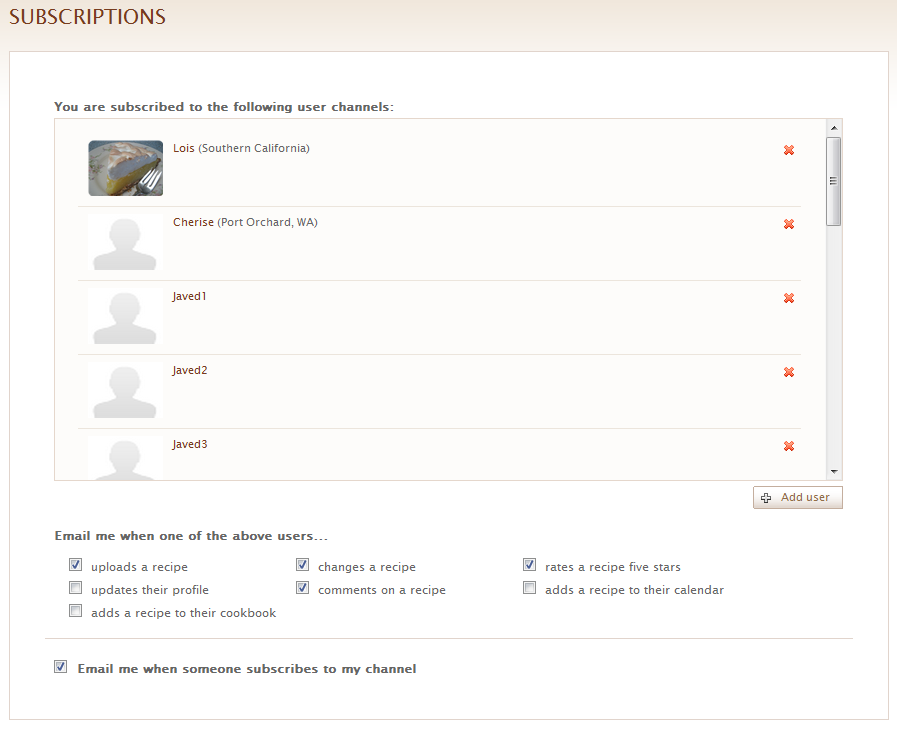
Subscriptions Page
This initial implementation contains two new web pages on the site. First, users can control their subscriptions and notification preferences on a single page by clicking the “Subscriptions” link on the top of any page. This page shows users who they’re currently subscribed to and allows the user to add a new subscription or remove an existing one. The popup User Viewer was also modified to allow users to subscribe to someone directly when they click on a username throughout the site. The Subscriptions page also contains check boxes to set preferences as to which email notifications users want to receive.
The second new page is the public profile page. This page is intended to provide detailed information for a user and show their recent activities on KitchenPC. Right now, this page shows basic information such as the user’s name, location, when they signed up, and when they last logged on. The page also contains their most recent activity (similar to the news feed on the home page) and contains the first ten entries in their cookbook. A visiting user can also “Follow” the displayed user directly from the page. Since notification emails have links to the user’s public profile, this makes it easy for a user to immediate follow someone who is following them. In other words, if you receive an email saying that I’m following you, you can click on my name to see my profile, then click “Follow” to subscribe to my feed as well.

Public Profile Page
Overall, I think this is a good first attempt at some basic social networking features for the site, and I’m curious to see how they’ll be used by the current user base. I purposely kept the first release as simple as possible just to get something out there, but I have all sorts of great improvements in mind. On the Subscriptions page, I’d like a way for users to import connections from other sources. Pulling in your GMail contact list would be a great start, as well as the ability to send out “Invite” emails to contacts that don’t already have accounts. Importing Facebook friends (similar to what Yelp does) would also be a huge win.
Facebook integration was something I really wanted to have for the first release, but it didn’t make the cut for two reasons. First off, Facebook Connect only exposes Facebook IDs and not email addresses. This means that I would only be able to import connections that not only is the user friends with, not only are also users of KitchenPC, but also use their Facebook credentials to logon to KitchenPC. Any way you look at it, the majority of users who tried to import Facebook contacts would just see zero results. This would be fine if we could use this as a free advertising tool. However, since Facebook won’t give me email addresses, I can’t send them invite emails. I could, perhaps, send them Facebook messages or post on their wall, but this just seemed too spam-y to consider at this time. With this said, I think I really need some sort of viral way to advertise the site by allowing users to invite their friends and connect using other social mediums. I think a bit more thought will have to go into this subject first.
There’s also some improvements I want to do for the public profile page. I’d like to show the user’s calendar, of course. What the user is planning to make and what they’ve made recently would be interesting information to share. Providing a list of who the user is following would also make “exploring” the user database a lot more fun. I’d also like to show what recipes the user has rated five stars, or perhaps just show all the ratings for the given user. I felt, for now, these features would just clutter up the UI too much and the first release should be very simple. This sort of functionality could be implemented using a tab interface, or perhaps similar to Facebook’s page with the left-hand filters that provide access to various information.
Another thing I’m planning on doing is making user profile URLs a bit more friendly. Right now, user pages are at /user.html?id=xxx where xxx is a unique identifier for that user. Since usernames are all unique, a better way would be to incorporate the username in the URL. For example, my public profile could be at /Users/Mike.html. This almost made it in for the initial release, however I didn’t think many people would bookmark these URLs so I felt okay with the idea of changing them later.
This is the first major feature implemented post-beta so I’m very excited about it. The fact that this feature was the second most requested feature on UserVoice also helps quite a bit, though I was planning on implementing this sort of functionality anyway. If you haven’t checked out the site in a while, I encourage you to logon and explore these new features. Let me know what you think, and feel free to share your ideas on what improvements you’d like to see. That’s all for now!
Yesterday, as I was working, I found myself interrupted by an email notification. Someone had submitted new feedback using the KitchenPC UserVoice page. This was a nice surprise, as typically I only get new feedback perhaps once a month or so; such feedback is always appreciated. Then, perhaps ten minutes later, another update from a different user. Several minutes later, a third! I thought this was a pretty big “spike” in UserVoice traffic, but I didn’t really have any theories at to what caused it.
About an hour later came the answer. I received an email from Betsy Wray, an editor for Cooking Club Magazine. She informed me that they featured KitchenPC in Food Now!, their daily e-newsletter. She was kind enough to forward me a copy, which can be found here. This mention just made my day, and I loved reading this positive take on my website! It’s these little victories that make the tough road of entrepreneurship completely worth it.
Shortly after, I decided to check the database to see if I’d gotten many new users due to this link. The results nearly knocked me out of my chair. Within the last couple hours, I had gotten 296 new user signups on the site! In other words, my user count had almost doubled in a few hours! I wrote back to Betsy to thank her, and also asked her how many people that email went out to. Her reply? Somewhere around 280,000. Absolutely crazy! All potential customers, all people who are interested in cooking, all notified about my site – wow!
I’m also glad to say the site held up flawlessly. It was still super fast even with all those users hitting it, and the site is still running on a single server with a gig of RAM.

Traffic spike on Google Analytics
That evening, I decided to check the Google Analytics stats. That day alone, 3,335 unique visitors has checked out the site. The bounce rate was only around 30%, and the average time on the site was 3 minutes. The home page was viewed around 4,800 times, 1,441 people searched for recipes, over a thousand people tried out the meal planner, and over a thousand people clicked on the cookbook link. These are fantastic numbers!

Random Twitter mention
What’s also amazing was the conversion rate. By the time the day was over, I had 584 new user accounts on my site. In other words, more than one out of six people who visited the site decided to create an account! I’m pretty pleased with this number, even though I really have nothing to compare it to. Yes, yesterday alone brought in more new users than the past three months combined. I also noticed some buzzing in the Twittersphere about the site, which means some people on that newsletter liked the site at least enough to Tweet about it.
I’m interested in how long this surge in traffic will last, and if it will create any regular users. I feel like there’s some super genius businessman thing I should do to capitalize on this temporary fame, but honestly I haven’t figured out what to do about it. Either way, this does mean that thousands of people are at least interested in the concept of my site and hopefully I can deliver a product that meets their expectations and provides something useful.
In the German ballad Der Zauberlehrling, made famous by Disney under the name The Sorcerer’s Apprentice, a young apprentice learning the ways of spell-casting is tasked with the boringly mundane and repetitive job of fetching water. Lazy and overwhelmed by work, the apprentice decides to use magic as a shortcut for achieving his goal. Due to a lack of experience casting spells at this level, the situation gets out of control when he realizes he’s unable to make his “cheap labor” stop.
Several months ago, I hired twenty workers using the website vWorker.com in an attempt to populate my database with thousands of recipes. At the time, I believed getting recipes into the database was the single most important task to attract users, and figured in this case, quantity was more important than quality as the good recipes would just bubble to the top of search results. However, the workers I could afford to hire were, in general, not the types that really take pride in their work. What I have now is thousands of mostly bad recipes, with no real way to review them or weed out the bad ones. The few users who do check out my site are instantly given a bad impression, as anyone who cooks will surely notice glaring mistakes, such as “flour tortillas” in an ambrosia cake recipe or “onions” in a chocolate chip cookie recipe. Even worse are mistakes that are tough to spot, such as 5 cups of flour when the original recipe says 2 1/2. A novice chef who prides them self in their ability to follow directions will face kitchen defeat in a floury mess.
These workers generally make themselves unavailable, do not respond to emails, do not report their status, but continue to enter bad recipes by the dozens. Out of the twenty I hired, only three have finished the task in a more or less satisfactory manner. The majority have either stopped doing any work, quit, or I’ve unsuccessfully attempted to fire. vWorker seems to have caught on as I’ve been hogging so much of their arbitration resources that I think I’m now a legend at that company. They actually stopped allowing me to fire workers since I didn’t pre-negotiate a fixed deadline for the projects, so technically the workers have not failed yet. vWorker had the nerve to tell me, “Mike – you don’t need to check each recipe your workers enter; it’s their job to do the work accurately within a reasonable timeframe.” They said this about a worker who had already entered almost 200 recipes with “1” for the amount of every single ingredient. I had to construct a special SQL query to delete all of these! When I attempted to alert this worker, he would not respond. I then disabled his account, and he simply created another account and continued working. Yes, one account split into two; now you’re getting my opening analogy. vWorker still would not allow me to cancel this contract, which is probably just as fine because I’m certainly convinced the cancellation of the contract would in no way be motivation for these worker to stop working. I was finally able to reach this worker and bribe him with $10 to go away. He still had the nerve to complain about the fact he was forced to pay the cancellation fee even though I had to spend hours cleaning up a mess he took no responsibility for creating.
One thing that I’ve learned is paying these workers more money in no way guarantees better results. In fact, it appears to have the opposite effect. People who enter recipes for the money are simply in it for the money. Two of the three workers who have completed the contract took the job for $20 and $25 for 1,000 recipes respectively. One worker who I hired pre-beta entered around 500 recipes and refused to take any payment at all, saying she was not doing the work for the money; she simply liked the site. Another worker just wanted to do great work to get a good review on vWorker. She moves slow, but the recipes she’s entered have all been accurate and complete.
The workers who charge more, such as over $100 per 1,000 recipes entered, mostly rush through the work, do not proof read, or quit by the time they get up to around 100 or so entered. A lot of these workers simply “sub-contract” out the work to people who will do the work for even cheaper, then don’t supervise the work simply hoping to collect free overhead money. One such “sub-contractor” even emailed me directly, saying his boss had basically disappeared and would not respond to any form of communication. He stopped entering recipes (after over 500!) for fear that he would never see a dime. Of course, I have no way to correct this situation as his boss is not responding to my emails either.
From this experience, I’ve learned a valuable lesson. Think twice before you build a website based around content. If this is the route you choose to go, make sure at least one of the following conditions is true:
- Your site offers value without much content. Mine does not, since without recipes no one can “plan” anything, and the meal planner will yield “no results” for most any query.
- You have a plan for automatically importing or aggregating content. Make sure this actually works by prototyping such a process first; make sure you can actually aggregate data correctly. My ingredient normalization architecture basically prevents me from any automated recipe importing without human supervision.
- You have the budget to hire skilled workers to generate content. Sure, you can hire workers in third world countries for pennies a day, but the content they generate will look like it came from third world workers who work for pennies a day. I’m sure if I paid amateur chefs $20/hr to craft each recipe with love and care, I could build the greatest recipe database the world has seen, but I’d need a few hundred thousand dollars in capital to have even the slightest hopes of a respectable database.
The mistakes of Mickey were out of laziness, however my mistakes were simply caused by inexperience in business. So far, I have not had to “axe” anyone (in the literal sense anyway), but I’ve definitely burned through an unnecessary amount of time and money trying to solve a problem that quite possibly can’t be solved. I have, however, made some changes to the site that will at least help impede the onslaught of awfulness. First, authors can now link to a “credit URL” to allow users to see where the recipe came from. I’ve instructed all my workers to make use of this feature if they want their recipes to count. This way, even if there are some issues with the recipe, a user can click on a link to see the original source which will hopefully be more accurate. This also gives me a way to proof read and correct recipes as time allows. Second, I’ve decided to restructure my best team in a way that permits 2 workers to enter recipes, and one worker will be a full time proof reader. This worker has been doing a fantastic job going through existing recipes and making sure everything is accurate, and letting me know when ingredients are missing from the database. They’re already modifying dozens a day! This means the quality of existing content is actually improving on a daily basis.
Hopefully, these tactics will lead to a more viable solution. Otherwise, it may be time to move on to a business plan that doesn’t require a massive amount of content to get started; however, that’s a topic of a future post.
In the United States, we have a house of representatives that shamefully holds an approval rating of around 11%. Yet, in the 2008 election, 94% of them were re-elected. How is it possible in a democracy that 91% of people can say you suck at your job, yet re-elect you by a land-slide margin? Well, the answer is quite simple. Everyone likes their guy, and to criticize everyone else who they didn’t vote on.
Turns out, trying to come up with a new name for a start-up by way of democracy suffers from a similar phenomenon. When asked, people are happy to come up with names they think are great. However, if you put all these names on a list, the majority of people won’t really like any of them. This, of course, brings us to the topic of the post; to review the results of a “poll” that went out over a week ago to solicit feedback on a variety of new names proposed for KitchenPC.
First off, I’d like to thank the 125 people who voted. You can rest assured your vote did count and I took every comment written very seriously. There were five new names proposed, as well as the existing name. Here are the results in tabular format for those who don’t care to read, say, words.
Results
| Rank | Name | Likes | Favorited |
| 1 | Preprika! | 49 (39.2%) | 27 (21.6%) |
| 2 | MealSage | 39 (31.2%) | 25 (20%) |
| 3 | KitchenPC | 43 (34.4%) | 23 (18.4%) |
| 4 | Mealmatic | 30 (24%) | 19 (15.2%) |
| 5 | MealsAlready | 37 (29.6%) | 18 (14.4%) |
| 6 | Mealable | 27 (21.6%) | 13 (10.4%) |

Favorite Names
Well, first off you’ll see that Preprika! and MealSage were the top choices by any metric; that’s fantastic because those were my two favorites as well. However, looking at the pie chart on the right you’ll notice a fairly even distribution of name choices (Heh, pie charts are so appropriate for KitchenPC.) In other words, no single name really resonated with the masses. If you take the name Preprika! by itself, less than 40% of people that hear it will say they like it. Would you want a name for your company that 60% of people don’t like? The more immediate issue here is this: do you spend a massive amount of work changing from KitchenPC to Preprika! only to get another 5% of the population to like your name?
Screw numbers, what are people saying?
The comments I got from the poll were also quite interesting to read. There were a few trends that stuck out. First, no one seemed to like the word “meal” used in any context. This is somewhat of a hassle for me since my company vision is to make meal planning easy and fun; that’s a tough sell when people hate the word meal.
I don’t like any with ‘meals’, since I negatively associate it with mealy-mouth.
I don’t really care for any of the meal* names. They make me think of ‘mealy apples’ and ‘mealy worms’.
Mealable made me think of meal worms, ugh.
Mealable makes me think of mealy apples and meal worms.
I don’t even like the word meal in the title.
Not a huge fan of any of the ‘meal’ ones. ‘Meal’ has some weird associations popping up – like ‘mealy’ and ‘mealworm’.
Ok, if I ever start a company that sells worms for fishing trips, I know what I’m calling it. The second trend was the utter dislike of the entire group of names as a whole.
I’m not big on any of these name proposals…
…I don’t think that any of them sound much better than KitchenPC.
None of these really screamed at me as the right choice…
These.. out of 1,000 candidates? Come on! This is heavy critique on all of them, but to tell you the truth I don’t think the name will matter much in the end. Keep KitchenPC…
My advice: start over! (sorry).
I think KitchenPC is the best name for the site…
Keep looking!
I hate to say this, but I don’t like any of them!
Some people even took this poll as an opportunity to suggest their own names. That’s not to say that there was no positive feedback. Preprika! definitely has its fan base.
the other ones sound lame and old… this one reminds me of mint.com
Cute
The best one
Delightful
ZOMG love this!
Catchiest one here!
Preprika is the only one that won’t get lost in a sea of sound alikes on Google. It’s nice, and I like it!
Preprika is memorable and I will remember it.. I have already forgotten the others.
As does MealSage.
Catchy. Conjures an image of forethought and guidance in meals.
Love the play on words!
Clever!
I like MealSage – sounds like the smart cooker!
A Name to Remember
Last week, I grabbed dinner and drinks with five friends of mine at a Rock Bottom. Everyone at the table had voted on a name, so I decided to ask them which name they voted on. Not only could no one at the table answer that question, but not one person could name a single choice that was on the list! I believe someone said Menumatic which I guess I can give half a point. Yet, everyone at the table knows the name KitchenPC.
Though a name is important, in the dot-com world, the ability for people to remember your name is of even greater importance than the name itself.
So How Does Everyone Else Do It?
During this experience, I began doing a little digging on how various startups got their names. One trend that seems to occur a lot is this: a company starts out with a mediocre name, builds some traction or gets some funding, then is able to allot the resources necessary to come up with a truly great name. This means money, focus groups, dozens of people working on the problem for hours each day, etc.
Mint.com, who apparently paid around $2 million for their four-letter domain name, is one such example. I couldn’t even find out what Mint.com was called before they got their first round. The story of Gist can be found here. Gist was originally being developed under the name Minebox, however they could never actually acquire the dot-com domain. Their seed funding enabled them to work with a marketing firm (these firms charge major coin, I checked) and Gist really stuck. They were able to purchase the domain name from a defunct startup for what I would imagine would be quite a bit of money.
The point is, the great startup names you can list off in your head probably didn’t start off with those names, but acquired them only after they had a great business vision, funding, VC resources, access to naming firms and a large budget to purchase the domain name of their dreams. I believe it’s somewhat of a fantasy to expect you can start off with one of these names. Allowing the general public to vote on your name at this early of a stage, I believe, will blow up in your face because the general public expects a name of the same caliber as those they’ve grown to love (Mint, Facebook, Twitter, Expedia, etc.)
My advice for new entrepreneurs: Pick a name you can live with, and change it once and only after you have the resources (both time and money) to do it right. There’s no sense in gradually upgrading to better and better names.
So now what?
I’m sure if you’re read this far, it won’t surprise you to learn that I’ve decided to stick with the name KitchenPC for the time being. That’s not to say I won’t keep thinking about names, because I will, but until I can come up with a name that will win the hearts of the majority, I can’t let myself move from a poor name to a slightly less poor name. If I’m going to change the name of the site, I’m going to change it to a name that rocks; a name that at least 80% of surveyed people like. If the site does gain traction or get funding, I don’t want to have to go through the headaches and randomizations that would come with changing the name a second time. And who knows, maybe a month from now the perfect name will just pop into my head.
At the very least, I hope someone out there who is searching for a name for their startup will read this post and get some insight on how difficult this process actually is, and what is realistic to expect for a very early stage company.
So after countless hours of work, conversations with both friends and strangers, going through over a thousand suggestions on SquadHelp, and annoying several people incessantly, I’ve narrowed down the new name to a list of five finalists. I’ve decided what better way to pick one than just let my existing users vote! So this is what I’ll do. First off, the five finalists in no particular order.
MealSage.com
The “sage” idea was first suggested by a friend of mine who I think has a great creative mind. I played around with various names with the word “sage”, but for some reason this one just stuck. Sage is, of course, a play on words as it can refer to a wise person as well as the cooking spice. To me, a “MealSage” is someone who can help you pick out meals and figure out what to cook. “What can I do with these ingredients? Well let’s ask the Meal Sage!”
Preprika.com
Preprika took a bit of time to win me over, but I’ll have to admit it’s grown on me. It combines “preparation”, which is an essential aspect to meal planning, as well as an allusion to “eureka!”, the exclamation which one may cry upon satisfaction or making a discovery. More clever yet, it’s a twist on “paprika” which brings a culinary reference into the name. I think the official branding would actually be “Preprika!” because exclamation points convey excitement and can make for good logos.
Mealmatic.com
This is a somewhat futury Jetsons sounding name, and brings in a certain infomercial “Billy Mays” quality to the product. Whether that’s a good thing or not will be left up to the voters. It definitely conveys a system that automatically comes up with meals to make, so it deserves a place on the list simply for its intrinsic ability to communicate the product function. It’s also fun to say, rolls off the tongue well, and has an alliterative quality that makes it desirable.
Mealable.com
Mealable is one of those made-up words that has a very Web 2.0 sounding connotation. I pronounce it as three syllables, such as “Mee-La-Bowl.” I think it’s fun sounding as well and easy to remember. It brings an element of “ease” into the name, which goes well with our company vision of “Meal Planning Made Easy.” It has a “can do” attitude and instills a confidence that this is a site that can enable you to find meals easily.
MealsAlready.com
MealsAlready is the longest of the choices, but it has a certain ring to it which I like. Most obvious is the pun, as this can be heard as “Meals, Already!” or “Meals All Ready” The first conveys a quickness, as in a product that can help you find meals right now based on what’s in your fridge. The second conveys a feeling of ease that everything is ready to go.
Please Vote!
I hope you like at least one of these! If so, please take 30 seconds or so out of your busy day and go vote here:
http://survey.kitchenpc.com/index.php?sid=88195
This link will be emailed to all my existing users, as well as posted on the KitchenPC Twitter feed and Facebook page. I figure I’ll collect responses for about a week or so, and then figure out the winner.
One last thing to point out is you can also vote to keep the name KitchenPC. I’ve ran across a few people who still dig it, so don’t feel ashamed to voice that opinion as well.
When the term KitchenPC was first coined, it referred to a side project I had in the works that aimed at bringing the power of the personal computer into the kitchen. I imagined the culinary utopia created by a central device that would organize my recipes, help plan meals, manage my inventory and talk to my kitchen appliances; all with a touch screen interface that was impervious to grease, flour, spaghetti sauce, and accidental blender explosions. I still look back at some of my early software prototypes, written in whatever language was popular or I felt like at the time. KitchenPC has been a name that has stuck by me through-out the years, and thus far the only constant in a river of change.
KitchenPC was purposely generic. I imagined a future where the name KitchenPC, though protected by trademark, was ubiquitous in household dialect; similar to Saran Wrap™, Jacuzzi™, Kleenex™ or Roller Blades™. I imagined the new LG or KitchenAid fridge, with a “Powered By KitchenPC™” logo in the corner. Ah, daydreaming was sweet.
Years later, the idea has morphed into a functional website that strives to help people build meal plans. Though this site might be used from a desktop computer or an iPhone, perhaps even an iPad or Tablet, one thing’s for certain. The name KitchenPC is neither a PC nor a kitchen device. Though the connotation connects most eloquently with both the idea’s past and its dreams of the future, KitchenPC leaves the users of today scratching their heads. “Is it a hardware device? Do I need Windows? Can I buy one at Radio Shack?”
This is a thought that has been on my mind off and on over the past few months. It creeps back into the cognitive foreground sometimes when I’m digging through lists of Google keywords, seeing that people searching for “How to build a kitchen pc” are being referred to my site or blog. It’s become linguistic muscle memory to explain what my site is immediately after saying the name, knowing any layman assumption is bound to be far disconnected from reality. Lately, one of the advisors I’ve been communicating a bit with as of late put it bluntly with, “Mike . We need to talk about the name KitchenPC.”
My fears have also been confirmed with others friends, who once confronted will say “No offense, but yea the name sucks.” Some, before the beta release, would hint at the subject with “So, are you gonna keep that name for the beta launch or come up with some clever new word?”
One thing’s for certain. KitchenPC has overstayed its welcome, and changing it sooner is a lot easier than changing it later. Ok, sorry that’s two things for certain. So, this begs the question that is no doubt on your mind by now. “If not KitchenPC, then what?”
Well, if I had an answer to that question I’d be on NetworkSolutions.com right now, and not blogging at 3am. However, I’ll share my thoughts on the importance of a name. A name has to communicate either a business function or an emotion you want your target customers to relate with; and preferably both. It also has to be memorable, and something you can build a brand name around. It can’t be too similar to competing brands and it can’t create confusion. In the dot com world, you also need to acquire the domain name within your budget. Due to the difficulty and potential expense with the last issue, completely made up words are becoming increasingly popular. If done right, they can be installed into common household vocabulary and be wildly successful. Zillow is a great example of this. If done wrong, no one has a clue what your company does. Does anyone really know what Zoosk is?
Ideally, these newly created words should be self-describing. Today, I was chatting with a friend about the snowfall here in Seattle (which is now the topic of most conversations in the area) and she mentioned that the nightly news would most likely be dedicated entirely to the weather. I responded with, “Yes – It will be snoclusive coverage.” I made up this word on the spot, however she chuckled because she knew exactly what this word meant. A good website domain should do exactly this.
Google is a successful name because “google” is a huge number, and your mind relates to a massive number of potential search results. Yahoo! is the feeling you get when you find something you’re searching for. Amazon makes you think of a massive landscape, perhaps filled with books. Mint makes you think of money. Even Twitter (one of my favorite Web 2.0 names) relates to Internet chatter floating around the Internet like tiny butterflies. The late 90s gave us TiVo, which has the letters T and V right in it, and also perfectly nails the much sought after transitive verb benefit.
I’ve been spending the entire evening trying to call upon my creative muses (which is probably why this post is a bit more linguistically artsy than my usual techno-dribble) and have found a few strands of inspiration I think I can run with.
First off, I’m a big fan of combining two words that share an overlapping end and start sound. The mission statement of KitchenPC is “Meal planning made easy”, thus a good company name should target that functionally and emotionally. Combining “Recipe” and “Easy into “Recipeasy” is both fun to say, and communicates function (recipes) and emotion (easy) into one. Though, this domain name carries a high price tag (around $2,600) and my friend Joe stated quite fairly that this sounds like Snoop Dogg’s recipe site. Perhaps I could get him to be my spokes person?
I think the reason Recipeasy works so smoothly is because the name “Recipe” ends with a soft vowel, which can smoothly transition into another word. I’ve been searching for other words that have similar properties. Ideally, I’d like a name that customers can easily relate with, and something I can build a brand name around. However, I fully recognize this will be weeks or even months of work.
Changing names is also extremely scary, as you completely disrupt any sort of customer base or brand name recognition you already have (though for me, this is very little). I would have to move my blog, redesign my logo, change massive amounts of website content, get a new Twitter feed, setup a new Facebook page, register for a new trademark, design new business cards, the whole works. However, as I said already, with each passing day that job gets even harder. I want to find a name that makes me excited about doing all that work.
One resource I’ve found so far is a website called SquadHelp. They provide a service that allows entrepreneurs in my position to offer a reward for domain name ideas, and it’s pretty cheap too. You don’t have to pay anyone if you don’t like any of the ideas, however you’re listing fee is non-refundable. So far, people have been coming up with a few interesting suggestions for my site. Feel free to take a look if you’d like. One gripe I have with SquadHelp is most of the suggestions are crap, and users insist on posting dozens of the same name with slightly different spellings, such as a Z instead of an S. I think it’s safe to say if I don’t like your S one, I won’t like your Z one. The site is also fairly buggy.
I’ve also been recruiting help through my Facebook network, and have found a lot of my friends are quite willing to bounce ideas around with me. I’ve found it really helps if you harvest the parts you like from a name, and try to use them in various ways. For example, I’ve become somewhat fond of the word “Scout,” and have been seeing if I could incorporate that into any clever name.
So what are my rules for a great domain name? First, I have to be able to acquire it without needing thousands of dollars. Second, it has to be spell-able. If I have to tell people about it and then tell them how to spell it, I’ve already lost. They’ll never remember. No hyphens or numbers either. Two or three syllables are ideal. I’m also a fan of alliteration, such as PayPal or BestBuy. If you have any ideas, please let me know! If the site takes off, I’ll try to find a way to return the favor.
That’s it for now!
 KitchenPC